Solved External calls to limited countries for specific extensions

Status
Not open for further replies.

apitsos

SOHO User
Basic Certified
Joined
Mar 27, 2020
Messages
184
Reaction score
52
Hi there!

How can I allow a specific extension (or some of them) to be able to make external calls, but only to a limited number of countries and not to all the countries that we allow from the general settings?

Thanks a lot in advance for your prompt attention!


With kind regards,
Angelos Pitsos
 
I think the best way to do this would be to restrict your Outbound Rules by utilizing the Prefix field and the Extension or Extension Group conditions.
 
Hi Chris,

I would like to thank you for your prompt reaction. I am not sure if I can understand what you mean. Are you talking for the prefix field on the SIP trunk? Because that is already configured and the calls can be done with the prefix "9".

As for the extension conditions, I don't see anything that could help in that case. The only relevant option I see is "Disable External Calls", under the tab "Options" of the extension. Under Groups i also don't see anything relevant.

Would you be so kind to be more specific?


With kind regards,
Angelos Pitsos
 
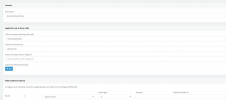
Actually, I was referring to the Outbound Rules for matching outbound calls. To clarify, let's say you have extensions 101 - 199 but you do not want extensions 101,102 and 103 to make calls to Greece or the UK. You can create the following Outbound Rule:

1631537805508.png


Then, place this Outbound Rule at the top of the list. Calls that match this outbound rule will be calls from extensions 101,102 and 103 to numbers starting with +30,+44,0030 or 0044. Since Route 1 is set to "Block Calls", these calls will be dropped. If the call does not match this Outbound Rule, it will just check the next outbound rule and then the next until it matches one.

Depending on your usage, configuration and requirements a different configuration of your Outbound Rules might be more effective. The above is merely an example of what I mean when I said that you can utilize the Outbound Rules to get the behavior your described.
 
  • Like
Reactions: Evolute IT
Really nice way to do :p , hope Apistos has not lots of case to fix with that otherwise he surely need drugs to prevent headache for rules to create;)
 
Hi there,

Thanks for the clarifications @ChrisC_3CX. I will give a try today or tomorrow and I will post here my results. Please don't close this Thread until I write back.

Dear @aws2p it really looks complicated, but at least is a workaround. The only problem I usually have is to remember all these workarounds for future projects. Sometimes I remember I had a similar problem to another customer and then I check all my posts here, in the Forums. But is not that efficient...

I will let you know about my results, soon.


Kind regards,
Angelos Pitsos
 
Thanks for the clarifications @ChrisC_3CX. I will give a try today or tomorrow and I will post here my results. Please don't close this Thread until I write back.
You're very welcome! Do let us know how it goes, I'll keep this thread open for now.

The only problem I usually have is to remember all these workarounds for future projects. Sometimes I remember I had a similar problem to another customer and then I check all my posts here, in the Forums. But is not that efficient...
I'm sure that the more you implement these types of configurations the easier it will become to remember them for future projects! Also, you can always just post your questions on our forums since our community members are very knowledgeable and eager to help. :)
 
Hi @ChrisC_3CX!

It looks like the things are much more complicated here. I have the following two issues:

1. The company allows a numerous of countries. That means that the sting with the prefixes I have to block is way too much. So the field "Calls to numbers starting with prefix" cannot accept all of them in one rule! here is the string...
+55,0055,+355,00355,+43,0043,+32,0032,+387,00387,+359,00359,+385,00385,+357,00357,+420,00420,+45,0045,+372,00372,+358,00358,+33,0033,+49,0049,+36,0036,+353,00353,+39,0039,+371,00371,+370,00370,+352,00352,+389,00389,+356,00356,+382,00382,+31,0031,+48,0048,+351,00351,+40,0040,+381,00381,+383,00383,+421,00421,+386,00386,+46,0046,+90,0090,+380,00380,+44,0044,+86,0086,+852,00852,+961,00961,+966,00966,+971,00971,+225,00225,+241,00241,+254,00254,+223,00223,+222,00222,+212,00212,+221,00221,+27,0027,+228,00228
2. The Main Outbound Rule has a prefix of "9", which means that they have to dial "9" in order to get an external line. This makes the above even more complicated.


In the meantime I thought something else...

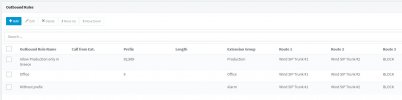
I moved the extensions that I want to restrict on a new group which I created. The new group is called "production", while the previous group was renamed from "DEFAULT" into "Office". The second rule you can see on the below screenshot is the one I had from previously. The only difference is that after the rename of the "DEFAULT" group, the new name "Office" appeared under "Extension Group" of the rule. I also renamed the name of the rule into "Office".

3CX-CG-Outbound-Rules-001_2021-09-20.jpg

Then I created the first rule you see on the above screenshot. This rule is applied to the group "production" (which means on the extensions which I want to restrict) and allows only calls that are starting with "92" and "969". This means that they use "9" in order to get a line and then a local Greek land number (always starts with "2...") or a Greek mobile phone (always starts with "69...") are allowed. This rule is first in the priority. According to my understanding, the extensions belong to the group "production", even if the dial 90049, shouldn't get a line, because the next rules that allow call to other countries, do not include these extensions.

What do you think?

I am looking forward to hearing your thoughts.


With kind regards,
Angelos Pitsos
 
According to my understanding, the extensions belong to the group "production", even if the dial 90049, shouldn't get a line, because the next rules that allow call to other countries, do not include these extensions.
That's correct, that's why I mentioned that the configuration required may differ depending on your requirements. The config you mention seems to make more sense for your scenario.

You can start off with something like the one you currently have and make adjustments to it as you go depending on user needs and requests.
 
  • Like
Reactions: apitsos
Hi there!

I managed to tune the Inbound rules on a way that give us exactly the behavior and functionality we wanted. I have made my tests, but I also have asked the customer to make their own tests and confirm.

I suppose this issue is completely solved now. I would to thanks a lot all the participants and all the efforts for helping me find a solution on this complex problem.

I am really grateful being a member of this great community and I enjoy setting up 3CX systems more and more.

Wishing to all of you all the best.


With kind regards,
Angelos Pitsos


PS: This thread can be closed now ;)
 
Glad to hear that you've resolved the issue @apitsos. If you require any other information or assistance, feel free to open a new thread.
 
  • Like
Reactions: apitsos
Status
Not open for further replies.

Forum statistics

Threads
111,974
Messages
590,081
Members
164,899
Latest member
mazet