Solved Failure on windows SBC install

Status
Not open for further replies.

AWS2P

Silver Partner
Basic Certified
Joined
Jan 9, 2014
Messages
5,076
Reaction score
1,096
Hi
I'm moving a pbx to cloud and I'm converting in SBC the previous pbx pc running W10
Install and restore on cloud pbx is OK, but now the SBC install is stuck on the step displaying the message on screen copy
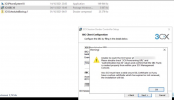
1636361873386.png

FQDN is resolving on new public IP adress without problem from SBC computer.
Also 3Cx console is available from https FQDN
Provisioning URL and authentication KEY ID have been copy/pasted so no way to typo error

So what can i do to get an SBC ending properly his install and working fine ?
 
Last edited by a moderator:
I just found some weird thing nslookup is giving the right Public IP against FQDN, but if I ping using FQDN or IP none are answering.
 
Have you uninstall 3cx from the pc ?

Check the windows\system32\drivers\etc host file

Do you have an fqdn dns configure somewhere else, which may be pointing to the internal IP address of the old 3xx server
 
Just gone in aws firewall and added an ICMP rule and now ping is answering from both IP and FQDN
Have you uninstall 3cx from the pc ?
Yes first step and done a PC reboot before SBC install tries
Do you have an fqdn dns configure somewhere else, which may be pointing to the internal IP address of the old 3xx server
No DNS on that location, only ISP box combining router and firewall, but in NIC dns setting is on google 8.8.8.8
 
Check host file, as above

If you have a fixed IP address, you could add the fqdn to the host file as a temp solution to get the system up and running
 
  • Like
Reactions: ChrisC_3CX
got something in host file fqdn is linked to 127.0.0.1 but after deletion of that entry I cant save the modified file
 
  • Like
Reactions: AWS2P
Ok thanks Saqqara, right on target, i got hosts file with entry deleted and file saved, now SBC install is ended and SBC is seen connected to 3CX;)
 
  • Like
Reactions: ChrisC_3CX
Glad to see it is how working,

Now the next step reconfigure the phones to use the sbc server
 
exactly , and i do this all remotely so it's really painfull to reprovision the phones manually
 
Got everything working and reprovisionned even if it was not a pleasure to access manually in each phone GUI to factory reset them, but it ended fine so the result is good.

Thanks for all help Saqqara:)
 
Glad I could help and resolve the issue
 
  • Like
Reactions: ChrisC_3CX
Status
Not open for further replies.

Forum statistics

Threads
111,974
Messages
590,081
Members
164,899
Latest member
mazet