In Consideration Fallback to originator after unsuccessfull blind transfer

maarteninvision

Joined
Jan 13, 2016
Messages
2
Reaction score
6
The following scenario is not possible at this moment:

User does a blind transfer to another user which is "registered" and the status is ""available".
When he or she does not answer the call within a specific time, it woul be nice to transfer the call back to the user that did the blind transfer.

This is only possible when a user is busy, but when a user is busy, you can see it in the precense view.

Hope to see this feature in a next release.
 
Upvote 181
+1 but on a setting per extension.

We would also like to see this when in other status for example DND that on the extension in DND an option can be clicked that when transferred to this extension in DND the call gets bounced back to the extension that performed the transfer.
 
Standard feature which should be availible
+1
 
+1
standard feature on phone systems
 
Seriously now. I need this.
 
+999

Have a client that had this on their old NEC system and they really need it back.

Making it optional definitely a must.

Ability to set per extension would also be nice, but even if just a global option - better than nothing.

Since 3CX already has the functionality to automatically transfer the call back to the person that transferred the call initially if the destination is busy, why not just allow us to create a forwarding rule that sets the extension to "Busy" if unanswered after XX seconds?

It wouldn't have to actually put the extension into a busy state, but when set to that forwarding rule just have it respond to the call with the same values it would normally would if the line genuinely were busy. (This way the extension could continue to receive other calls if they came in at the same time.)

This forwarding rule would also be great for those who don't want to use voicemail and don't simply want to "End Call" when it's not picked up - instead it could play the "Unavailable prompt".
 
Still +999 on wanting this to be added as a feature.

But - with one of our systems, all external incoming calls are always received by Reception. Where they are then transferred through to internal extensions as required.

If you're in the same boat, this workaround may also help you achieve something similar to callback on unanswered:

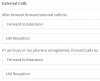
For each extension set the Forwarding Rules for External Calls to Forward to Extension and set it as Reception:

13833

Since reception are always the one's initially transferring the call, you're always going to want it to bounce back to them anyway, so this basically achieves that.

You can still set Internal Calls to forward through to voicemail or do whatever you'd like them to.

The only downfall of this is if you want your internal calls to ring a bit longer. You can't specify separate timeout times, you can only specify XX seconds for both internal and external.

Obviously not a feasible solution for those with multiple DID's and more complex setups, but for those who just have all incoming calls hitting reception - this solution at least gives you callback on unanswered to some degree.
 
+1 - In the current environment with many staff working from home this is essential otherwise a call can bounce around from staff member to staff member if not answered - would be much easier to have a recall back to the original transferring staff member to take a message - Note we don't use voicemail
 
+65

We moved this week from Avaya to 3CX overall we are very satisfied. However just found out this feature isn't there. I'm truly baffled....

If it's that hard then at least give back a message to the user who receives the call like: 'fallback from xxx, reason: no answer' in that case when a random other user receives the call he or she at least know how to react to the client.
 
+1

After more than four years after the first request here on this topic , has this resource not yet been created? The marketing area is demanding a solution for me, because, according to them, their old PBX had this function.
 
+1
This customer had this feature on their old system.
 
What a disappointment finding this thread, 2020 and this basic functionality hasn't even had a mention from 3cx. Its very embarrassing when you replace a 20 year old phone system and it can't even perform this simple action.
 
Seems to be a very old function in phone systems ! and 3CX still has this in
In Consideration ??
 
+1