Fallen at the first hurdle..

Alphabetic

3CX MVP
Silver Partner
Advanced Certified
Joined
Jul 1, 2016
Messages
6,505
Reaction score
2,548
:oops:

Well.. finally started to step into the AI Agents after getting transcriptions working with OpenAI and I thought I was cooking on gas..

However, when I call the agent (Receptionist or CS) it just hangs up.

If I change "If AI is unavailable" to anything other than end call then i pust get MOH.

i've not deviated far from the default settings other than modifying the welcome prompt and uploading a txt document with very basic stuff.

what am i doing wrong?

have not assigned a DDI and only doing internal calls atm.
 
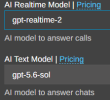
Hi @Alphabetic quick question, currently are you using the sp9 or the alpha sp10? what are the models used in the API section?

if calling from an internal extension to the agent do you have the same issue or is it only with the external calls?

please set the logs in verbose mode, then replicate the issue and check the 3cxai.log, there validate if there is any exception or error there sent by Open AI.
 
Hi @Alphabetic quick question, currently are you using the sp9 or the alpha sp10? what are the models used in the API section?

if calling from an internal extension to the agent do you have the same issue or is it only with the external calls?

please set the logs in verbose mode, then replicate the issue and check the 3cxai.log, there validate if there is any exception or error there sent by Open AI.
Hi Alejandro

im on Version 20.0 Update 10 (Build 1277 Alpha - AI 1.6.10)

Currently im only doing internal testing so no DID is assigned.

Im calling the AI and its going straight to "If AI is ..." though the extension is set to go to isnt being called but they receive a missed call notification once I hang up.

I will start reviewing logs and such.
 
@Alphabetic please check you are using these models in your Open AI account and tokens limit.

1786456614854.png

then check the mentioned log above and validate
 
The AI log said I didnt have access to the OpenAI Model, I must have used the same API key that I set up for transcription project. Creating a new API key for this protect has kicked things to life so im working currently.

More posts to follow when I need more help xD
 
I set the voice to "Ballad (Female UK)" and caller her Jessica.. and let me tell you.. its the manliest Jessica i've ever spoken to xD xD
 
Just a question if i may @Alejandro_3CX

These variables, are pulled from 3CX - yes?

Can I Literally type anything into the AI Prompt or do i need to use headers and such?

I can see things are prepended with # or -

are these like a thing that AI use or is it just how its been formatted?

im trying to like slow things down a bit (wait for caller to give name before yapping on)
 
@Alphabetic about the variables like {{company_name}} yes, they are pulled from 3CX. The PBX populates them automatically in real time using caller info, company settings, or CRM data.

Can I Literally type anything into the AI Prompt or do i need to use headers and such?

I can see things are prepended with # or -

are these like a thing that AI use or is it just how its been formatted?
You can customize the prompt and type in plain text, but using Markdown (# for headers, - for bullet points) this will help the AI understand better the hierarchy of instructions.
 
@Alphabetic about the variables like {{company_name}} yes, they are pulled from 3CX. The PBX populates them automatically in real time using caller info, company settings, or CRM data.


You can customize the prompt and type in plain text, but using Markdown (# for headers, - for bullet points) this will help the AI understand better the hierarchy of instructions.
Are these system variables a must?

Is there any 3CX Documentation on how these are to be used? I have 0 knowledge in AI prompts so i'm looking at these like they're in another language.

is_boss - caller is the designated boss - What does this mean? The person calling is the boss or what? o_O
 
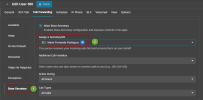
OK, if you are creating a PA this is intended to be used with the BOSS SECRETARY feature, for example lets say boss extension is 100, then you can enable the boss secretary for this user as the pic below and set as PA the AI agent with that role.

1786464896809.png


I suggest you that as first step read these documents and blogs:


Latest Posts

Forum statistics

Threads
111,811
Messages
589,124
Members
164,622
Latest member
domii