Fanvil I31S

Status
Not open for further replies.

Robbejanvdw

SOHO User
Joined
Feb 19, 2018
Messages
16
Reaction score
1
Hi,

So we bought an Fanvil I31S for our hotel. Our purpose is to use it as a doorphone at our gate so we can see who is there and to open the gate.
But we can't figure out how to enable the video? We already tried everthing.
Making just normal audio calls is no problem.

In this article they say it is no problem to use it with the webclient, but they don't give instructions how to set this up.
https://www.3cx.com/blog/voip-howto/door-phone/

Any help would be very appreciated!
 
Hi,

Did you add a Speed dial in your extension settings so the i31S can call your extension?

Did you log into that extension via the Webclient?
 
You'll need a compatable phone to display the video, I think the Fanvil X6 possibly the X5S, best to contact Fanvil to confirm this.

There isnt any pop software for on PC/Mac screen image if thats what you are after. You can use VLC player to stream the video via LAN
 
Hi,

Did you add a Speed dial in your extension settings so the i31S can call your extension?

Did you log into that extension via the Webclient?
Yes, and yes.

Both didn't work. Is there anywhere I need to switch videocalls on or off?
Or do i need to put the rstp link somewhere in? How does 3cx know i'm video calling otherwise?
 
You'll need a compatable phone to display the video, I think the Fanvil X6 possibly the X5S, best to contact Fanvil to confirm this.

There isnt any pop software for on PC/Mac screen image if thats what you are after. You can use VLC player to stream the video via LAN
ok, I'll check it out if it maybe's works with a yealink video phone.
I tried to use vlc to play the video but I couldn't make it work..
 
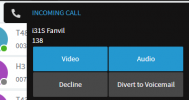
When the i31S calls the webclient, it will by default offer audio and video. The webclient will ring with the below options:
1618317078492.png

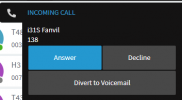
However if you've enabled Recordings or the option "PBX Delivers Audio" (on either the doorphone or the receiving webclient extension), then you will see something different:
1618317160904.png

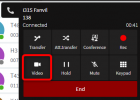
In that case it's simply a matter of answering the call, and then clicking the Video button once
1618317289483.png

Check the above and let us know how it goes.
If you still have trouble, tell us whether the i31S is configured as LAN/SSBC/STUN
 
Status
Not open for further replies.

Members Online Now

Forum statistics

Threads
111,834
Messages
589,287
Members
164,664
Latest member
dominik.pepel