Fanvil Phones & 3cx V20 provisioning

Status
Not open for further replies.

candry

Bronze Partner
Basic Certified
Joined
Oct 5, 2023
Messages
1
Reaction score
2
Wanted to share my experiance with migrating from v18 to v20 and the sole use of Fanvil phones being provisioned with STUN. I have found that some Fanvil phones (H2U and I32V) do not like to auto provision after the update to V20. I kept getting a timeout:true or register failed message.

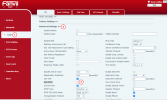
To fix this I logged into the phone GUI using the phone's IP address and went to "LINE" - > "Advanced Settings" and unchecked the "Use STUN" setting. After this is unchecked scroll down and click "Apply".

Refresh the page and the Line should say registered.

Once Registered you can go back and recheck the "Use STUN" and click apply to have that setting reapplied.
1710787943678.png
 
Hi there.
Thank you for the post and for sharing your experience, however, keep in mind that when it comes to the support we don't recommend using STUN as well and we don't support this type of registration for remote phones.

We made it easier and introduced SBC in many of the phone's firmware (we call them router phones) so that you could use them to provision your other supported devices that are remote and in the same office.
 
Hi Oleg & Candry

Im also in the same position of having multiple instances of 3CX with directly connected Fanvil phones.

Some of our instances currently on v18 have many remote users working from home with only 1 Fanvil handset,

These phone were provisioned in our office using an SBC connected to their instance, set to connect directly and then posted out to the end user.

I upgraded a system today from V18-V20 and found like Candry I had to login to the Fanvil handset and untick "Use Stun"

For this use case, systems with many home workers (encouraged during covid) with only a single Fanvil device it doesn't make sense to me to replace with router phones or install SBC's

I can't access these phones remotely and they are spread out around the country, please could you let me know if there's a solution to this, ideally that doesn't involve interacting with each remote user?
 
Thanks this worked for our client. :)
 
  • Like
Reactions: OlegR_3CX
Hi there.
Thank you for the post and for sharing your experience, however, keep in mind that when it comes to the support we don't recommend using STUN as well and we don't support this type of registration for remote phones.

We made it easier and introduced SBC in many of the phone's firmware (we call them router phones) so that you could use them to provision your other supported devices that are remote and in the same office.
That is fine. However the problem I am having is the phones does register IF the "Use STUN" is selected. However after the mentioned unchecking of the box and applying it they do. Problem is anytime you go into the user account and make a change the phone gets its config again and reenables STUN.

How can I stop the Fanvil phones from doing in the admin or config?
 
You will need to change the STUN from the PBX and reprovision the phone otherwise any manual setting to the device web interface will be overwritten upon reprovisioning(by default every 24 hours).
 
Hi there.
Thank you for the post and for sharing your experience, however, keep in mind that when it comes to the support we don't recommend using STUN as well and we don't support this type of registration for remote phones.

We made it easier and introduced SBC in many of the phone's firmware (we call them router phones) so that you could use them to provision your other supported devices that are remote and in the same office.
After upgrading to V20 I am about to pull my hair out and move to Ringcentral. You say you made it easier to provision using an SBC... I was running all X3U and X3S phones without any issues and now if I am reading this correctly, I need to purchase a "router phone?" If this is the case how to I register the router phone if everything is registered by the router phone?
 
Just need to get a new version of one of your phones. I did that with my Fanvil, and when you plug it in, you choose to add it as a router phone. From personal experience, 3CX is much more cost effective than Ring Central
 
I've been using it for 5 years, definitely don't want to give up the cost savings. I'll grab a new version (SBC phone) and try adding it. The funny thing is after upgrading to V20 about 3ish months ago all of my phones worked fine. I just moved my business and installed an upgraded router and still everything seemed to work fine. Then the internet people came in and changed out my modem for a newer "upgraded speed" modem and when he did the idiot plugged my PoE switch into the modem instead of the router and everything went down. It blacklisted my IP address and after cleaning everything up half my phones would not reprovision.
 
ok so i bought a Fanvil V64 SBC phone and I have watched a couple of.videos and I do not get the option to add an "SBC phone" when i go to add a phone. I already have several X3U's deployed on my 3CX. I use 3CX hosted install. I go to users, ip phone, add phone and it just asks me for the phone model and mac address. All videos I watch say you should have a choice of install sbc... I have not touched anything yet because I am afraid I will mess up the three phones I still have working at the moment. I am sure I will have to reprovision all of the X3Us with the sbc after it starts working, but no real info on how to do that either. All videos just say an SBC makes it so much easier to deploy phones but I never had any issues before, only have issues now!
 
i also just went to my 3cx console and noticed two of my extensions, which are both working, have the same ip address, which is not even in the subnet of the router I am using. One of my phones, the only X3Upro I have on my network, has an ip address that looks like it belongs to my routers' address pool.
 
i also just went to my 3cx console and noticed two of my extensions, which are both working, have the same ip address, which is not even in the subnet of the router I am using. One of my phones, the only X3Upro I have on my network, has an ip address that looks like it belongs to my routers' address pool.

You are probably confusing your public IP with the private one.

Private are in the ranges of 10.x.x.x, 192.168.x.x, 172.16.x.x-172.31.x.x

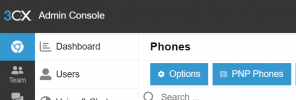
When you install the V64 router and factory reset the remaining phones, you can go to the PNP menu and you will see them there, ready to select and assign them easily to their respective users.

1727333994641.png
 
  • Like
Reactions: OlegR_3CX
What's normal time for a V62 on 3CX cloud V20 3 to register after provisioning. After reprovisioning it has taken 7 to 35 min. But it just registers and then unregisters immediately. Waited overnight and never registered again. Have latest firmware from 3cx, re-provisioned. Fanvil-SBC is still red. Just keeps registering and immediately unregisters.
 
Last edited:
it's possible i was confusing the ip address with my router's but one of the phone that was working fine on it's own extension actually had a different MAC address that what was registered with 3cx. I know, not possible, but it was working.. I installed the Fanville V64 set it up as SBC, then deleted and readded all of my X3Us with the SBC as the server and everything provisioned like magic! Yes it is easier to do once you get that router phone on the network. Thats when I discovered that phone that WAS working fine had th wrong MAC address registered, which caused me just to shake my head in wonder than anything was working at all.
 
What's normal time for a V62 on 3CX cloud V20 3 to register after provisioning. After reprovisioning it has taken 7 to 35 min. But it just registers and then unregisters immediately. Waited overnight and never registered again. Have latest firmware from 3cx, re-provisioned. Fanvil-SBC is still red. Just keeps registering and immediately unregisters.
Deleted user, started all over and works now
 
Also, those three working phones were all on the same wired network so i shouldn't have had two completely different IP addresses for three phones. One was on the 192.xxx and the other two were reading 75.xxx.xxx.xxx
 
You are probably confusing your public IP with the private one.

Private are in the ranges of 10.x.x.x, 192.168.x.x, 172.16.x.x-172.31.x.x

When you install the V64 router and factory reset the remaining phones, you can go to the PNP menu and you will see them there, ready to select and assign them easily to their respective users.

View attachment 44134
ahh actually i am just coming back and seeing this now.. I added the phones using mac address and pointed them at my SBC phone. They provisioned fine.. I will remember i can just plug them in and go to PNP phones next time... I have 4 more phones to add to get all of my extensions back up.
 
Status
Not open for further replies.

Members Online Now

Forum statistics

Threads
111,834
Messages
589,287
Members
164,664
Latest member
dominik.pepel