Fanvil X4 not provisioning

Status
Not open for further replies.

Carsten Reckord

Free User
Joined
Dec 27, 2020
Messages
6
Reaction score
0
I recently bought a Fanvil X4 to try it out and possibly get a few more if it works out. Well, it doesn't...

After upgrading to the latest firmware 2.12.1.7297 and doing a factory reset for good measure, it shows up as a new phone via PnP, and I followed https://www.3cx.com/sip-phones/fanvil-x3-x5/ for local lan provisioning. Wireshark shows that the phone requests the correct template, and I can see that "something" gets applied, because the display language and date format switch, and the provisioning link gets set, but pretty much nothing more. Especially no SIP server and account get applied. Consequently, the phone stays as "new" in the 3CX phone list.

I also tried to manually download the auto provisioning file from my 3CX server and apply it through the phone's web frontend, but with the same result.

I noticed that when I download the phone's config, it says <VOIP_CONFIG_FILE><version>2.0002</version> while the 3CX template has <version>2.0003</version> - not sure if that trips it up.

3CX Version: 16.0.9
Fanvil X4 firmware: 2.12.1.7297
 
Hi!

The fact that the phone stats as "New" means that it is not registering.
Also the fact that the phone is getting the display language applied means it is getting the provisioning file from the server.

Now If I had to guess, there is something wrong in the provisioning file that prevents the phone from registering.

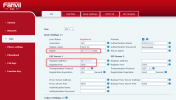
After you have tried to provision it, log into the phone UI and go to Line --> SIP.
What do you see in the Realm and Registrar fields?
1623059856372.png


As you have mentioned the phone appearing up in the "Phones" node in the Management Console, I am assuming that it is provisioned either as Local LAN or SBC, not STUN.
In the unlikely event though that during provisioning, you did select STUN as the provisionig method, remember that for STUN you need to uncheck the option "Disallow use of extension outside the LAN" in the Extension Settings in the Options tab.
 
Yes, it is provisioned as Local LAN. All SIP related entries are still empty or at their default values after the provisioning attempt.

As I said, the phone doesn't even accept the provisioning file when I load it manually in the web frontend, so I assume that there's a problem with the file's content.

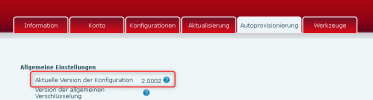
Doing a simple diff between a settings export from the phone and the provisioning file, I see a couple of differences in some tags, and, most notably, in the file's version (2.0002 on the phone, 2.0003 in the template), despite having updated to the latest 2.12.1.7297 firmware.

1623167889578.png
 
First, if you have any other 3CX installation, I would suggest comparing the Fanvil template on that system with yours in case it has been changed.

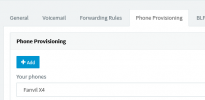
Also, in the Extension Settings, in the Phone Provisioning tab, make sure you have the right model selected:
1623224041617.png

After this, while still in the Phone Provisioning tab, take the provisioning link, put it into the browser of another PC on the same LAN and check if it downloads the file. If it does, open the file with a text editor and check some of the SIP value to see if they are correct, as well as the <Version> tab that you noted.

To get the provisioning link, take what appears in this tab, which will be something like:
Code:
http://192.168.1.100:5000/provisioning/y0mjt6he4tmr

Then also take the MAC Address, add to the end of the URL and add ".cfg" at the end. So if the MAC Address was 0C3812345678, the final URL you would try would be:
Code:
http://192.168.1.100:5000/provisioning/y0mjt6he4tmr/0C3812345678.cfg


Once you do this:
  • Is the right model selected in the drop down?
  • Is the file downloaded?
  • Is the MAC Address correct and match that of the actual device?
  • Is the <Version> tag correct?
  • Is the SIP Information correct in the file?
What this will help us understand is if the file that 3CX serves is correct, or if the phone is simply not getting the file or getting it partially.
 
First, if you have any other 3CX installation, I would suggest comparing the Fanvil template on that system with yours in case it has been changed.
I only have one installation, and this is the first Fanvil phone I'm trying to provision.

Also, in the Extension Settings, in the Phone Provisioning tab, make sure you have the right model selected:
View attachment 22426
That's the one I used.

After this, while still in the Phone Provisioning tab, take the provisioning link, put it into the browser of another PC on the same LAN and check if it downloads the file. If it does, open the file with a text editor and check some of the SIP value to see if they are correct, as well as the <Version> tab that you noted.
Did that, and it's accessible. SIP settings look good, but some of the tags in the file look different from what I get in the phone's export. And of course the file version number is different.
Once you do this:
  • Is the right model selected in the drop down?
Yes
  • Is the file downloaded?
Yes
  • Is the MAC Address correct and match that of the actual device?
Yes
  • Is the <Version> tag correct?
No, and some of the phone settings (outside the SIP account settings, which look good) appear to be using differrent tags
  • Is the SIP Information correct in the file?
Yes
What this will help us understand is if the file that 3CX serves is correct, or if the phone is simply not getting the file or getting it partially.

In the meantime, I've used the 3CX provisioning file to manually configure the phone to the best of my abilities, to evaluate the phone itself. I've attached versions of both the 3CX file and a current phone export for comparison.

I still need to get the provisioning to work, since I was planning to get more of these phones.
 

Attachments

Sorry, minor correction:
Did that, and it's accessible. SIP settings look good, but some of the tags in the file look different from what I get in the phone's export. And of course the file version number is different.
The tags that look different are not part of the SIP account config, but concern general phone settings
 
Hi Carsten,

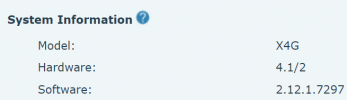
I provisioned a phone labelled as "X4G" (appears as X4 in your management console) with the following software and hardware version:
1623664568150.png

My template in 3CX reads version 109359 (Settings>>Templates>fanvil.ph.xml)
1623664515901.png

I've selected German to make it similar like yours, and the phone provisioned successfully as LAN-mode and works fine.

I exported the phone config also and it reads version 2.0002 like yours, so our conditions are identical yet your phone does not fully configure itself. Perhaps its faulty or perhaps something else is happening:

These phones have been known to stop provisioning IF you give them information with special characters
https://www.3cx.com/sip-phones/fanvil-x3-x5/#h.8owp0itk5r99

1. So create a new extension, DO NOT add a name or any BLFs, just press OK to save immediately. Keep it simple!

2. Now try again to factory reset it and assign the phone to this new extension and see if it works!
 
  • Like
Reactions: NickD_3CX
Status
Not open for further replies.

Members Online Now

Forum statistics

Threads
111,834
Messages
589,287
Members
164,663
Latest member
svdDGS