Flowroute : 407 Proxy Authentication Required

Status
Not open for further replies.

Francois_MTL

New User
Joined
Mar 21, 2023
Messages
10
Reaction score
2
Hi there,
I'm new here and also new in this technology. I started yesterday with Flowroute and 3CX with an Iphone 13.
I can make outbounds calls without any troubles. The only issue is that... nobody can call me.
I started a ticket with Flowroute and they answered me this :

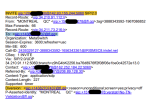
Everything on your Flowroute account is setup correctly. We are seeing both Inbound and outbound calls, however Inbound calls are failing at 3CX level. As shown in the call logs above, Flowroute is sending Inbound calls to your 3CX server, however 3CX is responding with a 407 Proxy Authentication Required error message. I would advise you to consult to your IT who helped you set up your 3CX or open a ticket with 3CX support to resolve the 407 Proxy Authentication Required error issue. There are also a couple of 3CX community forums online which have solutions for this error.

I've been through all the topics on this forum, but it looks that even the Main trunk number on 3CX cloud is right ! it start with a +.

Is there anyone who could help me with this please with a "simple and easy" explanation ;)
 

Attachments

Set 3CX to verbose mode, then replicate the issue. The log there should tell you what 3CX is seeing and why it might be sending a 407.
 
+Hi @Francois_MTL

Make sure that all your numbers are added with the "+" sign and make sure you have added the numbers correctly in 3CX.
Nothing else should be needed.
Also are you on StartUP?
 
Set 3CX to verbose mode, then replicate the issue. The log there should tell you what 3CX is seeing and why it might be sending a 407.
Hi SweetAction,
I can't find the “Dashboard” > “Activity Log” > “Settings” on my web interface.
This is a free account and the Web page i'm working on is https://1251.3cx.cloud/webclient
Is it because I'm using a free account that i'm not able to generate a log file ?
Thanks so much
 
+Hi @Francois_MTL

Make sure that all your numbers are added with the "+" sign and make sure you have added the numbers correctly in 3CX.
Nothing else should be needed.
Also are you on StartUP?
Hi Yannish,

Thanks for this tip, but as I explained in my first message, I already paid attention to this. Have a look on this PDF.
The setup is very simple. I have 1 Iphone, 1 line to trunk. Nothing else.

I do not understand your last question.

Thanks a lot again for helping me.
 

Attachments

Hi SweetAction,
I can't find the “Dashboard” > “Activity Log” > “Settings” on my web interface.
This is a free account and the Web page i'm working on is https://1251.3cx.cloud/webclient
Is it because I'm using a free account that i'm not able to generate a log file ?
Thanks so much
Ah, you are using StartUP and won't have access to Logs. 3CX support will need to assist here.
Hi Yannish,

Thanks for this tip, but as I explained in my first message, I already paid attention to this. Have a look on this PDF.
The setup is very simple. I have 1 Iphone, 1 line to trunk. Nothing else.

I do not understand your last question.

Thanks a lot again for helping me.
The last question was if you were on StartUP, which you are.
 
Ah, you are using StartUP and won't have access to Logs. 3CX support will need to assist here.

The last question was if you were on StartUP, which you are.
Hi,
Good to have news. Do i need to purchase a ticket or the best way is to wait a little bit more on this Forum?
What's your best suggestion at this point?

Thanks
 
Hi,
Good to have news. Do i need to purchase a ticket or the best way is to wait a little bit more on this Forum?
What's your best suggestion at this point?

Thanks
I would wait for YiannisH_3CX to reply back with next steps.
 
  • Like
Reactions: Francois_MTL
+Hi @Francois_MTL

Make sure that all your numbers are added with the "+" sign and make sure you have added the numbers correctly in 3CX.
Nothing else should be needed.
Also are you on StartUP?
Hi Yiannish,

I was wondering if you've seen my last comments with the screen shots.
SweetAction confirmed me that I'm using the free version, which I need because I only have 1 line.
Is it because is a free version that I can't receive any inbound calls?

Thanks for your answer and your support.
Kind regards
 
Is it because is a free version that I can't receive any inbound calls?
No that is not the case. You should be able to receive both inbound and outbound calls.
Can you try calling your number again? Do you still have the same issue?
 
Hi Yiannish,

I was wondering if you've seen my last comments with the screen shots.
SweetAction confirmed me that I'm using the free version, which I need because I only have 1 line.
Is it because is a free version that I can't receive any inbound calls?

Thanks for your answer and your support.
Kind regards
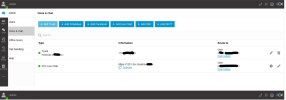
If you call directly to the actual DID you have set under your trunk, which starts with +12, does this issue still occur?
 

Attachments

  • 1679586383029.png
    1679586383029.png
    99.1 KB · Views: 15
  • 1679586593866.png
    1679586593866.png
    135.4 KB · Views: 14
If you call directly to the actual DID you have set under your trunk, which starts with +12, does this issue still occur?
Dear Charles, Yannish,

First of all I want to thank you for your support.

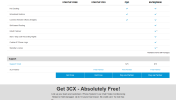
Btw, Glomero (Montréal Canada) called me yesterday for support me, but they mentioned me that the FREE account was only available for 2 month, and after I had to pay 175$. She propose me for 125$ 1 hour with a technician. So, at the end, the STARTUP FREE become to be very expensive :(
I hope that I can keep this STARTUP FREE forever as this is shown on the advertisement hereby
1679673758184.png

So, this was for the context.

Now about the technical aspect. Here is what I tried yesterday.
  1. I call the +1(204) XXXXX (Provided by Flowroute) with my cell phone and I was able to let a voicemail. The browser on my PC was open and I was logged in.
    1. My PC didn't show the inbound call
    2. And obviousy, my Iphone didn't ring ;)
  2. I set up the transfer call on my Iphone (All inbounds call redirect to the +1(204) XXXX number
    1. Asking someone to call me
    2. The person got a voice message telling "Your number cannot be completed as dialled. Check the number and dial again..."
  3. Last test, I asked the same person to call directly the +1(204) XXXX to bypass the transfer function of course
    1. The person got a voice message telling "Record your message and press pound or press star to contact the operator". She left me a voice mail.
    2. I receive a email from 3CX :

You have received a new voice mail from "+1514XXXXX7 -"MONTREAL QC"


From:+1514XXXXX7

To: 23510" - "FrXXXXXXs" "XXXs"

Received:"Friday, 24 March 2023 12:23:58"

Duration:"00:00:04"

File:"vmail_+151XXXXX7_23510_20230324162358"


I hope this helps and that you will be able to find a solution.

Kind regards
François
 
  1. I call the +1(204) XXXXX (Provided by Flowroute) with my cell phone and I was able to let a voicemail. The browser on my PC was open and I was logged in.
    1. My PC didn't show the inbound call
    2. And obviousy, my Iphone didn't ring ;)
  2. I set up the transfer call on my Iphone (All inbounds call redirect to the +1(204) XXXX number
    1. Asking someone to call me
    2. The person got a voice message telling "Your number cannot be completed as dialled. Check the number and dial again..."
  3. Last test, I asked the same person to call directly the +1(204) XXXX to bypass the transfer function of course
    1. The person got a voice message telling "Record your message and press pound or press star to contact the operator". She left me a voice mail.
    2. I receive a email from 3CX :
Number 1 sound as if they may have reached a voicemail, from your provider if you did not get a message as in number 3 and no incoming call is seen. Did it sound the same as in number 3?

Number 2 means that a number, either dialed, or input as a forwarded number, is not correct so the call could not go through.

Number 3 means the call has reached 3CX, but the PBX is unable to ring the extension, and sends the call to voicemail. The extension may be seen as not registered, or, something such as DND (Do not disturb), or another function (forwarding?), is enabled. preventing the call from reaching the extension.
 
  • Like
Reactions: Francois_MTL
I call the +1(204) XXXXX (Provided by Flowroute) with my cell phone and I was able to let a voicemail. The browser on my PC was open and I was logged in.
  1. My PC didn't show the inbound call
  2. And obviousy, my Iphone didn't ring ;)
This means that inbound calls work and you reached the voicemail of an extension. Check your configuration and where your calls are routed in the webclient of your 3CX instance.

I set up the transfer call on my Iphone (All inbounds call redirect to the +1(204) XXXX number
  1. Asking someone to call me
  2. The person got a voice message telling "Your number cannot be completed as dialled. Check the number and dial again..."
This is not a 3CX prompt. This could indicate that the transfer did not work on your carrier level or the number was manipulated in a way that was not correct. You should reach out to your carrier regarding this. Let's focus on direct calls for now. Once you get those going you can look into forwarding.

Last test, I asked the same person to call directly the +1(204) XXXX to bypass the transfer function of course
  1. The person got a voice message telling "Record your message and press pound or press star to contact the operator". She left me a voice mail.
  2. I receive a email from 3CX :
Same as the first point. The call is reaching your 3CX and routing to a voicemail for some reason. Check the routing in your 3CX webclient through the admin menu.
 
  • Like
Reactions: Charles_3CX
This means that inbound calls work and you reached the voicemail of an extension. Check your configuration and where your calls are routed in the webclient of your 3CX instance.


This is not a 3CX prompt. This could indicate that the transfer did not work on your carrier level or the number was manipulated in a way that was not correct. You should reach out to your carrier regarding this. Let's focus on direct calls for now. Once you get those going you can look into forwarding.


Same as the first point. The call is reaching your 3CX and routing to a voicemail for some reason. Check the routing in your 3CX webclient through the admin menu.
Dear Yannish,

Thanks for the detailed informations.
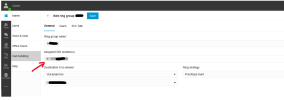
I've done this modification and now 3CX is working correctly when someone reach me on +1(204)XXX directly.
I've add the DID number to the Call handling which wasn't present in that field.
1679920923420.png
The transfer function still not work. I'll investigate to Flowroute to see what is going wrong.

I'll keep you informed anyway as this post can helps people who face the same issue as I do.
Btw, the procedure https://www.3cx.com/docs/sip-trunk/flowroute-usa/ doesn't mention this step. For the outbound calls, you don't have to do anything, but maybe it should be nice to explain how to configure the system for inbound calls ;)

Thanks again. As I'm moving to europe today, I cross my fingers !
François
 

Attachments

  • 1679920719671.png
    1679920719671.png
    39.4 KB · Views: 6
  • 1679920737614.png
    1679920737614.png
    39.4 KB · Views: 6
  • Like
Reactions: Charles_3CX
The transfer function still not work. I'll investigate to Flowroute to see what is going wrong.
If you are relying on the DID rule, then you may be having an issue if one number is dialed, but it is then forwarded to the DID number. I've seen this happen before, as the DID number is not being directly dialed. Your provider may be able to look at the call logs and do some manipulation, to send the DID number, to 3CX if that is what is happening.

In the meantime, you could check the 3CX Activity Log to see if the correct DID is being sent for a forwarded call.
 
Last edited:
  • Like
Reactions: Francois_MTL
Hi guys,

I'm still facing the same issue.
I've send an email to Flowroute with the link of this conversation and the response I received is this one :

Hi François,

Transferring would be done at your PBX once the call is established, so this is unfortunately not something that Flowroute can assist with. You would need to work with your PBX manufacturer on this matter.

Our platform can only handle Forwarding to a different external number at the point of the initial inbound call. This can be done in the portal at [Interconnection > Inbound Routes > +Add Route. You would then assign this route to the DID back at DIDs > Manage], though this doesn't sound like you are looking for.


Regards,
Dan
Flowroute Team


At this point, I don't really know what to think. 3CX and Floroute are playing back en forth...
As simple user, I think I wouldn't recommand this combination. I cross the finger to find someone who can helping me to fix this.
I'm at the airport now and tomorrow in Europe.

At the airport, I see that the small square on top right of the 3CX app is still grey. I tried using my PC to call the +1(204)XXX and my cell ring.

Thanks for your support
 
When you say you set up a transfer call on your Iphone do you mean the 3CX app on your Iphone or the phone directly?
Can you explain the call scenario that is not working in detail please?
 
Correct me if I'm wrong with any of this...
When you call the 204 number directly, the correct DID is sent and all works as it should.

If you forward your mobile number to the 204 number, and someone calls your mobile, the call fails (follows the default route of the 3CX trunk group).

If this is what is indeed happening, then I have to assume that the DID number is not being passed on by your provider. If you are using Start-up, and unable to access the Activity Log to confirm this, perhaps Floroute can.

Without a DID, in the correct format, to match your DID rule, you would be unable to sent calls to the desired destination.
 
Correct me if I'm wrong with any of this...
When you call the 204 number directly, the correct DID is sent and all works as it should.
Exact!
If you forward your mobile number to the 204 number, and someone calls your mobile, the call fails (follows the default route of the 3CX trunk group).
Exact!
If this is what is indeed happening, then I have to assume that the DID number is not being passed on by your provider.
It can be. I don't understand what kind of limitation I have, but maybe the "transfer function" is not allowed for my provider. I'll make some research today about it. But good tip ;)
If you are using Start-up, and unable to access the Activity Log to confirm this, perhaps Floroute can.

Without a DID, in the correct format, to match your DID rule, you would be unable to sent calls to the desired destination.
As first message, I joined a copy of Flowroute's repport. Maybe you could find some interresting informations into it.
I'll be back to you after some other tests.

Thanks you very much Leejor.
François
 
Status
Not open for further replies.

Latest Posts

Forum statistics

Threads
111,889
Messages
589,571
Members
164,753
Latest member
GemmaC