FQDN Stopped working

Status
Not open for further replies.

lightspeedhosting

Bronze Partner
Basic Certified
Joined
Nov 26, 2019
Messages
27
Reaction score
2
For no reason the FQDN just stopped resolving. If I do a dig

dig @8.8.8.8 et1.oh.3cx.us

It can't find it yet on my system it shows this is my FQDN and it's green.

I had to change the SBC at this office to use the IP just to mitigate outgoing calls in the short term and change the SIP trunk to use the IP as well. But things like the mobile apps etc use the FQDN.

We obviously have no control over the FQDN registrations in DNS but it appears to be gone now.
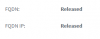
 
Sounds like either someone released it, or the maintenance lapsed or something .You want to check in the customer console to see the status.
 
According to our partner portal the license is still valid and according to 3CX dashboard after doing a refresh, it’s still valid.
 
So a valid license doesn't mean the FQDN wasn't released. When you go into the partner portal and click on the license details what do you see here?

1594847083834.png
 
@lightspeedhosting you can send me private message with your key and I can take a look
 
I can confirm it shows as released.. No idea why.. Will PM you the key
 
This FQDN and 3CX is extremely active though. Doesn’t make any sense to me
 
The machine using this may be active, but if it can't contact the activation server for a long period of time it will end up appearing as unused.
 
So how do we get it pointed back at our PBX?
 
Reinstall using a backup that has no key/fqdn included.

During the web config wizard, the system will see that you have no fqdn and offer you to choose one.

At that point you can choose the same one if it is available and get it back.

Ensure that the system can contact the 3CX servers (in case it was a firewall blocking you for example)
 
Status
Not open for further replies.

Forum statistics

Threads
111,954
Messages
589,921
Members
164,851
Latest member
DrunkeMeister