Solved Generate SSL certificate?

Status
Not open for further replies.

simonknight

Silver Partner
Basic Certified
Joined
May 22, 2008
Messages
15
Reaction score
1
I feel like I'm being stupid here but, hey, there's no stupid questions, right?

We use a 3cx.co.uk provided domain. I've set up my FQDN to point to the same IP address but how do I generate a certificate for it? Where does the CSR come from and where do I get the private key? I want to use GoDaddy to get the certificate.

Any pointers appreciated.
 
I feel like I'm being stupid here but, hey, there's no stupid questions, right?

We use a 3cx.co.uk provided domain. I've set up my FQDN to point to the same IP address but how do I generate a certificate for it? Where does the CSR come from and where do I get the private key? I want to use GoDaddy to get the certificate.

Any pointers appreciated.
Use a webserver if you have one. Don't use online tools.

DM me if needed and I'll get you one.
 
Hi everyone!!

I am also confused about the certificate and the key that mentions the step by step to implement the integration.
The 3CX manual points to a Microsoft website with trusted certificates, lists a list and indicates that the SBC provider must indicate how to implement the certificate, but the procedure is cut there.

I have bought the certificate from one of the entities validated by Microsoft, Sectigo Root CA, but now the certificate has to be configured and I do not see how to achieve this configuration process.
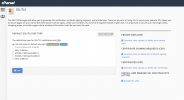
Captura de Pantalla 2021-09-13 a la(s) 14.37.01.png
Captura de Pantalla 2021-09-13 a la(s) 14.37.37.png
Is this done through the SSL manager that is in the webhosting cpanel?


Captura de Pantalla 2021-09-13 a la(s) 14.42.42.png

I will appreciate any guidance, dear, thank you very much!
 
Hi everyone!!

I am also confused about the certificate and the key that mentions the step by step to implement the integration.
The 3CX manual points to a Microsoft website with trusted certificates, lists a list and indicates that the SBC provider must indicate how to implement the certificate, but the procedure is cut there.

I have bought the certificate from one of the entities validated by Microsoft, Sectigo Root CA, but now the certificate has to be configured and I do not see how to achieve this configuration process.
View attachment 24378
View attachment 24379
Is this done through the SSL manager that is in the webhosting cpanel?


View attachment 24381

I will appreciate any guidance, dear, thank you very much!
First, you'll need to generate a CSR for the chosen FQDN for the Teams SBC. This will also create the private key, which you should keep safe.

Then, you need to issue the certificate using the generated CSR. The provider will send an email for validation and then you'll receive your CRT and CA-BUNDLE files.

Using those, along with the private key, you configure the Teams Direct Routing section in 3CX > Settings > Microsoft 365. You can usually rename the CA-BUNDLE and the private key to .pem and upload that directly.

Once configured, you can validate that the Teams port is started correctly via two ways:
1. In the Activity Log, check for any "Unable to load private key PEM file". That would indicate the file is an incorrect format.
2. Using the terminal, you can run "netstat -tunpl" and see if the port 5062 is listening.

Note that if you're using a custom FQDN that is a domain under your Office 365, the port 5061 and the PBX certificate will be used.

Otherwise, for other custom domains and 3CX FQDNs, you have a separate FQDN and SSL for Teams (due to their requirements.)
 
thanks for your help!! I have managed to advance with the certificate, but I cannot open port 5062. I already opened it in AWS, in nftables.conf and checked in nft list table inet filter, but I can't get 5062 to finally be enabled :s

any idea ???
 
Check the Activity Log and see if you get a "Unable to load X PEM file" (where X can be "certificate" or "private key")
 
  • Like
Reactions: NickD_3CX
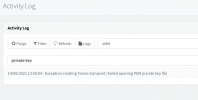
Thanks for the hint, reviewing what you indicate, indeed there is an error (attached image).

What I did with this .key file that I downloaded from the webhosting server, was soko change extension. Is this the reason for the error?
Is there another procedure for file conversion?Captura de Pantalla 2021-09-14 a la(s) 14.11.47.png
 
Thanks for the hint, reviewing what you indicate, indeed there is an error (attached image).

What I did with this .key file that I downloaded from the webhosting server, was soko change extension. Is this the reason for the error?
Is there another procedure for file conversion?View attachment 24402
When you open the file in Notepad, does it start by: "BEGIN PRIVATE KEY" or "BEGIN RSA PRIVATE KEY"?
 
@StefanW What format should it be?

We have a customer with the same issue and both RSA and not RSA are not loading.

Also, can you add to the FAQ the kind of key to generate? Like bits (1024, 2048, 4096)?

Mine worked first try but we had issues for other people.
 
the private key must start and end with

-----BEGIN PRIVATE KEY-----
-----END PRIVATE KEY-----

You can take this windows batch to generate the Key and a CSR for the domain in question.

Code:
@ECHO OFF
cd /d "%~dp0"
SET workdir=%cd%

echo 3CX SSL AND CSR GENERATOR
echo.
echo -------------------------
echo To Generate your "SSL Private Key" and "CSR" you must install:
echo https://slproweb.com/download/Win64OpenSSL_Light-3_0_0.msi
echo -------------------------
pause
cls
echo -------------------------
echo Fill in your data
echo -------------------------
SET /P organization=[Enter 3CX (Teams) FQDN, eg team.expample.com]:
SET /P organizationalunit=[Enter Organization Unit, eg IT]:
SET /P country=[Enter Your Country Code, eg US UK AU DE FR]:
SET /P locality=[Enter Your Area, eg England]:
SET /P city=[Enter Your City, eg London]:
SET /P company=[Enter Your Copmany, eg 3CX]:
echo -------------------------
echo Generating Key and CSR
echo -------------------------
"C:\Program Files\OpenSSL-Win64\bin\"openssl req -new -newkey rsa:2048 -nodes -out %organization%.csr -keyout %organization%.key.pem -subj "/C=%country%/ST=%locality%/L=%city%/O=%company%/OU=%organizationalunit%/CN=%organization%"
cls
echo -------------------------
echo This is your private key
echo %workdir%\%organization%.key.pem
echo -------------------------
type %organization%.key.pem
pause
cls
echo -------------------------
echo This is your CSR for %organization%
echo Upload this to your SSL issuer
echo %workdir%\%organization%.csr
echo -------------------------
type %organization%.csr
pause
 
As an added note to this thread, if you get an error like "Unable to load private key PEM file", here's how to fix it (assuming the key and certs are matching) :

Copy the root and intermediate certificate BELOW the certificate itself, not above as we used to do for Nginx and Apache.

Once the content was put below, Teams loaded it perfectly. Thanks to @NickD_3CX for the help on this one!
 
  • Like
Reactions: NickD_3CX
the private key must start and end with

-----BEGIN PRIVATE KEY-----
-----END PRIVATE KEY-----

You can take this windows batch to generate the Key and a CSR for the domain in question.

Code:
@ECHO OFF
cd /d "%~dp0"
SET workdir=%cd%

echo 3CX SSL AND CSR GENERATOR
echo.
echo -------------------------
echo To Generate your "SSL Private Key" and "CSR" you must install:
echo https://slproweb.com/download/Win64OpenSSL_Light-3_0_0.msi
echo -------------------------
pause
cls
echo -------------------------
echo Fill in your data
echo -------------------------
SET /P organization=[Enter 3CX (Teams) FQDN, eg team.expample.com]:
SET /P organizationalunit=[Enter Organization Unit, eg IT]:
SET /P country=[Enter Your Country Code, eg US UK AU DE FR]:
SET /P locality=[Enter Your Area, eg England]:
SET /P city=[Enter Your City, eg London]:
SET /P company=[Enter Your Copmany, eg 3CX]:
echo -------------------------
echo Generating Key and CSR
echo -------------------------
"C:\Program Files\OpenSSL-Win64\bin\"openssl req -new -newkey rsa:2048 -nodes -out %organization%.csr -keyout %organization%.key.pem -subj "/C=%country%/ST=%locality%/L=%city%/O=%company%/OU=%organizationalunit%/CN=%organization%"
cls
echo -------------------------
echo This is your private key
echo %workdir%\%organization%.key.pem
echo -------------------------
type %organization%.key.pem
pause
cls
echo -------------------------
echo This is your CSR for %organization%
echo Upload this to your SSL issuer
echo %workdir%\%organization%.csr
echo -------------------------
type %organization%.csr
pause

in my case it says RSA in the middle of the sentence. that does not work?
 
I do this in the pbx?
No, but you can simply do this:

"openssl rsa -in private.key -text > privatekey.pem"

It should output a similar file without RSA in it.
I do this in the pbx?
 
on your PC install this
then run

Code:
"C:\Program Files\OpenSSL-Win64\bin\"openssl rsa -in private.key -text > privatekey.pem
 
  • Like
Reactions: Evolute IT
we will be working on a solution in which you can purchase an SSL cert directly from your 3CX customer portal.
You can opt to have it all generated for you (including key) or an advanced mode where the key and the CSR needs to be generated by the user.
 
Status
Not open for further replies.