Solved GoDaddy SSL Certificate for Teams

Status
Not open for further replies.

Tlaurin

Forum User
Joined
Jul 8, 2022
Messages
4
Reaction score
1
Hello,

I’ve read as many posts and tutorials on the SSL setup but still a bit confused… I’m running V18 on a self managed cloud. Domain of 3CX is different than my Teams domain. SSL purchased through GoDaddy.

I followed the guide and I’m left with the following files:
OpenSSL Files
- .csr file (the “notepad file” that has its text copy and pasted to genenrate the SSL certificate)
- .pem file (the “private key”)

GoDaddy Files
- .cst file (one block of text beginning with “-----BEGIN CERTIFICATE-----“)
- .pem file (the ”certificate.” one block of text beginning with “-----BEGIN CERTIFICATE-----“) <— In notepad the text from this .pem matches the text in the .cst file above.
- .p7b file (the “intermediate.” one block of texting beginning with ”-----BEGIN PKCS7-----“)

From my understanding, I first need to upload the certificate in a .pem format and this certificate must be text edited in Notepad to include the text from these files (1) “certificate” (2) ”intermediate” (3) “private key”. Then second i need to upload the “private key”.

Does the first part sound about right? Or does the .pem certificate only need to include the “certificate” text and the “intermediate“ text?

Thanks!
 
  • Like
Reactions: Evolute IT
The certificate needs to include the certificate for the actual fqdn of the sbc, the intermediate and root certificates for the CA. No private key in the certificate text. Private key is required separately,

I would suggest to go through this guide it will help:https://www.3cx.com/docs/microsoft-teams-integration-faqs/#h.uos0mgcmlxo5
Thanks I’ve read that over but its still a little unclear. What do you mean by “intermediate and root certificates”? Which is the root certificate from the list of files i mentioned? I only have one intermediate certificate.
 
You should have the ability to download certificates from the CA (GoDaddy) usually with the word Bundle. This bundle will contain the intermediate and root certificates for the CA, you may also contact GoDaddy in order to get the information you require.
 
You should have the ability to download certificates from the CA (GoDaddy) usually with the word Bundle. This bundle will contain the intermediate and root certificates for the CA, you may also contact GoDaddy in order to get the information you require.
The confusion is that GoDaddy provides the intermediate and root in a single file and single block of text Known as PKCS7 format (.p7b file). Should i convert this to a .pem so that its two separate blocks of text and then combine these with the Certificate? Or will combining the certificate and PKCS7 suffice?
 
You need to include the intermediate and root certificate from GoDaddy within the pem file, as mentioned within the guide I provided, so basically separated as below in a single file:

-----BEGIN CERTIFICATE-----
Your certificate
-----END CERTIFICATE-----
-----BEGIN CERTIFICATE-----
Your intermediate certificate
-----END CERTIFICATE-----
-----BEGIN CERTIFICATE-----
your root certificate
-----END CERTIFICATE-----
 
  • Like
Reactions: Evolute IT
Solved. FYI for anyone using GoDaddy. The PKCS7 is the intermediates and root in one. So your single file will look like.

-----BEGIN CERTIFICATE-----
Your certificate (text from GoDaddy CST file)
-----END CERTIFICATE-----
-----BEGIN PKCS7-----
Your certificate (text from GoDaddy p7b file)
-----END PKCS7-----
 
  • Like
Reactions: Evolute IT
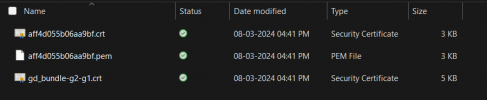
I have this 3 file from Godaddy.

1709896373902.png

So which is what? How should convert them to PEM and what should be the order?

My call stop working and when check on SSL i am getting following error

The certificate is not trusted in all web browsers. You may need to install an Intermediate/chain certificate to link it to a trusted root certificate. Learn more about this error. You can fix this by following GoDaddy's Certificate Installation Instructions for your server platform. Pay attention to the parts about Intermediate certificates.​


I followed instruction contacted Godaddy but they are saying they are just certificate provider and refuse to help.
 
Combine the bundle and the PEM file together in this other:

---
MAIN PEM
---
---
INTERMEDIATE CERT
---
---
ROOT CERT
---

Usually just putting the bundle below the PEM under one file will work fine, and then can be uploaded to 3CX for use.

If you encounter issues, don't ask GoDaddy, they're the worst.
 
@ConceptsWeb

Here when i am uploading
1709897229796.png

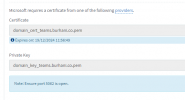
My file name are not updating. For Example my filr name was "final3cxteamcertificate.pem" and Key file name was "team.burhani.co.pem"

But in console post updating its not changing. Once I click OK

1709897412947.png

How can i verify if its done ?
 
@ConceptsWeb

Here when i am uploading
View attachment 40191

My file name are not updating. For Example my filr name was "final3cxteamcertificate.pem" and Key file name was "team.burhani.co.pem"

But in console post updating its not changing. Once I click OK

View attachment 40193

How can i verify if its done ?
That's normal, 3CX renames the files.

To make sure, delete the file (Remove button on the right of the field), then reupload your files.
 
  • Like
Reactions: srane.sushant
@ConceptsWeb you are a Saver.:) yes certificate issue is now resolved.

But still calling issue is not resolved.

I am not able to dial out or get inbound calls. getting error code 603 on MS Teams SBC

1709899494958.png

It was working before suddenly stop.
 
  • Like
Reactions: Evolute IT
@ConceptsWeb you are a Saver.:) yes certificate issue is now resolved.

But still calling issue is not resolved.

I am not able to dial out or get inbound calls. getting error code 603 on MS Teams SBC

View attachment 40198

It was working before suddenly stop.
What type of cert are you using? Wildcard or regular?
 
it was wildcard

Issue is now resolved.
 
Thank you for the feedback ;)
 
Status
Not open for further replies.

Members Online Now

Forum statistics

Threads
111,832
Messages
589,285
Members
164,662
Latest member
DejanMDS