• We do not provide troubleshooting help for unsupported phones. Please try with a supported phone.
  • V20 Update 10 Alpha 2 Learn more

Solved Grandstream GXP2130 on V20 UK British Summer Time

Status
Not open for further replies.

NeilEwing

Bronze Partner
Basic Certified
Joined
Jul 15, 2020
Messages
12
Reaction score
2
Hi

Just been doing an upgrade from V18 to V20 for a customer still using GXP2130 handsets. For the life of me I cannot get them to display the correct time, out by one hour as they do not appear to be honouring British Summer Time (which is GMT+1). Anyone come across this that might have a solution?
 
Hi,

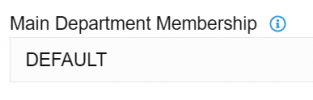
1. Check the extension's Main Department Membership (Extension >> General), example:
1716300750313.png
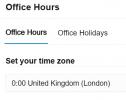
2. Check that Department's Office Hours to see the Timezone
1716300785591.png
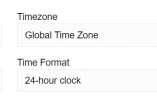
3. Check the phone provisioning tab of the extension and see that the phones follow global timezone:
1716300843200.png

With the above set as per my example, the phone (running firmware 1.0.11.74) was confirmed to show the correct time.

If in doubt, delete one phone from a user, factory reset it, and assign it again.

There is a slight chance that the phones may be picking up NTP from your network, which could be serving them the wrong time / timezone. If that is the case you would have to troubleshoot it yourself or with the help of a network specialist to see what is running on your LAN.
 
Awesome - that seemed to work changing the department time zone. Thanks
 
  • Like
Reactions: JohnS_3CX
Status
Not open for further replies.

Forum statistics

Threads
112,147
Messages
590,954
Members
165,165
Latest member
cvanderzwan