• We do not provide troubleshooting help for unsupported phones. Please try with a supported phone.
  • V20 Update 10 Alpha Learn more

Solved Grandstream GXP2130 on V20 UK British Summer Time

Status
Not open for further replies.

NeilEwing

Bronze Partner
Basic Certified
Joined
Jul 15, 2020
Messages
12
Reaction score
2
Hi

Just been doing an upgrade from V18 to V20 for a customer still using GXP2130 handsets. For the life of me I cannot get them to display the correct time, out by one hour as they do not appear to be honouring British Summer Time (which is GMT+1). Anyone come across this that might have a solution?
 
Hi,

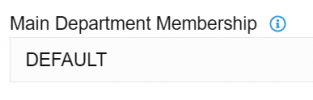
1. Check the extension's Main Department Membership (Extension >> General), example:
1716300750313.png
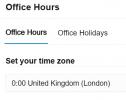
2. Check that Department's Office Hours to see the Timezone
1716300785591.png
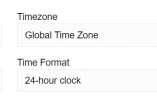
3. Check the phone provisioning tab of the extension and see that the phones follow global timezone:
1716300843200.png

With the above set as per my example, the phone (running firmware 1.0.11.74) was confirmed to show the correct time.

If in doubt, delete one phone from a user, factory reset it, and assign it again.

There is a slight chance that the phones may be picking up NTP from your network, which could be serving them the wrong time / timezone. If that is the case you would have to troubleshoot it yourself or with the help of a network specialist to see what is running on your LAN.
 
Awesome - that seemed to work changing the department time zone. Thanks
 
  • Like
Reactions: JohnS_3CX
Status
Not open for further replies.

Members Online Now

Forum statistics

Threads
111,831
Messages
589,277
Members
164,660
Latest member
RJenkinsROCK