Solved Grandstream GXW4104 Configuration Issues

Status
Not open for further replies.

jpoppi

Free User
Joined
Jul 18, 2019
Messages
8
Reaction score
1
Hello,

3CX noob here. I'm having issues configuring my new Grandstream GXW4104. I can get outbound calls to work, but for the life of me I can't figure out how to get the inbound calls to work properly. I've spent 2 days trying different things, tried several configuration guides, read the forums, been all over the internet, but nothing seems to work. I did have 1 successful inbound call routed to an extension (immediately after completing a re-configuration), but was unable to make a 2nd inbound call - it just rings out.

Strangely, after a standard configuration (as per the 3CX guide), with no inbound rules, inbound calls will consistently go to the operator, which is by default sent to voicemail, as I have no phone set up for that extension. If I then create an inbound rule or change any settings, no inbound calls come through. Changing the settings back to how they were also results in no inbound calls! I can only get it to work again by doing the gateway configuration from scratch!

Apart from the situation above, looking at the 3CX activity logs shows no activity when an inbound call is placed (log set to Verbose). Within the GXW4104 web interface, it shows that the line has a call coming through, yet 3CX reports nothing. I have set up the syslog server in the GXW4104, and from my untrained eye, when a call comes in, it is spitting out heaps of data, yet 3CX activity shows nothing. The gateway status always has a green light next to it.

I have also been noticing some strange things. As an example, when I set the DID numbers in the gateway setup of 3CX and the configuration is provisioned to the gateway, the user ID's for the forwarding in the GXW4104 itself don't match the DID's... I've tried to provision the gateway with matching DID's, and even manually adjusting the config in the GXW4104, but still don't have any success.

I have had no issues accessing the 3CX interface, provisioning the Yeahlink T48G and W60B/W56H phones. The 3CX server is the Debian ISO, installed as a Hyper-V guest on Server 2019. The VoIP network is a standalone VLAN - server, gateway and phones all on the same VLAN. Server and gateway both have static IP's. I have played around with turning the firewall off - but not extensively (not sure why the firewall would sporadically let traffic through).

I would appreciate any help that can be given - I've committed to 3CX and I am contractually bound to these crappy PSTN lines for at least another 18 months - I need to get this working. Before I pay for support, I thought I would give this a try first.

Thanks in advance,

Justin
 
So you mention following guides but not which guides so to confirm, did you follow this guide?

https://www.3cx.com/voip-gateways/grandstream-fxo/

Also, you mention it works when you don't configure any rules but then when you configure DIDs you have problems. You do know that there aren't any DIDs per se with analog lines. Section 6 of the linked guide covers that part.
 
Hi cobaltit,

Thanks for your speedy response - I appreciate it.

Yes, that is the main guide I have been following - many many times. I have also tried this one: http://www.grandstream.com/sites/default/files/Resources/gxw410x_interop_3cx.pdf

It doesn't really work: "after a standard configuration (as per the 3CX guide), with no inbound rules, inbound calls will consistently go to the operator, which is by default sent to voicemail, as I have no phone set up for that extension. If I then create an inbound rule or change any settings, no inbound calls come through. Changing the settings back to how they were also results in no inbound calls! I can only get it to work again by doing the gateway configuration from scratch!"

The above is recorded in the call log as "out_of_area (caller ID)"

So admittedly VoIP on this level is a little new to me - I guess I have assumed that the DID's and the channel user ID's needed to match. I thought that was what the guide was telling me: "Therefore each FXO port is reflected with a fix DID number." and "Create those DIDs within the gateway to allow calls to be routed based on the port the call was received on"

Please correct me if i'm wrong, but the DID is matched with the UserID for each FXO channel in the gateway. This is configured under Settings / Channel Settings / Calling to VoIP / Unconditional Call Forward to Following. I thought this is how 3CX knew what line the call was coming from?

Irrespective of me messing with the DID's (in an attempt to get it working), following the guide to the letter results in calls coming though (to the operator voicemail) but why when I configure a simple rule (to send an external call to an extension, for example), does all inbound calls stop being detected?
 

Attachments

  • Capture.JPG
    Capture.JPG
    28.7 KB · Views: 189
I should clarify that when i say "change any settings" I'm talking about trivial things, for example: forwarding the call to an extension rather than the operators voicemail (under the operator's extension forwarding rules)
 
Change the inbound destination under the sip trunk settings for the gateway (in 3CX Managment console). The inbound rules and did options are only necessary if you want certain lines to go to different destinations.
 
Thanks Jonathan,

I assume you are talking about the Route calls to section under the General tab. I have tried that previously - but I will give it another go. On the previous attempt, changing the default settings (as specified in the guide) led to the already described situation - 3CX would fail to detect any incoming calls (nothing in the activity log).

How can I go from:

Receiving incoming calls which are routed to the operator extension voicemail

to

Not detecting anything (no calls, nothing in the activity log), when all I changed was the extension I routed to?

I don't understand! :( All I'm doing is changing the drop down from 100 to 101!

Surely, even if I mis-configured my routing, there should be something in the activity log???
 
Hi, I have a GXW with four PSTN lines working with 3CX. I am not an expert on the GXW or 3CX but maybe I can help. I will say I followed the 'How to configure' steps but found they did not provide the flexibility I needed from the GXW. I selected Generic Gateway Device when I added my GXW and I manually configured the GXW. I did not want 3CX to provision the GXW. That being said, try this.

During step 2, you where asked to enter '00146900000' as Main Trunk No. If you have not created your gateway then enter '000000' (which matches UserID for ch1:000000...) instead of '00146900000'. Maybe 3CX support can explain why '00146900000' was suggested.

If you have already created your trunk and added DIDs (as in step 6), simply go to SIP Trunk - DIDs tab and remove the '000000' DID.
Next back to SIP Trunk - General - Route Calls - Main Trunk No and change '00146900000' to '000000'. Note: When you change the the Main Trunk No to '000000' then the '000000' DID is added automatically.

You may know have done the below already.
Does the GXW register with 3CX (3CX SIP trunk dot turn green)?

Do you have multiple PSTN lines connected to the GXW?
Is each PSTN line plugged into the FXO port the way you expect them to work?
While logged into the GXW GUI, checking GXW Status - Network Status - PSTN Networks:
During an inbound call, does the correct Line change from 'Connected, idle' to 'busy Connected'...?
(You will have to refresh the browser screen to see the state change as the GXW screen is not live)
Call each PSTN phone number connected to the GXW to confirm the GXW changes state on each inbound number.
If the PSTN lines are plugged into the ports you expect, when Line 1 is picked up, the GXW will send of '000000' (the first UserID) to 3CX. When line 2 is picked up, the GXW will send '000001' to 3CX.

I hope this helps, if not I have some more ideas.
 
Last edited:
  • Like
Reactions: jpoppi
Hi jakthree,

Thanks for taking the time to reply.

I have previously tried different Main Trunks and DID's, but it didn't work. Just in case, I followed you methods, but unfortunately 3CX still does not detect any incoming calls. I tried removing the gateway completely and configuring from scratch with your instructions, which still did not work.

Yes I can get the GXW to register - dot turns green every time. I can even see the registration transactions in the activity log, and also in the syslogs of the GXW.

Yes I have multiple PSTN lines, and yes they are plugged in the correct ports (1 and 2)

Yes each PSTN line changes to "Busy Connected" when called.
 
So, I've done some reading and further investigation today, and I think I have discovered the issue - the GXW is not sending a SIP INVITE signal when the the incoming call comes in. Looking at the syslogs of the GXW, all the details about the incoming call are recorded, the ring time, the ring count, the CID, etc. But at no point, does an INVITE go out to the SIP server. I can see other transactions occurring when there is no calls incoming, such as REGISTER events every 2 minutes or so. I can even see that SIP server has acknowledged that the lines exist on the GXW!

Once again, please correct me if I'm wrong, but if I had a valid parameters in the GXW, shouldn't it attempt to send a INVITE with whatever my parameters are? I've got a server address, port numbers, accounts with correct passwords, etc. It registers with the SIP server fine - then why not send an INVITE?

It should also be noted I have reset the GXW to factory default a few times, after trying different things.
 
jpoppi,
I have not used syslogs of the GXW so I can't comment on syslog records. I noticed your statement that the GXW does not send an INVITE. I wanted to check what shows up in 3CX event log on an inbound call from the GXW. My 3CX event log shows an INVITE, which is what we expect should happen.

Some basic stuff,
Example IP address(s)
3CX server: 192.168.1.254 (assuming you have used default 5060 ports when setting up 3CX)
GXW:192.168.1.252
(note: the 3CX server and GXW are on same local LAN)
Test that you can ping the GXW from 3CX terminal
Dashboard - PBX Status - click on Terminal to open a 3CX terminal
Ping the GXW
If you can ping then onto next check.

These settings work for me as a minimum to receive inbound calls.
3CX trunk setup
Add Gateway:
Select Brand: Generic
Number of Ports: 4 (for GXW4104)
Main Trunk No: 1112223333 (00146900000 is what step 2 suggests. However, enter your primary PSTN phone number here. Since you selected Generic you will be manually configuring the GXW)
Click OK to create gateway
Edit the 'SIP trunk' you just created.
General - Trunk Details
Enter name for Trunk: GXW-01 (or what ever you want - not used by GXW)
Registrar/...: 192.168.1.252 (important - must be GXW's IP address) don't forget the port to the right.
Port: 5060 (important - the port used by GXW, more about this later)
Number of SIM Calls: X (enter the number of PSTN lines you have plugged in)
Number of Physical...: 4 (number of FXO ports)
Authentication
Type of Authentication: Register/Account based (important)
Authentication ID: 10000 (example, also 3CX default - COPY - used by GXW)
Authentication Password: asdF1234 (example, use whatever 3CX creates - COPY - used by GXW)
3-Way: not checked
Route calls to
Main trunk: 1112223333 (000000 is what 3CX provisions the GXW with. However you are manually configuring your GXW. The number here was set during add gateway)
Destination during: set how you want
Destination outside: set how you want
DIDs tab
1112223333 should already be entered here (add each of your PSTN phone numbers)
Done with trunk setup
Click OK to save changes.
At this point the registration dot should be RED.

Start with GXW factory reset.
GXW settings
Account1 - General settings
Account Active: Yes
Account Name: GXW to 3CX (or whatever you want, not used by 3CX)
SIP Server: 192.168.1.254:5060 :)5060 is important, used by GXW as port to register)
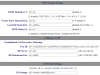
Outbound Proxy: 192.168.1.254:5060 (same as above)
SIP settings
(factory default setting except)
SIP Registration: Yes
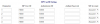
Accounts - SIP User Accounts (i think this is how the GXW knows where to send INVITE to)
11514
The SIP User ID and Authenticate ID are same as 3CX Authentication ID copied from above.
Use the 3CX Authentication password copied from from above.
Save and reboot the GXW.
Notice on the 3CX's SIP Trunks page that the dot turns GREEN. You may have to refresh the page to see the change.
Notice of the GXW's Status - Account Status that all account's SIP Registration state changes from "No" to "Yes". You will have to refresh the page to see the change.
The GXW has registered but you won't be able to receive calls yet.
GXW - Settings - Channel Settings
11515
The UserID is where you enter your PSTN phone number plugged into the FXO ports. The UserID is sent to 3CX as the DID of the FXO port that is sending the INVITE message. The 3CX SIP trunk DIDs must match the GXW's UserID so the call can be accepted.
One more GXW settings to check
GXW - FXO Lines - Dialing
11516
With Round-robin set as rr:1-4; all inbound calls will be sent to port 5060.

Hope this helps.
Have you ever been able to make an outbound call?
 
Last edited:
  • Like
Reactions: jpoppi
HI jackthree,

Thanks for taking the time to write all these instructions - much appreciated.

Most of the settings I had were the same as what you have listed, but I tried anyway, but unfortunately I was still having issues.

While I was messing around and trying some suggestions from Grandstream support, I have discovered that the issue seems to be directly related to the "Number of Rings Before Pickup" parameter. If I make this parameter anything higher than 2, the gateway will not send a SIP INVITE. So finally, with the "Number of Rings Before Pickup" set at 2, the 3CX server is able to receive inbound calls - yay! :D

But, this raised another issue - the CID was not being sent through to 3CX, leading to an "unknown" caller. Here in AU, the CID burst is sent between the 2nd and 3rd ring - because the pickup was set at 2, the INVITE was being sent before the CID had been resolved.

Grandstream support provided me with a firmware which I uploaded. After a few strange browser issues, I changed the "Number of Rings Before Pickup" parameter to 4, and was able to successfully place an inbound call with CID - yay again! :D:D

I'm going to do some more testing on site tomorrow, but things are looking good. :)
 
  • Like
Reactions: seawyk
So I have carried out further testing, and I am satisfied that the issue has been resolved. I am able to receive inbound calls and place outbound calls. Summary: Gateway was not sending SIP INVITEs. Thanks for everyone's input.
 
Status
Not open for further replies.

Latest Posts

Forum statistics

Threads
111,932
Messages
589,807
Members
164,805
Latest member
Diana Paladutsa