Group Routing Holiday Message

Status
Not open for further replies.

orion

Silver Partner
Advanced Certified
Joined
Mar 18, 2009
Messages
14
Reaction score
4
There doesn't seem to be a way to play a holiday message for a call routed group.

Is there a workaround so that a Group Holidays can play a message or is there a possible update that will address this issue?
 
From the web client you can assign group holidays.

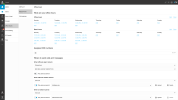
Go to Admin > Office Hours > Select Group > Scroll to bottom

1678192116890.png

edit: Think I misunderstood, you're referring to the destination for holidays?

I would imagine this will go to the default HOL IVR.
 
Thank you for responding, however I can’t see how the HOL IVR would be effective if multiple groups had holidays at the same time, but each group requires a different message to be played.
 
  • Like
Reactions: FredTBI
Thank you for responding, however I can’t see how the HOL IVR would be effective if multiple groups had holidays at the same time, but each group requires a different message to be played.
I have the same question about playing a holiday message. From what I saw, holiday sets on group put the group in "When office is closed route to" mode, so perhaps it will be possible to try a workaround in using pause hours to route calls when office should normaly be in out of office hours and then use the "When office is closed route to" to route to an IVR playing the holiday message?
 
There doesn't seem to be a way to play a holiday message for a call routed group.

Is there a workaround so that a Group Holidays can play a message or is there a possible update that will address this issue?
I think that I've found a workaround ;-)
As the setting of holiday on a group triggers the "When office is closed route to", you can just use this mode to play a holiday message, but you also have to use the break hours in order to play the normal office is closed message ;-)

Have a look on the screenshot below.
 

Attachments

  • firefox_7Ii3aI29eg.png
    firefox_7Ii3aI29eg.png
    64.7 KB · Views: 150
I think that I've found a workaround ;-)
As the setting of holiday on a group triggers the "When office is closed route to", you can just use this mode to play a holiday message, but you also have to use the break hours in order to play the normal office is closed message ;-)

Have a look on the screenshot below.
Nice work around thank you :-)
It would be great if 3CX would fix this and have the Holiday message work as expected ;-)
Thank you again for your input on this one.
 
  • Like
Reactions: WifxMain and jed
+10... Yes, I agree 200%!

OK, Let's define what I am looking for?

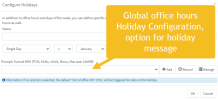
We need to get Group Holiday in Office Hours to work as expected; in that I was expecting that each defined Holiday in Group Office Hours to work close to the Global Settings in Settings --> Language & Office Hours Settings --> Configure Holidays.

By this I mean to say that when the current time is associated with an active Group Office Hour Holiday Schedule then the calls need to get routed to a different destination based upon the active Holiday Schedule. I like to define all of voice overs for all Holidays six months in advance, so I don't have to do any manual intervention during a "Holiday".

For each defined Group Office Hour Holiday would FIRST play an optional Holiday specific pre-Recorded message, then the call would be routed to one of the following choices: a User (aka Extension), a VoiceMail Box, a Ring Group, or a Digital Receptionist.

This is the way v15(?) kind of worked. I like this because the optional Holiday specific pre-Recorded message would indicate why the office is closed and when the office re-opens; then the Digital Receptionist could also have a specific pre-Recorded message for general instruction how to interact with the IVR.

Therefore, we get "Holiday specific pre-Recorded message" would play the message "Thank you for calling Company X. Our office is now closed for Christmas and will re-open on <date>". Then in my case I would redirect to the Night Digital Receptionist which would play its IVR instruction message "To Dial by Name press X, To Dial by Extension press Y, Press 7 for Emergency Customer Service or Press 0 for our General Voice Mailbox" -- you get the idea.

Also, for some reason I can't use chose the default HOL Digital Receptionist BTW as a destination in Group Office Hour.
 
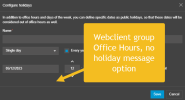
I agree we need the option to play a holiday message in the group holiday settings, same as it is in the global office hours holiday settings. The new group routing feature is awesome but the missing holiday message makes group routing not usable for my clients.

1683921059754.png

1683921076291.png
 
Status
Not open for further replies.

Latest Posts

Forum statistics

Threads
111,973
Messages
590,074
Members
164,893
Latest member
jbergeon