GXW-4008 V1.3A

Status
Not open for further replies.

marcob

Joined
Mar 29, 2009
Messages
6
Reaction score
0
I just buy a grandstream to connect 7 analog devices to 3cx software.
But when i get it registerred i can't use the phones.
I can see all the ports in PSTN devices and in the ports/trunk status all are green.
But i can't call with it like a call from a 3cx software phone (nr 100) to the analog device connected to the grandstream.
I looked but there is no place where i can find a sample.
Only looked at videos from Patton but it is different as my grandstream.
And i extra did buy a grandstream because they are mentioned at the 3cx site.

Can someone help me out with sample or screen shots how to solve this.

My pc is windows mediacenter
linksys wireless modem router 192.168.2.1
grandstream 192.168.1.103
pc 192.168.1.104 connected to the grandstream 4008 and then to the linksys

3 CX recent software downloaded this week 29-03-2009
Product Model: GXW-4008 V1.3A
Software Version: Program-- 1.0.1.21 Bootloader-- 1.0.0.9 Core-- 1.0.0.25 Base-- 1.0.0.76

thanks
Marco
 
HI Marco,

Please provide more details for your settings. What type of device for that 8 ports GWX4008 connected to? PSTN line or analogy phone set?
 
Hi Ricky,

I have analog phones connected to the grandstream device.
This is now a test but i want to use it for 7 hotel rooms with analog phones and no network cable.
 

Attachments

  • sample.JPG
    sample.JPG
    48.9 KB · Views: 2,270
Hi

Please set this up first without the wireless connection, and connecting the Grandstream to the network using a network cable to the 3CX machine.

Ensure that you set up the Grandstream FXS as per the instructions on https://www.3cx.com/voip-gateways/

Once this is set up and working, then you can try using the wireless option. This will ensure that the system id working well before introducing a factor which can cause some issues (the wireless).

regards
 
Last edited by a moderator:
Hi Alex,

It is not wireless connected.
The computer is cabled to the grandstream and the grandstream is cabled to the linksys.
The setup you mention i followed.(https://www.3cx.com/voip-gateways/Grands ... W4024.html)
)And i get 7 green lights in the trunk. But then i do not know how to go on
How do i use the analog phones. I can't call from a softphone to the analog phone.
Thanks

rgrds
Marco
 
Last edited by a moderator:
Hi ,

I placed a zip file with jpg files of my settings from the grandstream and the 3cx software.
Please download it from http://www.wilhelmina-kerkrade.nl/gs/settings.zip
It was to big to upload it.
If anyone can check what i do wrong then i post the working setting after this so it can help people to setup same configuration.
 
Remove the wrong GXW4008 setting at 3CX BOX. The 8 FXS port at GXW4008 should be setup as 8 extensions at 3CX box.
 
Hallo Ricky,

Do you mean in the management console i should make 8 phones?
Thanks
 
Yes. You should create 8 extension for GXW4008. The steps are same as you create a extension for your softphone.

You should refer to this URL
https://www.3cx.com/voip-gateways/
to config your GXW4008
 
Last edited by a moderator:
Exactly

This is an FXS gateway not an FXO

FXS => Analogue phones -> Extensions in 3CX
FXO => ANALOGUE LINES => Gateway in 3CX management console PSTN section.

So you have to create 8 extensions
Then add the extensions in the 4008

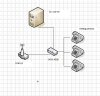
Attached is a Screenshot

All you have to do is register to the PBX in profile 1

Then go to FXS ports and add the extensions you created - in your case 8 and point them to profile 1

In 2 minutes you should have this working. Works out of the box. If you have a problem let me know. We support this.
 

Attachments

  • 4004FXS.jpg
    4004FXS.jpg
    57.8 KB · Views: 2,075
Thanks all it works almost.
I can use an analog phone and call a software phone and all analog lines are registered.
Only if i call the analog phone it does not "ring"
But if i pick up the horn i have connection.
Any idea ?
Also there is much delay. But that can be pc related i think. However it is only running 3cx.

Thanks
 
Check the ringer on the analog phone then if it doesnt ring , ringer volume or something - start from there.
 
Status
Not open for further replies.

Latest Posts

Forum statistics

Threads
111,885
Messages
589,545
Members
164,744
Latest member
johnblackwood1