- Joined
- Oct 27, 2020
- Messages
- 15
- Reaction score
- 2
Hello,
I have a website on AWS Lightsail (wordpress) and 3CX installed another AWS instance for 3cx. I also downloaded wordpress plugin and set my Click2Talk in the settings. but chat icon is not working and console shows me error.
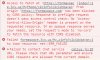
1. Access to fetch at 'https://formaspace.3cx.us/MyPhone/c2cinfo?c2cid=bayan' from origin 'https://formaspacecontract.com' has been blocked by CORS policy: Response to preflight request doesn't pass access control check: No 'Access-Control-Allow-Origin' header is present on the requested resource. If an opaque response serves your needs, set the request's mode to 'no-cors' to fetch the resource with CORS disabled.
2. callus.js?ver=9.1.0:29 GET https://formaspace.3cx.us/MyPhone/c2cinfo?c2cid=bayan net::ERR_FAILED
3. callus.js?ver=9.1.0:29 Failed to contact chat service URL. Please check chat URL parameter and ensure CORS requests are allowed from current domain.
Before i had similar problem with another plugin and I fixed CORS problem to add Header set Access-Control-Allow-Origin "*" into apache bitnami.conf file. but i have no idea for 3cx. Is there any same problem as mine?. I double checked all my urls and read carefully STEP 4. everything is correct but still having problem.
Please help me to fix it. url: https://formaspacecontract.com/
Thank you
I have a website on AWS Lightsail (wordpress) and 3CX installed another AWS instance for 3cx. I also downloaded wordpress plugin and set my Click2Talk in the settings. but chat icon is not working and console shows me error.
1. Access to fetch at 'https://formaspace.3cx.us/MyPhone/c2cinfo?c2cid=bayan' from origin 'https://formaspacecontract.com' has been blocked by CORS policy: Response to preflight request doesn't pass access control check: No 'Access-Control-Allow-Origin' header is present on the requested resource. If an opaque response serves your needs, set the request's mode to 'no-cors' to fetch the resource with CORS disabled.
2. callus.js?ver=9.1.0:29 GET https://formaspace.3cx.us/MyPhone/c2cinfo?c2cid=bayan net::ERR_FAILED
3. callus.js?ver=9.1.0:29 Failed to contact chat service URL. Please check chat URL parameter and ensure CORS requests are allowed from current domain.
Before i had similar problem with another plugin and I fixed CORS problem to add Header set Access-Control-Allow-Origin "*" into apache bitnami.conf file. but i have no idea for 3cx. Is there any same problem as mine?. I double checked all my urls and read carefully STEP 4. everything is correct but still having problem.
Please help me to fix it. url: https://formaspacecontract.com/
Thank you