I have followed the guide and the test is successful. I don't know what the next steps are to be able to click 2 dial from the zoho and record incoming and outgoing calls.
Please note that the Click2Call is installed on your browser and allows you to just click a number from your CRM and make the call from the 3CX Desktop App or Web Client.
That I found late yesterday. Thank you for the response. Any way to have the call made from a desk phone when using Click2Call?
Also, I see CRM contacts in 3CX contacts after a call is placed or received. The pop-ups are not working. I did disable the pop-up blocker. Maybe it is a number match issue.
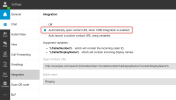
If you see the caller's name, and the contact card icon, then you should check the Web Client > Settings > Integration options. You should select "Automatically open contact URL when CRM integration is enabled".