Help setting up in WIX

Status
Not open for further replies.

JLSeagull

Forum User
Joined
Jan 1, 2020
Messages
84
Reaction score
21
I've followed the steps of the Code Generator, but the code is not working in my Wix website and they told me that can't give support third party code.

How can I get the Live Chat Code in HTML?

See the reply from the WIX Support:

"
Hi!
Thanks for waiting while our team investigated your case.

We checked the problem video. I see that you are trying to add third party code to the Corvid code panel. Note that Corvid only supports JavaScript with the limitations described here (https://support.wix.com/en/article/corvid-javascript-support). In addition, we are unable to provide support for third party codes that were not created or tested by Wix.

However, if we understand correctly, you want to embed a third-party chat application on your Wix site. We recommend incorporating it using an iFrame. Click here (https://support.wix.com/en/article/wix-editor-using-iframes-to-display-visible-content-on-your-site) to learn how.

We hope this answer has been helpful.
Feel free to return to us when necessary.

Regards,
Wix.com"
 
Last edited:
  • Like
Reactions: NEIL DEVONPORT
Hi @JLSeagull,

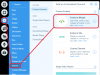
You need to add the HTML snippet produced by the Code Generator into a Custom HTML Widget in Wix.

1608379225420.png

It is important that in the 3CX Management Console you whitelist the correct domain.

If https://yoursitename.wixsite.com does not work,
try adding: https://yoursitename-wixsite-com.filesusr.com
 
  • Like
Reactions: DavidM84
Hi, @agp ! Thank you very much for your prompt reply. I've followed this step previously, but the result is not working (see attached picture). I suspect that in fact I'm not using a HTML code, because at 3CX Code Generator I can only download the file callus.js. I've edited it in a text editor, copied and pasted it into a Custom HTML Widget in Wix, but it is not working. Even using the file callus.js code into Wix Corvid I can't get the Live Chat working.

Another point: I can't whitelist URL in 3CX Management Console so I added the website's IP.
 

Attachments

  • callus.js Wix HTML widget.JPG
    callus.js Wix HTML widget.JPG
    19.8 KB · Views: 29
Last edited:
OK....I got the HTML code (see the attached picture), bur nothing is happing. I didn't get any error, the Live Chat is not displayed on the website.
 

Attachments

  • callus.js 3CX live chat snippet.JPG
    callus.js 3CX live chat snippet.JPG
    19.4 KB · Views: 25
Did you upload the callus.js file on a publicly accessible server? As far as I am aware Wix won't let you upload JS files (and you can certainly not embed the code). So you need to upload it on another server(or a bucket) and point to it.
 
  • Like
Reactions: JLSeagull
No, @agp ! I didn't upload the callus.js file on a publicly accessible server. I've created a .js file in Wix Corvid and pasted the callus.js file's code into it. After I renamed the new .js file as "callus.js".
 
From what I can see the WIX JS editor is outputting errors so another option (far from ideal) it to copy the code of the callus.js file (as you did initially) into the HTML widget area wrapped in <script></script> tag and then below it add the HTML code produced by the Generator. Just make sure you remove the script tag at the end.

Code:
<script src="XXX"
     id="tcx-callus-js"
    ></script>

The browser might freeze for a few moments and then it will be OK.

So the final result would be similar to this:

HTML:
<script>
CODE FROM callus.js file
</script>
<call-us
 style="position: fixed; right: 20px; bottom: 20px;
         font-family: Arial;
          z-index: 99999;
         --call-us-form-header-background:#373737;
         --call-us-main-button-background:#0596d4;
         --call-us-client-text-color:#d4d4d4;
         --call-us-agent-text-color:#eeeeee;
         --call-us-form-height:330px;" id="wp-live-chat-by-3CX"
     channel-url="https://XXXXX.com:5001"
     files-url="https://XXXXX.com:5001"
     minimized="true"
     animation-style="none"
     party="XXXXX"
     minimized-style="BubbleRight"
     allow-call="true"
     allow-video="false"
     allow-soundnotifications="true"
     enable-onmobile="true"
     enable="true"
     popout="false"
     ignore-queueownership="false"
     enable-poweredby="true"
     authentication="both"
     show-typing-indicator="true"
     operator-name="Support"
     show-operator-actual-name="true"
     channel="phone"
     aknowledge-received="true"
     gdpr-enabled="false"
     gdpr-message="" message-userinfo-format="both"
     message-dateformat="both"
     start-chat-button-text="Chat"
     window-title="Live Chat & Talk"
     invite-message="Hello! How can we help you today?"
     authentication-message="Could we have your name and email?"
     unavailable-message="We are away, leave us a message!"
     offline-finish-message="We received your message and we'll contact you soon."
     ending-message="Your session is over. Please feel free to contact us again!"
     first-response-message="" greeting-visibility="none"
     greeting-message="Hey, we're here to help!"
     greeting-offline-visibility="none"
     greeting-offline-message="Hey, we're here to help!"
    > </call-us>

I need to repeat though that this is not an ideal way to implement it. The best way is to just host/upload it somewhere and point to that file as initially instructed.
 
OK, @agp ! I am studying host the callus.js in an AWS Instance. Anyway i will test your suggestion. I am aware it is not ideal.

Thank you for your attention and Merry Christmas!!!
 
You're welcome, Happy Holidays and stay safe :)
 
  • Like
Reactions: JLSeagull
Hi guys! I hope you are safe!

I keep trying put my Live Chat in action, but until the moment without success. What I did:


1.I've uploaded the callus.js file to my AWS EC2 instance (where is hosted my 3CX PBX) in /var/lib/3cxpbx/Data/Http/wwwroot/livechat (I am able to see the code connecting the URL "https://myfqdn.my3cx.com.br:5001/livechat/callus.js";
2.I gave the folder livechat and all files and folders within the livechat folder all permissions.
3.I've changed the owner and group of the callus.js file within the livechat folder to phonesystem.
4. In my website I embeded a Widget and copied into it the generated Live Chat code snippet.
=========================================
This is my Live Chat code snippet:
=========================================
<call-us
style="position: fixed; right: 20px; bottom: 20px;

font-family: Arial;
z-index: 99999;
--call-us-form-header-background:#373737;
--call-us-main-button-background:#0596d4;
--call-us-client-text-color:#d4d4d4;
--call-us-agent-text-color:#eeeeee;
--call-us-form-height:330px;" id="wp-live-chat-by-3CX"
channel-url="https://myfqdn.my3cx.com.br:5001"
files-url="https://myfqdn.my3cx.com.br:5001"
minimized="true"
animation-style="none"
party="vaxxinvmc"
minimized-style="BubbleRight"
allow-call="false"
allow-video="false"
allow-soundnotifications="true"
enable-onmobile="true"
enable="true"
popout="true"
ignore-queueownership="false"
enable-poweredby="true"
authentication="both"
show-typing-indicator="true"
operator-name="Support"
show-operator-actual-name="true"
channel="phone"
aknowledge-received="true"
gdpr-enabled="false"
gdpr-message="" message-userinfo-format="both"
message-dateformat="both"
start-chat-button-text="Chat"
window-title="Live Chat & Talk"
invite-message="Hello! How can we help you today?"
authentication-message="Could we have your name and email?"
unavailable-message="We are away, leave us a message!"
offline-finish-message="We received your message and we'll contact you soon."
ending-message="Your session is over. Please feel free to contact us again!"
first-response-message="" greeting-visibility="none"
greeting-message="" greeting-offline-visibility="none"
greeting-offline-message=""> </call-us>


<script src="https://myfqdn.my3cx.com.br:5001/livechat/callus.js"
id="tcx-callus-js"
></script>
==================================================================

But all I got is the displayed in the attached picture. When I move the mouse over the chat, the forbidden sign appears.

I appreciate any help!
 

Attachments

  • IMG_20201229_110836105.jpg
    IMG_20201229_110836105.jpg
    1.5 MB · Views: 21
Hi @JLSeagull,

It seems that you haven't whitelisted your domain in your PBX. When you open the Developer Tools (press F12 in the browser) what error do you see?
 
  • Like
Reactions: JLSeagull
As a web developer I'll just say this: don't use platforms like Wix or Squarespace if you plan on doing integrations.

Those are literally the worst platforms to ever exists. Just build a WordPress for crying out loud. I see so many posts about those.
 
  • Like
Reactions: JLSeagull
Hi @JLSeagull,

It seems that you haven't whitelisted your domain in your PBX. When you open the Developer Tools (press F12 in the browser) what error do you see?

Hello @agp !

I can see 3 errors:

1. Access to fetch at 'https://myfqdn.my3cx.com.br:5001/MyPhone/c2cinfo?c2cid=vaxxinvmc' from origin 'https://www-*******-com-br.filesusr.com' has been blocked by CORS policy: Response to preflight request doesn't pass access control check: No 'Access-Control-Allow-Origin' header is present on the requested resource. If an opaque response serves your needs, set the request's mode to 'no-cors' to fetch the resource with CORS disabled.
2. Failed to load resource: https://myfqdn.my3cx.com.br:5001/MyPhone/c2cinfo?c2cid=vaxxinvmc net::ERR_FAILED
3. Failed to contact chat service URL. Please check chat URL https://myfqdn.my3cx.com.br:5001/livechat/callus.js parameter and ensure CORS requests are allowed from current domain.
 
All good.

Just whitelist in your PBX the URL https://www-************-com-br.filesusr.com and everything should work :) (replace *** with the one shown in the error)

What version is your PBX by the way?
 
  • Like
Reactions: Evolute IT
As a web developer I'll just say this: don't use platforms like Wix or Squarespace if you plan on doing integrations.

Those are literally the worst platforms to ever exists. Just build a WordPress for crying out loud. I see so many posts about those.
I just realized it! :-(
 
  • Like
Reactions: Evolute IT
I just realized it! :-(
If you just began the website, switch to WP right now.

If you need help, we do web development here so, let me know.
 
  • Like
Reactions: JLSeagull
All good.

Just whitelist in your PBX the URL https://www-************-com-br.filesusr.com and everything should work :) (replace *** with the one shown in the error)

What version is your PBX by the way?
My PBX version number is 16.0.1078.

As far as I know I can only whitelist IP addresses (not URL). Am I right?
 
My PBX version number is 16.0.1078.

As far as I know I can only whitelist IP addresses (not URL). Am I right?
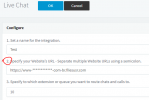
You whitelist in the Messaging section, under Live Chat. Not in the IP Blacklist.
 
As @Frederick Marcoux correctly said, it is under the Messaging tab where you initially created the Live Chat URL. Edit the item and specify the URL in the second step.

1609255676166.png
 
Status
Not open for further replies.

Forum statistics

Threads
112,149
Messages
590,965
Members
165,170
Latest member
SupportRock