Holiday date-times only work before the date-time

Status
Not open for further replies.

CiraConnect

Silver Partner
Advanced Certified
Joined
Mar 22, 2019
Messages
33
Reaction score
7
I have noticed an issue the last several builds, unless this is by design for some reason?
If you set a holiday date/time ahead of time (like setting a holiday for tomorrow and Friday), the timer works fine and my trunks/extensions honor the date/time.
However, if you set a date/time on the current day (like say a department tells you 'the day of' about a meeting), my trunks/extensions do not honor it.
I have to manually put them in DND mode and back to Available.

We had this happen in the past as well, but if you made any manually changes, it would kind of kick start the extension, and it would at least honor the date/time
after the initial manual change. However, now it just ignores the entry all together if you add one on the same/current day.

Anyone else experiencing this? Is this by design, and if so, why?
 
Hi,

The intended behavior is that the holiday/schedule needs to be triggered. Examples:

1) If you set something to start before the current time (ie it starts in the past), the tigger will not occur hence it will not work. This is because you are setting today to be a holiday, and today has already begun. You missed the trigger in this case because it is in the past.

2) If you want to set it for the current day, then set it to start for let's say 5 minutes from now, and to run until 23:59. In 5 mins, the holiday time will be triggered, and the extensions will switch as expected.

Same thing goes if you delete a holiday, while you are in it. You will have to wait until the next opening hours for the extensions to switch again.
 
I do understand you can't set something in the past. That makes total sense. That is not what is occurring.
I have done #2 and it does not honor the 'time' trigger.

If it is 8am in the morning, and they tell me about a meeting at 2-3pm, I set the holiday for 2-3pm that day (today in a sense). Yet at 2pm, the extensions do not honor that holiday setting.
It seems the only trigger that does work is the 'day' trigger, meaning only if you set a holiday before the day of the holiday. The 'time' trigger does not work if you set it on the same day, like you are suggesting in #2.
 
Please provide some additional info:

  1. What version is your PBX
  2. What OS is it running on
  3. What timezone is set on the dashboard
  4. What timezone is set on the OS
 
Version = 16.0.6.655
OS = PBX Express on Azure {Linux (debian 9.13)}
TZ dashboard = CST
TZ OS = CST
 
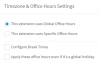
The extensions in question need to have their Forwarding settings to "Auto Switching enabled", and they must look exactly like this for all the below options:
1606821003241.png

Otherwise they may ignore the holiday and not switch to DND automatically when expected.
 
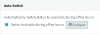
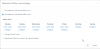
I do have all that set, except we are using "This extensions uses Specific Office Hours", not "Global Office Hours". We have extensions that need different hours than the Global. This should still work exactly the same though, and it is not.
1606832129192.png
1606832141198.png

Keep in mind, the holiday timing works just fine if it is set at least a day ahead.
It only fails if set on the same day as the current day, even if it is set minutes ahead.
 
Just out of curiosity, how do you verify whether any given extension has switched to DND when you set a same day holiday?
 
We know right away, because the calls aren't routed away from the call center like they're supposed to be (via the DND / AWAY rules). The calls are still using the Available rule.
Plus if you look at the status of the extension at the time, it shows "available".
 
And will the Global Hours extensions honor it, while the Specific Hours extensions ignore it?

Or are you saying they ALL consistently ignore it when done same day?
 
This is an easy thing to test on your end.

*) Create an extension with custom/specific hours.
*) Have the available and DND rules do two different things.
*) Set a holiday for the same/current day, maybe 5-10 minutes before.
-) The extension won't change to DND when the holiday time is reached.

This has been happening for several builds now, including a brand new server just recently built.
 
And will the Global Hours extensions honor it, while the Specific Hours extensions ignore it?

Or are you saying they ALL consistently ignore it when done same day?

I have not tested using the global hours, since we cannot use those.
Our extensions must use hours different from the global hours.
I will try to setup a test extension to test global hours.

Both types of hours should still work the exact same way though,
even if global hours happens to work.
 
I replicated this just earlier before typing message #8 just to be sure, so it seems our two PBXs do not behave the same which is indeed strange. I had all my extensions on global, and one extension on specific hours. I then set a holiday 3 mins into the future, and ending at 4 mins in the future. All extensions switched to DND and then back to Available (including the one extension with specific hours).

Above you mentioned "the calls aren't routed away from the call center like they're supposed to be (via the DND / AWAY rules)".

I would like to better understand how exactly your calls are routed. For Example:

DID 12345 on Trunk A > Goes to IVR 500 during available hours > Option 1 send it to Queue 800
 
DID > goes to EXT > Goes to IVR A during available hours > Goes to Queue
............................... > Goes to IVR B outside available hours

I have two PBX (one PBX Express on Google Cloud, one PBX Express on Azure) doing the same thing.
Both do not honor holiday times, if set on the same/current day.
 
Are the Specific Hours of any extensions regularly edited?

To be more precise, have they been edited on the same day that you had set a holiday to start?

There is a known issue that happens during this specific scenario I just described.
 
No, the extensions have had those hours since day one of their creation.
We have never edited any extensions on the day a holiday is also being created, no.
 
Ok let's try one more thing from earlier, create an extension which follows global hours and lets see how it behaves compared to the other ones that have specific hours.

Remeber to tick autoswitch on of course, but dont define any specific hours for it and lets see during the next test.
 
  • Like
Reactions: Evolute IT
Status
Not open for further replies.

Latest Posts

Forum statistics

Threads
111,990
Messages
590,161
Members
164,926
Latest member
tohoken1