Hot New Features in 3CX Video Conferencing

LeonidasG_3CX

Product Manager
Staff member
Joined
Nov 19, 2008
Messages
2,174
Reaction score
658

New features making meetings even better.​

The latest release of the 3CX Video Conference platform continues to provide a powerful, user-friendly, video conferencing experience. Mobile apps have been revamped allowing organizers and moderators to manage participants more effectively. There’s nothing to do on your side other th...
Continue reading the Original Blog Post.
 
Last edited by a moderator:
Great to see improvements in the Video Conferencing side! I love the icons showing which devices people are using.

Quick question - is Remote Control back, or do you have a timeline for it? We used it extensively and it was an attraction of 3CX over Teams for video calling.
 
  • Like
Reactions: icns01
Great to see improvements in the Video Conferencing side! I love the icons showing which devices people are using.

Quick question - is Remote Control back, or do you have a timeline for it? We used it extensively and it was an attraction of 3CX over Teams for video calling.

We're working on it. I believe we're a couple of weeks away from its re-release
 
We're working on it. I believe we're a couple of weeks away from its re-release
That's fantastic news! Many thanks, both for replying and for all of 3CX's hard work improving!
 
Great, this is really fantastic news. The changes in the video conference. Very good 3CX. However, I have a question. It was once announced on the roadmap to use 3 CX video conferences on prem. What's the status there?
It is in our roadmap.
 
Great improvements. Well done team.

Btw: Any possibility to get still image captures while in the meeting? This is a very important feature for VKYC solutions.
 
  • Like
Reactions: N_G
We're working on it. I believe we're a couple of weeks away from its re-release
This is great to hear. Can you provide information on how it works? We would love to see the ability for the person presenting to have a clear button allowing them to share remote control with named attendees, then the quick easy ability to remove remote control.

Also for the Host role to be able to ask for remote control of a remote user sharing their screen.
 
  • Like
Reactions: icns01
Back on June 16th you said it was weeks away and now it's been 6 months. What's the deal, it's still not in v20.
 
Back on June 16th you said it was weeks away and now it's been 6 months. What's the deal, it's still not in v20.
Remote control? Per another thread today, it's back and several have confirmed it.
 
  • Like
Reactions: icns01
  • Like
Reactions: icns01
Back on June 16th you said it was weeks away and now it's been 6 months. What's the deal, it's still not in v20.

Hi,

Remote control has been silently released for a few weeks now and can be used. An official post regarding it's release will be made in early 2024.

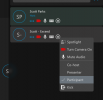
Same usage as before. Have organizer rights, click on someone and ask to remote control them.
 
Back on June 16th you said it was weeks away and now it's been 6 months. What's the deal, it's still not in v20.

I can confirm this is available.

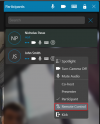
While in a meeting click the "More" button and select "Remote Control"

1703059948467.png

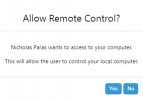
The participant will see a prompt asking for permission from the host of the meeting for remote control

1703059998814.png

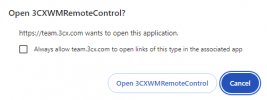
The person to be controlled will then need to install a small plugin to allow this functionality.

1703060054444.png

Once it is installed the participant will need to confirm the remote control session. So there is always control from the participant of what is happening on their computer. A meeting host cannot just hijack the participant's computer

1703060145813.png

A final confirmation will be required on first attempt

1703060182619.png

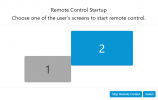
Multiple screens are no issue for us. The host can just select which of the 2 screens to control

1703060235628.png

The person being controlled will always be in control and can stop the connection at any time with the "Close Remote Session " button!

1703060321675.png
 
Thanks for replying with detailed screenshots. Does the other person we're trying to contact have to be on PC or MacOS works too? Because I don't see it.

Screenshot 2023-12-28 at 11.08.24 PM.png
 
It only works for Windows computers
 
  • Like
Reactions: icns01
Ok, thank you for confirming. Any chance it might be on the roadmap to be cross OS compatible? More and more users are getting apple devices. I know most of my clients are.
 

Latest Posts

Forum statistics

Threads
111,973
Messages
590,075
Members
164,895
Latest member
jasonkkrause