





New features making meetings even better.
The latest release of the 3CX Video Conference platform continues to provide a powerful, user-friendly, video conferencing experience. Mobile apps have been revamped allowing organizers and moderators to manage participants more effectively. There’s nothing to do on your side other than enjoy the new features of Version 14.7. All updates are done automatically! Here’s what you can expect.
Managing your Video Conference Users through the Mobile Apps
If you’re an Organizer or Moderator using the mobile apps, you can now fully manage other users through the user management panel inside the app. The UI has also been modernized with most Web app user management features - including locking audio/video/chat for the entire audience and assigning various roles and permissions to your participants - now included in the mobile app too.
Chromecasting/Screen Mirroring Available for Android Users
In our latest update, we’ve made the Chromecasting/Screen Mirroring feature easily accessible from within our Video Conferencing Android mobile app. You can access this feature easily by simply clicking the Chromecast button located in the side-menu. Although casting directly from within the app isn’t yet supported, we’ve found a great work around! By clicking the Chromecast button, you’ll be redirected to perform the necessary casting operations. It’s 3 very simple steps:
- Open the app and access the side menu
- Select the target device
- Confirm the casting and start screen mirroring
The major benefit of this feature? You can now utilize your mobile device as a complete conference hardware setup - including speakers, microphone, and camera device. Gone is the need for additional equipment making meeting setup easy and collaboration effortless. Start enjoying the benefits of sharing your mobile device's screen on a larger display and create a more engaging meeting environment.
‘Push to Talk’ for Better Audio Management
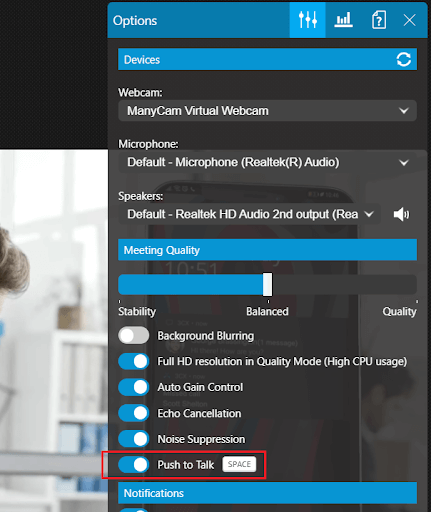
If you’re a web app user, there’s some good improvements to look out for. First, there’s a burger menu on each video frame. If you’re the organizer - or a user with special permissions - this means you’re able to manage other users.
In addition to the burger menu, there’s a new Push to Talk feature giving you much more control over background audio during your meeting. It’s a feature you’ll love if you or others are in a noisy setting - or if there’s an echo because you’re too close to other conference participants - as it mutes the background noise until the spacebar button is pressed to speak. You can enable it from within the settings area.
Better User Differentiation and Visibility Across Devices
We know how important it is for you to be able to identify users joining your meeting via landline or through our mobile app. In this update we’ve implemented clear, visual indicators to distinguish them from regular PC users giving you better visibility and differentiation as people join your meeting from various devices.
How does this work in practice? When participants join the meeting using a landline or dial-in method, they’ll be represented by a distinctive phone handset icon next to their name. This visual cue allows everyone to quickly identify those joining from a phone line.
If you’re joining from our mobile app you’ll see a mobile phone device icon next to your name. Not only does this visual indicator set you apart from PC users, it also identifies you as using the mobile app.
Tell Us What You Think!
Join us in the 3CX Community Forum to tell us what you think about the latest features! Hit the follow button on Twitter and LinkedIn for blog updates.









 Copyright © 2026