How the hell do I restore?

Status
Not open for further replies.

orange2

Bronze Partner
Basic Certified
Joined
May 16, 2014
Messages
152
Reaction score
10
My backup has an FQDN which is no longer available (.3cx.co.uk) so when I released the old FQDN and set up a new matching instance to restore to, I get an error as the FQDN's don't match. Anyone know how I get round this? I HAVE to get it back up asap as it our main phone number.
 
BTW the new uk fqdn is subdomain.MY3cx.co.uk - hence the issue
 
Why did you released the FQDN, now you have to use the new one...
 
And the backup is from a newer version than the ISO installs so I have to go through the steps of creating a 'dummy' instance to be able to upgrade it to the same version that my backup is in
 
Why did you released the FQDN, now you have to use the new one...
Because I couldn't create a dummy instance with that FQDN without doing so, or so it seemed.
 
Where did you get ure ISO before? The way is the same with every ISO. Install with any FQDN and Data, update to 7a and use ure backup to restore to your FQDN and data.
 
Where did you get ure ISO before? The way is the same with every ISO. Install with any FQDN and Data, update to 7a and use ure backup to restore to your FQDN and data.
From the link on the Installing 3CX page. The one I linked to is newer than that - update 7a
 
From the link on the Installing 3CX page. The one I linked to is newer than that - update 7a
The ISO uses a repo so unless you had a very old version of the ISO, it would always install the latest [official] version.
 
  • Like
Reactions: bitn2
I fear you are wrong. I downloaded the 'official' ISO last night at 8pm and it was older than my 7a backup
 

Attachments

  • Screenshot 2023-05-24 at 13.43.53.png
    Screenshot 2023-05-24 at 13.43.53.png
    61.8 KB · Views: 8
I fear you are wrong. I downloaded the 'official' ISO last night at 8pm and it was older than my 7a backup
Update 7a is not official yet.

Update 7 is.

That's why.

When using the ISO, you have the option to install a beta release. By doing that it would've installed U7a directly.
 
The ISO uses a repo so unless you had a very old version of the ISO, it would always install the latest [official] version.
The iso linked there is different and likely points to the test/beta repos in the install script that runs post debian install
 
Update 7a is not official yet.

Update 7 is.

That's why.

When using the ISO, you have the option to install a beta release. By doing that it would've installed U7a directly.
I wasn't offered that option. But it's sorted now.
 
  • Like
Reactions: Evolute IT
The iso linked there is different and likely points to the test/beta repos in the install script that runs post debian install
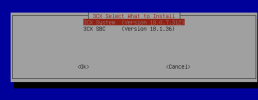
Same ISO for both. It asks "PBX, SBC, or Beta PBX" during postinstall.

I do it all the time. Just gotta use the latest ISO and that's usually found in the Customer Portal.
 
Last edited:
  • Like
Reactions: Evolute IT
Same ISO for both. It asks "PBX, SBC, or Beta PBX" during postinstall.

I do it all the time. Just gotta use the latest ISO and that's usually found in the Customer Portal.
Not from the standard download ISO it doesn't. Any ideas why you and I are seeing something different?
 

Attachments

  • Screenshot 2023-05-24 at 15.31.10.png
    Screenshot 2023-05-24 at 15.31.10.png
    34.5 KB · Views: 7
Not from the standard download ISO it doesn't. Any ideas why you and I are seeing something different?
No clue. Maybe the ISO only sees betas and not alphas? @JohnS_3CX care to pitch in?
 
What @orange2 sees is indeed correct.

When downloaded from the portal our ISO is presenting the latest official release
This needs to be installed first before you can upgrade to the alpha, and then the beta (18.0.7.441)

However, the ISO linked in this blog post was a special build which gets you the alpha (and as of now the beta 18.0.7.441)
https://www.3cx.com/blog/releases/v18u7a-alpha-security-update/

Hope this clears up any confusion.
 
What @orange2 sees is indeed correct.

When downloaded from the portal our ISO is presenting the latest official release
This needs to be installed first before you can upgrade to the alpha, and then the beta (18.0.7.441)

However, the ISO linked in this blog post was a special build which gets you the alpha (and as of now the beta 18.0.7.441)
https://www.3cx.com/blog/releases/v18u7a-alpha-security-update/

Hope this clears up any confusion.
Ohh so the latest ISO doesn't allow to directly install betas anymore? They used to appear whenever one was available.
 
What @orange2 sees is indeed correct.

When downloaded from the portal our ISO is presenting the latest official release
This needs to be installed first before you can upgrade to the alpha, and then the beta (18.0.7.441)

However, the ISO linked in this blog post was a special build which gets you the alpha (and as of now the beta 18.0.7.441)
https://www.3cx.com/blog/releases/v18u7a-alpha-security-update/

Hope this clears up any confusion.
Can you provide the 'approved' method to handle this in future please? I got into a terrible mess with FQDNs etc not matching. The final VM is I think the 6th attempt!
 
  • Like
Reactions: Evolute IT
Status
Not open for further replies.

Forum statistics

Threads
111,974
Messages
590,081
Members
164,899
Latest member
mazet