How to get the authorize code in the CRM template generator

Status
Not open for further replies.

greychain

Gold Partner
Advanced Certified
Joined
Jul 13, 2018
Messages
779
Reaction score
122
I have 3CX getting the refresh_token when I click on Authorize but if I try to test the integration I am getting an intermediary login web page which cant be parsed.
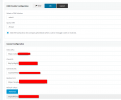
1696516494463.png
The following HTML is the odoo login webpage
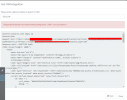
1696517277240.png

I notice there are hidden input for the authorize


<input type="hidden" name="redirect" value="/restapi/1.0/common/oauth2/authorize?client_id=BbjOyNBIgfEj9n8wxxxxxxxxxxxx&amp;redirect_uri=https://3cxpbxxxxxxxxx:5001/api/oauth2crm&amp;response_type=code"/>


How do I store and use the refresh_token
 

Attachments

  • 1696516617026.png
    1696516617026.png
    62.8 KB · Views: 10
Most probably you're not following the correct OAuth2 flow. This is how the integration should work:
1) When you click "Authorize" in the 3CX console, 3CX will launch the authorization endpoint in a new browser tab. This is a page provided by your CRM, where you login, grant access to the app, and then you're redirected back to 3CX.
2) When you're redirected back to 3CX (once you granted access from your CRM), 3CX will receive an "authorization code".
3) Then 3CX will invoke the token endpoint from your CRM REST API to get a refresh token using this authorization code. The CRM will return a refresh token, which 3CX will store in the configuration. Up to this point, it seems you're OK, as 3CX seems to have this refresh toke, right?
4) Next, when you will run a test, or 3CX needs to perform an API call against the CRM, 3CX needs to get an access token. To get this access token, 3CX will invoke again the token endpoint from your CRM REST API, passing the refresh token, and the CRM should be getting back an access token. This seems to be wrong in your case, because the CRM is returning HTML instead of the access token.....
5) Once 3CX has the access token, it uses it to authorize every HTTP request sent to your CRM.

In your XML template, you need to check your scenario with Id="Auth", as that's the scenario that will be executed in step 4 above, which is what's failing in your case. Ensure that you're invoking the appropriate endpoint in your CRM REST API.
 
what would be a good template to look at? I have looked at the Hubspot template, which might be the reason it is getting the refresh token
 
Last edited:
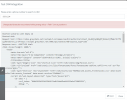
I'm more closely following the hubspot example but am now getting this, it seems to be processing the OauthGetRefreshToken. What does CRM call result is empty mean?


Error occured while accessing CRM. Please check log provided.
Started OAuthGetRefreshToken
Request text: https://odoo.net/restapi/1.0/common/oauth2/access_token
Request form value code set to dQGAWftaOvFWoZpd9E7QUXW4PmQWx0f6
Request form value grant_type set to authorization_code
Request form value client_id set to BbjOyNBIgfEj9n8w2ijfNmKcYhTfRZyy
Request form value client_secret set to wqntkze94XdXRbLwJXp8kykAhA1VZCXn
Request form value redirect_uri set to https://3cx.net:5001/api/oauth2crm
Request form value state set to 4723af11-6474-4995-bc2f-75b9999a7e1f
Response text: {"access_token": "sufwdm42R0xxh1U6vNF4VV0s4cUJ3tI3", "access_token_validity": 1800, "token_type": "Bearer", "refresh_token": "VAphofFkfA1wdz67Imqn0MQcEGS3pC5d"}
Response finished
Variable Result set to VAphofFkfA1wdz67Imqn0MQcEGS3pC5d
Variable refresh_token set to VAphofFkfA1wdz67Imqn0MQcEGS3pC5d
Finished OAuthGetRefreshToken
System.Exception: CRM call result is empty or null
at ManagementConsoleJS.Controllers.OAuth2CrmController.OAuth(String state, CrmProcessorFactoryDelegate crmProcessorFactory, IMemoryCache cache)
 
You're not returning the required outputs in this scenario. Can you post here the XML for this particular scenario only?
 
I noticed in the other different templates some pass headers as variables in different places. How would I find where and when to put these headers

XML:
<Number Prefix="AsIs" MaxLength="[MaxLength]" />
  <Connection MaxConcurrentRequests="2" />
  <Parameters>
    <Parameter Name="host" Type="String" Parent="General Configuration" Editor="String" Title="Odoo URL:" Default="https://odoo.greychain.net" ListValues="https://odoo.greychain.net" />
    <Parameter Name="ClientId" Type="String" Parent="General Configuration" Editor="String" Title="Client ID:" Default="BbjOyNBIgfEj9n8w2ijfNmKcYhTfRZyy" ListValues="BbjOyNBIgfEj9n8w2ijfNmKcYhTfRZyy" />
    <Parameter Name="ClientSecret" Type="String" Parent="General Configuration" Editor="String" Title="Client Secret:" Default="wqntkze94XdXRbLwJXp8kykAhA1VZCXn" ListValues="wqntkze94XdXRbLwJXp8kykAhA1VZCXn" />
    <Parameter Name="redirect_uri" Type="String" Parent="General Configuration" Editor="String" Title="Redirect Uri:" Default="https://3cxpbx.greychain.net:5001/api/oauth2crm" ListValues="https://3cxpbx.greychain.net:5001/api/oauth2crm" />
    <Parameter Name="RefreshToken" Type="OAuth" Parent="General Configuration" Editor="String" Title="Refresh Token:" RequestUrl="https://odoo.greychain.net/restapi/1.0/common/oauth2/authorize" RequestUrlParameters="response_type=code&amp;client_id=[ClientId]&amp;redirect_uri=[RedirectUri]&amp;state=[State]" ResponseScenario="OAuthGetRefreshToken" />
  </Parameters>
  <Authentication Type="Scenario">
    <Value>Auth</Value>
  </Authentication>
  <Scenarios>
    <Scenario Id="Auth" Type="REST">
      <Request SkipIf="" Url="[host]/restapi/1.0/common/oauth2/authorize?client_id=[ClientId]&amp;redirect_uri=[redirect_uri]&amp;response_type=code" MessagePasses="0" RequestContentType="application/x-www-form-urlencoded" RequestEncoding="UrlEncoded" RequestType="Get" ResponseType="Json">
        <PostValues>
          <Value Key="refresh_token" Passes="0" Type="String">[RefreshToken]</Value>
          <Value Key="grant_type" Passes="0" Type="String">refresh_token</Value>
          <Value Key="client_id" Passes="0" Type="String">[ClientId]</Value>
          <Value Key="client_secret" Passes="0" Type="String">[ClientSecret]</Value>
        </PostValues>
      </Request>
      <Rules>
        <Rule Type="Any">access_token</Rule>
      </Rules>
      <Variables>
        <Variable Name="AccessToken" Path="access_token">
          <Filter />
        </Variable>
        <Variable Name="ExpiresIn" Path="expires_in">
          <Filter />
        </Variable>
        <Variable Name="Refresh_Token" Path="refresh_token">
          <Filter />
        </Variable>
      </Variables>
      <Outputs Next="OAuthGetRefreshToken" AllowEmpty="false" />
    </Scenario>
    <Scenario Id="OAuthGetRefreshToken" Type="REST">
      <Request Url="[host]/restapi/1.0/common/oauth2/access_token" MessagePasses="0" RequestContentType="application/x-www-form-urlencoded" RequestEncoding="UrlEncoded" RequestType="Post" ResponseType="Json">
        <PostValues>
          <Value Key="code" Passes="0" Type="String">[code]</Value>
          <Value Key="grant_type" Passes="0" Type="String">authorization_code</Value>
          <Value Key="client_id" Passes="0" Type="String">[ClientId]</Value>
          <Value Key="client_secret" Passes="0" Type="String">[ClientSecret]</Value>
          <Value Key="redirect_uri" Passes="0" Type="String">[RedirectUri]</Value>
          <Value Key="state" Passes="0" Type="String">[state]</Value>
        </PostValues>
      </Request>
      <Rules>
        <Rule Type="Any">refresh_token</Rule>
      </Rules>
      <Variables>
        <Variable Name="Result" Path="refresh_token">
          <Filter />
        </Variable>
      </Variables>
      <Outputs AllowEmpty="false">
        <Output Type="HeaderName" Passes="0" Value="Authorization" />
        <Output Type="HeaderValue" Passes="0" Value="Bearer [AccessToken]" />
        <Output Type="BearerExpiration" Passes="0" Value="[ExpiresIn]" />
      </Outputs>
    </Scenario>
 
Well, you have a mix of issues here.

First, you don't need the redirect_uri parameter, 3CX will automatically generate the [RedirectUri] variable from your current URL. This will not cause any issue, it's just a useless parameter.

Second, in the Auth scenario you're invoking the authorization endpoint. This endpoint is a web page in your CRM where you need to login and grant access. This is for sure why you're seeing the HTML login response instead of getting the token. You need to put your token endpoint URL here.

Third, your OAuthGetRefreshToken scenario is invoking the access token endpoint, and not the refresh token endpoint. I'm just pointing this out, but this might be OK anyway. Some CRMs don't have separate endpoints for refresh and access token, and return both. If this is the case, you should store your refresh token at this point, and configure this same endpoint again for the Auth scenario.

Hope the information helps.
 
  • Like
Reactions: pangel
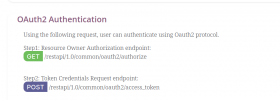
These are the two URL's I have to use:

So I could see how things work I used the hubspot XML and found that I need to manually set the refresh token, is this normal? I have bee able to get the refresh token previously with odoo.

Went back to scratch, used the wizard to create the initial app and I could get the toke, put the token into the crm template generator and it's doing what it should.

Thanks for the help, it still seems a bit vague about what is going on in the background but it works.
1696683111530.png
 
Last edited:
Things are going well , however I am having trouble with sending " in the get url.

I am trying to send this /restapi/1.0/object/res.partner/search?domain="[(phone, '=','012620441')]"

this is how Odoo format it's search function

but am seeing this in the test /restapi/1.0/object/res.partner/search?domain=''

I'm guessing I need to escape some of the characters especially []
 
Last edited:
So much easier to use something prebuilt and supported instead of a random third-party module...
 
Yes but some people prefer a pay once model. Using your system wouldn't solve my problem of learning the CRM integration, do you also have a gateway for Jade?

The support I have received from the supplier has been OK, it's more of a lack of knowledge on my part that is the issue.
 
  • Like
Reactions: Evolute IT
PM with pricing details, does it work multi-tenant?
 
PM with pricing details, does it work multi-tenant?
Once you own it, you can deploy the proxy as many times as you want.

DMing.
 
Things are going well , however I am having trouble with sending " in the get url.

I am trying to send this /restapi/1.0/object/res.partner/search?domain="[(phone, '=','012620441')]"

this is how Odoo format it's search function

but am seeing this in the test /restapi/1.0/object/res.partner/search?domain=''

I'm guessing I need to escape some of the characters especially []
https://www.3cx.com/docs/crm-template-xml-description/#h.2oikrv8ncny6
  • The quotation mark " which needs to be replaced by ^^.
 
Status
Not open for further replies.

Latest Posts

Forum statistics

Threads
112,322
Messages
591,882
Members
165,469
Latest member
footandankle.my3fcx.us