


- Joined
- Nov 8, 2010
- Messages
- 101
- Reaction score
- 28
Having recently gone through the latest Beginner and Advanced training with Nick, I was inspired to take up the challenge of connecting a Yealink SIP-T28P to 3CX. Occasionally, you may have a remote user who needs to connect to your 3CX PBX but don't have a case for running an SBC. The problem with attempting to just install the phone without a proxy is that the SIP packets will contain the private (192.168.x.x and such) address in the header. 3CX doesn't know how to route across the Internet back to the private address. However, if you can install a firewall such as pfSense (free) and the siproxd package on that system at the remote user's home/network, you can still make it work.
The basic configuration of the old Yealink phones is explained here:
https://www.3cx.com/sip-phones/yealink-t20p-t22p-t26p-t28p/
Essentially, for older or unsupported SIP phones, you need to configure the phone manually on 3CX. Some users have reported being able to pull a template from a "nearby and still supported" Yealink phone model. YMMV. The main points in the above doc are to note that the Register Name is the jumbled/cryptic random string 3CX sets for the user, the User Name is the Extension Number, and the Password is what 3CX assigns to the user.
Then, install the siproxd package on pfSense. Enable it. Most of the default settings shown below should be sufficient for your purposes. However, note that you need to change the RTP Port Range (Lower) and RTP Port Range (Upper) to 9000 and 10999 to match 3CX audio ports!
View attachment 1723816169402.png
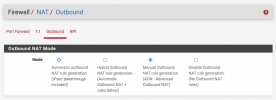
Make sure that your pfSense is set to use Manual Outbound NAT:
Go to your IP phone and add the account settings from 3CX. Set your Display Name and other settings to suit you.
Look for the section on Outbound Proxy and enter the IP of your firewall. Be sure the port matches the siproxd port. Enable the Outbound Proxy.

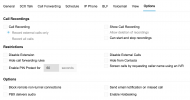
After you have configured and saved everything, your phone still may not work. Why? Remember that little mention in training about security and blocking remote connections? Yep. That's it. Go to your User, Options, and look for "Block remote non-tunnel connections" and uncheck that. Save. Your phone should now be registered.
Of course, if you find that you have a growing number of users, installing a dedicated solution will be easier to support long term. Hopefully this helps someone.
The basic configuration of the old Yealink phones is explained here:
https://www.3cx.com/sip-phones/yealink-t20p-t22p-t26p-t28p/
Essentially, for older or unsupported SIP phones, you need to configure the phone manually on 3CX. Some users have reported being able to pull a template from a "nearby and still supported" Yealink phone model. YMMV. The main points in the above doc are to note that the Register Name is the jumbled/cryptic random string 3CX sets for the user, the User Name is the Extension Number, and the Password is what 3CX assigns to the user.
Then, install the siproxd package on pfSense. Enable it. Most of the default settings shown below should be sufficient for your purposes. However, note that you need to change the RTP Port Range (Lower) and RTP Port Range (Upper) to 9000 and 10999 to match 3CX audio ports!
View attachment 1723816169402.png
Make sure that your pfSense is set to use Manual Outbound NAT:
Go to your IP phone and add the account settings from 3CX. Set your Display Name and other settings to suit you.
Look for the section on Outbound Proxy and enter the IP of your firewall. Be sure the port matches the siproxd port. Enable the Outbound Proxy.
After you have configured and saved everything, your phone still may not work. Why? Remember that little mention in training about security and blocking remote connections? Yep. That's it. Go to your User, Options, and look for "Block remote non-tunnel connections" and uncheck that. Save. Your phone should now be registered.
Of course, if you find that you have a growing number of users, installing a dedicated solution will be easier to support long term. Hopefully this helps someone.
Last edited:


