How to set default values in a template file

Status
Not open for further replies.

JMG

Forum User
Joined
Feb 6, 2020
Messages
36
Reaction score
3
Hello,

I don't know a lot about these IP Phones, but I would like to set a default ringtone, a default background (wallpaper) as well as a default screensaver time of 1 min instead of 30 sec in a template file for a Yealink T46S.

I have been reading tons of sites and forums about those config, however I couldn't achieve it.

I have tried these commands :

screensaver.wait_time = 60
phone_setting.backgrounds = Resource: pictures(01).png

But it had no effect on the phone.

Thank you in advance for your help.

Marc
 
Hi @JMG

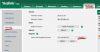
I think you are going about it the hard way, we already allow you to auto provision these things by default. Here is a screenshot of my T46S default provisioning page:

14283

The only exception might be the logo which requires Enterprise edition but we do not prevent you from uploading your own image directly to the phones.
 
Hi @JMG

I think you are going about it the hard way, we already allow you to auto provision these things by default. Here is a screenshot of my T46S default provisioning page:

View attachment 14283

The only exception might be the logo which requires Enterprise edition but we do not prevent you from uploading your own image directly to the phones.
The thing is, that even if I parameter as per above screen shot from you, it is not taking this and go back to another default parameter which I do not know where it comes from. And I tried the two ways, parameter on the phone directly and the problem is that the default parameters are set back after a certain amount of time, and via the extension phone provisioning which give no result neither.
That is why we were going on the hardway solution thinking that it might be the template always seting back default parameters.
Thank you for your help.
 
I think in this case you should not be trying to work around it with a custom template, but you need to understand why the phone does not provision in the first place.

If you delete the phone from the extension, then reset it, then assign it automatically from the "Phones" section, can the phone actually provision automatically? Or will it just sit there unprovisioned forever?
 
Hello,
I deleted the phone from the extension, however I can't reset it because the system tells me that the mac address is already used by an existing device ...
I really don't know how to solve this issue.
Could I give someone of your support team a call ?
Thank you for your help.
 
Are your phones using the latest 3CX FW? 66.84.0.95

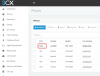
can you see the MAC address in the "Phones" page?

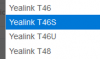
And are you using the correct template?

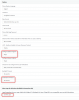
1581504382315.png
 
Last edited:
No our phones are using the 3CX FW 66.84.0.35 but I tried to upgrade it with the 66.84.0.95 directly on the 3CX interface and I had a message which told me that the phone was going to download it from 3CX and then it will reboot but nothing happened.

And I also don't find any other phones with this particular MAC address.
 
I download the latest FM version on the link you just gave me and what am I suppose to do with this file ?
Do I need to place it in a specific place ? my phone doesn't want to update the firmware.
 
If your 3CX is on the same LAN as your phones you can go to the phones tab and press on Phone UI.

it will log you in to the phone GUI.

If not, you will have to use a web browser to go to the IP of the phone http://<IPOFPHONE>

Log in using the credentials admin and password (which you can get from the Phones tab in 3CX.

Go to Settings > Upgrade > Upgrade and browse in the firmware you downloaded.

Once completed do a RESET TO FACTORY and see if 3CX provisions.

1581514466659.png
 
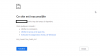
I have this page coming up when I type the phone IP in my browser :

screenshot trouble.png

I can't access the phone GUI.
 
before we go any further can you just fill this out:

specifically the red stuff

  • 3CX Version, e.g. Standard Annual 16.0.2.910
  • Server OS, e.g. Debian 9 / Windows Server 2012 R2 / Raspberry Pi
  • Is the 3CX Server Hosted and where?
  • IP Phone Make/Model/Firmware
  • Provisioning Method: Local / VPN / STUN / SBC
  • Trunk Provider or Gateway Make/Model
  • Has the Firewall Checker passed: YES / NO
  • Are custom Phone Templates being used: YES / NO
 
Hello,
I deleted the phone from the extension, however I can't reset it because the system tells me that the mac address is already used by an existing device ...
I really don't know how to solve this issue.
Could I give someone of your support team a call ?
Thank you for your help.

Hi,

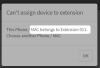
This means you did not actually delete the device from under your Extension > Provisioning tab as you may have thought. The system should tell you where this is provisioned like this example here:
1581519078718.png
I would need to go to extension 011 now, look under provisioning, and delete any devices that appear there with this MAC.

If the phone does not appear there, look at all your extensions one by one, and see if there is anything called "CyberData Emergency Intercom" under the provisioning tab of any extension. Delete this, press ok, and try again to assign your phone again from the beginning as I explained before.

Lets see if the phone will provision normally now, using default 3CX templates.

I think most of your questions would be answered by our 3CX Academy. We include all the basics from how to setup the 3CX system, to provisioning phones, creating trunks, troubleshooting etc. We highly recommend this to anyone who is new to our system as it will save you a lot of time, by teaching you the essentials. With this short (and free) course you can get your system up and running in no time!
https://www.3cx.com/3cxacademy/
 
Hello JohnS_3CX,

I checked every extensions and any of them contain the IP address that I am trying to assign to my phone and there is no "CyberData Emergency Intercom" neither.

When I add an extension, then I try to assign a phone to it, there is any new phone showing up on the phone tab.
 
1582038817697.png

Oh so you mean the phone does not appear on the "Phones" section in bold like my screenshot above?

Is the PBX and the Yealink phone on the same local network?
 
Status
Not open for further replies.

Latest Posts

Forum statistics

Threads
111,937
Messages
589,831
Members
164,819
Latest member
mechelle