How to set different rings for queues

Status
Not open for further replies.

Michelle Dinh

Forum User
Joined
Dec 5, 2017
Messages
16
Reaction score
0
The setting is in settings - phone / client

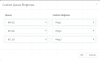
When you have enabled the above, you select the ringtone for each queue under ‘phone provisoing’ tab for each phone

You have to be running 3cx standard templates - no custom templates
 
Last edited:
  • Like
Reactions: YiannisH_3CX
To have the option appear, your extension will need to be a member of a queue
 
To have the option appear, your extension will need to be a member of a queue
What if a user is in multiple queues? How do we distinguish?
Ideally I would want to assign a queue a ringtone so if a user if in multiple queues, they potentially can get two different rings on their phone. Is that possible?
 
Once you enable the option you will be able to assign a different ring tone for each queue.

2018-11-30_10h31_40.png
 
You can enable this setting by navigate to the PBX Settings / Phone/client options and enabling the option at the bottom. Then you can set the ring tones under each extensions phone provisioning tab.
To apply the changes you need to reprovision the phone.
 
  • Like
Reactions: Michelle Dinh
Status
Not open for further replies.

Latest Posts

Forum statistics

Threads
111,901
Messages
589,636
Members
164,768
Latest member
Eagle Man