How to setup WhatsApp integration

KaterinaK_3CX

Joined
Feb 24, 2016
Messages
246
Reaction score
36
WhatsApp integration enables agents to send a reply to WhatsApp messages directly from 3CX. Read the guide carefully for any known WhatsApp limitations. Use the guide to walk you through the steps required to:
  • Create WhatsApp application
  • Adding a phone number
  • Set up an Admin role
  • Generate a new token
  • Configure in 3CX
  • Configure your webhook
Read the guide.
 
3CX support contacted me and suggested the number used for WhatsApp may not be registered on another trunk as well…

Since it’s after hours, I just deleted the DID from the other trunk (voice trunk) and sure enough, WhatsApp started working both ways just fine :-)
I hope this will be fixed for the next alpha/beta, since I need to add the number back to the trunk (and in the end we want the main number to be WhatsApp-enabled of course and not a spare number that cannot be called as well)
 
Same here... From a siptrunk point of view it's ok but I think this will be fixed in the next update because whatsapp with same number of main trunk it's a common customers behavior.
 
Same here... From a siptrunk point of view it's ok but I think this will be fixed in the next update because whatsapp with same number of main trunk it's a common customers behavior.
Indeed.
Well, at least we now know everything has been set-up correctly with Meta… Man, they have lots and loads of options, pages, setting et cetera. But I must say, they did a great job at streamlining everything because I remember some time ago it was a real mess. Now it wasn’t that hard to find everything, but still, many, many screens :-)
 
Yes, is not like "next, next and finish"! Now I am trying to add the second number pointing to another webhook, not finished yet but I did not understood where is the link between the number and the webhook.
 
3CX support contacted me and suggested the number used for WhatsApp may not be registered on another trunk as well…

Since it’s after hours, I just deleted the DID from the other trunk (voice trunk) and sure enough, WhatsApp started working both ways just fine :)
I hope this will be fixed for the next alpha/beta, since I need to add the number back to the trunk (and in the end we want the main number to be WhatsApp-enabled of course and not a spare number that cannot be called as well)
Hi Noord,

Yes they have contacted me this morning and when i deleted the did the whatsapp started to work both way. Hope they fix it in the next alpha beta.
 
Yes, is not like "next, next and finish"! Now I am trying to add the second number pointing to another webhook, not finished yet but I did not understood where is the link between the number and the webhook.
You cannot do that.
You need to create another business in order to do that. You can have two businesses on one facebook-account. I tried to do what you are trying now, I created a new app for it and everything, but ultimately, it wouldn’t work since all the numbers became mixed up anyway and I couldn’t set-up which number should use which web hook.

Making a new business fixed it and separated everything!
 
  • Like
Reactions: Gioal
Oh, one bug I noticed with WA:
When sending from your mobile phone (WA) to 3CX, WA always shows two grey checks (message delivered). It never turns blue. This is expected behavior and is fine.
When sending from 3CX to WA, 3CX shows two blue checks (meaning message has been read). This is incorrect. The messages have not been read. Not sure if the WA api exposes the ‘read’ status or just ‘delivered’
Anyone else seeing this behavior as well?

Have to wait for the next alpha to do some more testing perhaps, I cannot keep the DID removed from the main trunk for too long, and registering test numbers is really not that easy with all the checks Meta does before enabling a number for WA….
 
  • Like
Reactions: ODD Network BV
Hi Noord,

I saw that.

Regarding the DID. You can try add like 0000000 instead of entering the correct DID and try making inbound calls on the correct DID number.
That works for me and it is working fine. I just removed my DID from my provider. And added 000000 than make a inbound on the correct DID and boom calla went correctly to my IVR.
 
Hi Noord,

I saw that.

Regarding the DID. You can try add like 0000000 instead of entering the correct DID and try making inbound calls on the correct DID number.
That works for me and it is working fine. I just removed my DID from my provider. And added 000000 than make a inbound on the correct DID and boom calla went correctly to my IVR.
Yes, that works because you can set-up a default route for a trunk. Meaning if the trunk gives you a call for a number you haven’t configured yet, it just goes the default route.
This is useful if, for example, you register a new number with your voip provider, but forget to set it up in 3CX. It will ‘just work’ then, following the default route set up. But this also only works with register/account-based providers, not with providers that shoot you the call in another way.

But thanks for sharing, this might be useful for someone, but unfortunately, I cannot use this in my case :-)
 
Yes, that works because you can set-up a default route for a trunk. Meaning if the trunk gives you a call for a number you haven’t configured yet, it just goes the default route.
This is useful if, for example, you register a new number with your voip provider, but forget to set it up in 3CX. It will ‘just work’ then, following the default route set up. But this also only works with register/account-based providers, not with providers that shoot you the call in another way.

But thanks for sharing, this might be useful for someone, but unfortunately, I cannot use this in my case :)
Yes correct. You're welcome.
That's not great that you can not use this config in your case.
Hope the next Beta will solve this issue.
 
Yes correct. You're welcome.
That's not great that you can not use this config in your case.
Hope the next Beta will solve this issue.

Your suggestion did get me thinking, I did manage to implement a work-around with our voip provider :-)
I forwarded our main number to another number and configured that number in 3CX. Outbound is still the original number, so no one ever sees this temp number :-)
I hope it’ll be fixed for the next alpha/beta, but for now, it works and we can continue testing :-)

Thanks!
 
  • Like
Reactions: ODD Network BV
Your suggestion did get me thinking, I did manage to implement a work-around with our voip provider :)
I forwarded our main number to another number and configured that number in 3CX. Outbound is still the original number, so no one ever sees this temp number :)
I hope it’ll be fixed for the next alpha/beta, but for now, it works and we can continue testing :)

Thanks!
That's a great work around
 
Ah! We used the same number we use for SMS integration. So I assume this is also our problem, but I am yet to check.

Also, I agree that this should be under Messaging category and not SIP trunk section. It makes way more sense. :)
 
Feature requirement: we must be able to use the same number for WhatsApp as well as for another trunk. We obviously want to use our main number for WA and so it has to be able to receive normal calls as well.

If not, the entire feature is really useless. I’m not saying this to be annoying or anything, but this is really how it needs to work. I have a work-around in place, but using a work-around makes your entire set-up less transparant (eg. removing the main DID, using temp numbers or fake numbers)

I also think WA needs to be moved from trunk to Messaging, since you’ll never be able to receive a call through a WhatsApp-trunk so it’s not really a trunk in my book. But as long as above requirement is met, I don’t really mind where it’s configured :)
 
Same with me. I can receive whatsapp messages on 3CX chats, but when we reply back the message on 3CX chat box only shows 1 tick (adivisng it was been sent) but not 2 ticks (advising the message arrived to the destination). Also testing with my mobile I never receive a reply back when replying from 3CX chat.
 
Same with me. I can receive whatsapp messages on 3CX chats, but when we reply back the message on 3CX chat box only shows 1 tick (adivisng it was been sent) but not 2 ticks (advising the message arrived to the destination). Also testing with my mobile I never receive a reply back when replying from 3CX chat.
We already figured that one out: the number used for WA, may not appear in any other trunk as a DID. Please see this thread for possible work-arounds to get the routing of voice calls to that number correctly when you have removed it as a DID. We hope 3CX will resolve this with the next alpha or beta. But the work-arounds will allow things to work and allow you to continue testing.
 
We already figured that one out: the number used for WA, may not appear in any other trunk as a DID. Please see this thread for possible work-arounds to get the routing of voice calls to that number correctly when you have removed it as a DID. We hope 3CX will resolve this with the next alpha or beta. But the work-arounds will allow things to work and allow you to continue testing.
Brilliant, it works now. Hopefully in the Final release version they will allow to use the same DDI for Whatsapp and also for Incoming calls.
Thanks!!
 
  • Like
Reactions: stefanprasch
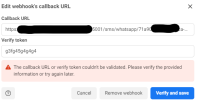
I'm having another issue. I'm getting stuck at step 5. For some reason it won't verify my webhook. Does anybody had similar problem? I didn't find any logs I could trace.
1659519750723.png
 
I'm having another issue. I'm getting stuck at step 5. For some reason it won't verify my webhook. Does anybody had similar problem? I didn't find any logs I could trace.
View attachment 31320
Not sure, that worked fine for me.
Can you open the callback url manually, from your browser?
Try restarting 3cx or the entire VM.
This should just work, there is nothing you can do wrong in this dialog.

You don’t have a firewall rule limiting access to port 5001…?

Groeten uit Joure :-)
 
  • Like
Reactions: Rick-Arcus-IT
Not sure, that worked fine for me.
Can you open the callback url manually, from your browser?
Try restarting 3cx or the entire VM.
This should just work, there is nothing you can do wrong in this dialog.

You don’t have a firewall rule limiting access to port 5001…?

Groeten uit Joure :)
Never mind. I just found out the pbx (since it's an internal demo system) is not reachable from outside the company network after a palo alto migration...:oops:

Groetnis út Snits;)
 
Last edited:
  • Like
Reactions: Evolute IT

Forum statistics

Threads
112,090
Messages
590,699
Members
165,061
Latest member
AlenaAAA