- Joined
- Aug 29, 2022
- Messages
- 2
- Reaction score
- 1
Went through the whole config again piece by piece and finally got it working. Somewhere between the Auth token seems to have been the problem.


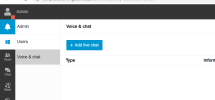
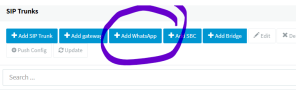
Got this resolved, had to make the webhook url public.Good day, I am having trouble setting up WhatsApp. I have the option to add the Whatsapp trunk but I dont have WhatsApp under my chats. Am I missing something?
View attachment 32538
View attachment 32539
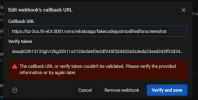
I am busy setting up whatsapp for business but I do not have a token for the webhook and I cannot save it. The instruction guide says I can insert any value but it is not accepting the password.
Please assist.
Thanks
It's text only not media yetAnyone have issues with sending images from WA and not receiving in 3CX?
How do you delete the DID? I have a voice truck and whatsapp on the same number and I can not reply to customers?Hi Noord,
Yes they have contacted me this morning and when i deleted the did the whatsapp started to work both way. Hope they fix it in the next alpha beta.
You can have a seperate whatsapp trunk with the same number with the latest version. If you can't reply to your customers, something must be wrong with the whatsapp configuration. I assume you do receive messages? Do you have any errors in your event log?How do you delete the DID? I have a voice truck and whatsapp on the same number and I can not reply to customers?
Since Meta furds its business spying on all of us, does 3CX have isolation so that there is no access via any Meta Routines to our numbers or voice? If not our company will purchase a PBX similar even if for only handful of lines, We are a privacy centric company that steers clients away from Facebook and Whatsapp. If they are jst bolt-ons I am instructed to remove, or go without our PBX until a contractor finds a replacement - regardless of cost. For those who say they do not care if listened to - think why would a huge company WANT to listen in on your calls. It would be fooolish to think it is to enhance somehow our lives. Everyone with an Alexa or google home consents to being under constant monitoring. Even Nissan Connnect can listen in on your conversations in the passenger cabin. No one reads their contracts, Nissan says conversation monitoring is to enhance the drive...... Anyone believe that? Yes probably have a cellular data modem if there is navigation installed..... Revolt and those will be taken out. Shameful manufacturers snuck them in knowing we don't read hundreds of pages of jargon.Hi,
I did made the test and it is working in the Meta site.
But can not reply in the 3CX webclient.
Hello. Can you explain:Got this resolved, had to make the webhook url public.
What did you do? What you mean make url public?had to make the webhook url public.
This is a message to everyone to help troubleshoot your issues with WA.I am having the same issue, customer sends in message through WA to 3CX the messages comes in fine but message from 3CX to WA is not going through. what's can i do to resolve this?
Does this mean I need to purchase an additional phone number for WhatsApp? Is so, does it need SMS capabilities?This is a message to everyone to help troubleshoot your issues with WA.
To resolve a potential conflict with SMS which is a common cause of the above issues raised here, is a trunk conflict with SMS. So if you are receiving messages but can't send them try this. The 3CX Trunk setup has an issue with the number for WhatsApp being the same number you are also using for SMS with 3CX. You cannot use the same number at the time of writing and this has been the case from the beginning with 3CX WA; so if you are you'll have to use a different number for one or the other.
Other things to check off...
Check you have your call queue set up so that WhatsApps can be received by the agents in the call queue.
I have a call queue extension set to RingAll. I have the agents I want to receive WhatsApps assigned to that queue.
In the WhatsApp Trunk Details - check you have entered the Access Token (from developers.facebook.com under WhatsApp > Quickstart > API SETUP) known as the Temporary access token.
Also check that you have added the correct Phone Number ID, not to be confused with your WA phone number, it is the Phone Number ID. It's specifically shown on the same page as the Temporary Access Token below your FROM phone number that is stated.
Also check in Step 3 of the above API setup page that you have setup / copied across the 3CX Webhook URL, that 3CX creates for you, into your Quickstart configuration (same WhatsApp area of developers.facebook.com). It is called the Callback URL in Meta and has the verify token next to it that 3CX gives you as well.
For inbound issues. Check your Route settings in the Trunk, check you have the WhatsApp number setup and the Destination for calls during office hours and outside office hours setup. Choose an extension for the destination and set it to your Call Queue as the destination - the queue that has your WA agents in it.
In META (developers.facebook.com) (WhatsApp > Configuration) make sure you have subscribed to messages under Webhooks (Webhook fields).
Founded in 2005, when VoIP was an emerging technology, 3CX has gone on to establish itself as a global leader in business communications.