How to switch the new v18 client to only one window?

Status
Not open for further replies.

itservice8

Bronze Partner
Joined
Dec 23, 2015
Messages
18
Reaction score
8
How to switch the new v18 client so that only one, instead of always two windows are displayed?

This is so currently totally annoying and it wastes a lot of space on the desktop and in the taskbar are always two icons between which you have to choose. This is also for me a waste of time in the way of working.

Overall, the v18 client is graphically quite nice. But I don't understand why the dial dialog isn't in there as well. Surely you can switch that, right?
 
How to switch the new v18 client so that only one, instead of always two windows are displayed?

This is so currently totally annoying and it wastes a lot of space on the desktop and in the taskbar are always two icons between which you have to choose. This is also for me a waste of time in the way of working.

Overall, the v18 client is graphically quite nice. But I don't understand why the dial dialog isn't in there as well. Surely you can switch that, right?
No you cannot and I don't see why the separated dialer is a problem.

Just uninstall the app and use the Webclient/PWA and you'll get your dialer in one window.
 
No you cannot and I don't see why the separated dialer is a problem.

Just uninstall the app and use the Webclient/PWA and you'll get your dialer in one window.
Ok it is ok, that you don't see a problem with two seperated window. But I see it as a problem.

To uninstall a App is not a solution, it is a workaround. I don't want to use a browser-tab for using my phone. Browser is for other activities reserved. And a tab would only make the day by day workflow worse.

The v16 client was really good. One app. Separated as an extra Windows window. Separated from the web browser and directly accessible from the taskbar or toolbar next to the clock. Autostart with Windows.

No clicking around between two windows. No searching for the tab in the browser.

I know I can still use the v16 client. But I hope the v18 client will be even better. We are currently testing the v18 client for our customers and this problem is the most annoying.
 
Ok it is ok, that you don't see a problem with two seperated window. But I see it as a problem.

To uninstall a App is not a solution, it is a workaround. I don't want to use a browser-tab for using my phone. Browser is for other activities reserved. And a tab would only make the day by day workflow worse.

The v16 client was really good. One app. Separated as an extra Windows window. Separated from the web browser and directly accessible from the taskbar or toolbar next to the clock. Autostart with Windows.

No clicking around between two windows. No searching for the tab in the browser.

I know I can still use the v16 client. But I hope the v18 client will be even better. We are currently testing the v18 client for our customers and this problem is the most annoying.
Like I said, the PWA is your solution. It acts like the DesktopApp without the separate dialer window.

And "browser" is relative. The DesktopApp is technically a browser.
 
  • Like
Reactions: bitn2
I was thinking the PWA is the synonym for the Desktop App ?
I know that the Framwork uses a browser and html to render the app. But it is a seperate window on the desktop and in the taskbar and that is important.

How can I use/install "PWA" ?
 
in the taskbar are always two icons
In Windows 10 there is a setting to combine or separate taskbar icons. I think that doesn't exist anymore in 11 (?) but it sounds like you have them separated in 10. Looks like that is Settings/Personalize/Taskbar -> Combine taskbar buttons.
 
That doesn't solve the problem of two windows and two icons on the taskbar, whether they are single buttons or hidden behind a menu, doesn't matter.
 
I was thinking the PWA is the synonym for the Desktop App ?
I know that the Framwork uses a browser and html to render the app. But it is a seperate window on the desktop and in the taskbar and that is important.

How can I use/install "PWA" ?

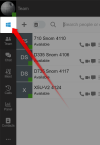
Click the Windows icon inside the 3CX Webclient.
1667981861043.png

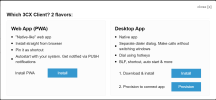
It gives you two desktop options with their explanations:
1667981473595.png

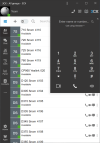
Exit the Desktop App, then install the PWA and take it for a test drive!

1667981989840.png

..if you change your mind, you can always remove the PWA from the 3 dots menu and go back to your desktop app.
 
  • Like
Reactions: Evolute IT
Thank you. I will test it!
 
  • Like
Reactions: JohnS_3CX
Ah I found it, after switching to Chrome (I'm a firefox user!).

Looks pretty good so far. It would be nice if the window could be made much smaller.
With CTRL+- I can make the font and the content a bit smaller. But the window remains very large.

I will test it over the next weeks.
 
Status
Not open for further replies.

Forum statistics

Threads
112,351
Messages
592,037
Members
165,515
Latest member
fngl