Solved How to Verify Hosted 3CX Expiration Date

Status
Not open for further replies.

EddieW

Gold Partner
Joined
May 4, 2020
Messages
23
Reaction score
1
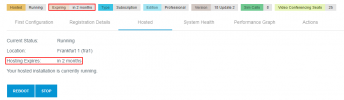
Hi, I have been asked to verify a client's hosted 3CX expiration date and do not see where to check this. I know in the management console under Information I can see their 3CX license expiration date but also need to verify their hosting expiration date. Where/how do you check this? Thanks, Ed.
 
Hi, I have been asked to verify a client's hosted 3CX expiration date and do not see where to check this. I know in the management console under Information I can see their 3CX license expiration date but also need to verify their hosting expiration date. Where/how do you check this? Thanks, Ed.
The hosting is tied to the license key so it should expire and be renewed at the same time as the license.
 
Hi @EddieW,

This can be checked via the Customer Portal. You can also open a support ticket to check this for you.
1638213473056.png
 
Last edited by a moderator:
  • Like
Reactions: Evolute IT
Hi AlexisV, thank you for the update. Just to confirm is the 3CX license and hosting license renewal date both the same? I assume if you migrated an existing customer from premise to hosted, like we did for this one, the initial hosting term would be pro-rated to match their 3CX license renewal date. Please let me know. Thank you, Ed.
 
Hi AlexisV, thank you for the update. Just to confirm is the 3CX license and hosting license renewal date both the same? I assume if you migrated an existing customer from premise to hosted, like we did for this one, the initial hosting term would be pro-rated to match their 3CX license renewal date. Please let me know. Thank you, Ed.
Yes that is correct! Hosting maintenance starts from the moment the Subscription was first activated, thus your Subscription + Hosting renewal date should be the same.
 
Status
Not open for further replies.

Forum statistics

Threads
111,974
Messages
590,081
Members
164,899
Latest member
mazet