• We do not provide troubleshooting help for unsupported phones. Please try with a supported phone.
  • V20 Update 10 Alpha Learn more

Solved HT802 falling offline

Status
Not open for further replies.
I have to agree with @cobaltit on this one, if phones are also disconnecting then I doubt it's an issue with the HT802. A second piece of of evidence, is the above log too, showing that the tunnel connection drops.

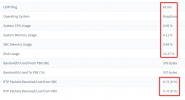
I would start looking at the network connection to see if there is any instability. The SBC also serves some stats, like packet loss for example which can reveal part of what is happening

1642415962113.png
1642415976090.png

The second most importantly, is your machine that runs the SBC. For example if the machine is in a VM, you need to check for time drift. This can cause connection drops, even when then network conditions are ok
 
The SBC is a Hyper-V VM. Initially it was a Server 2016. After having the issues, I built a new one with Windows 10. The Hyper-v Time sync is disabled so it gets it time from NTP, not from host.

I have worked on the issue a lot over the past couple of days. I am now thinking the issue with the phones may have been something else. I have not lost a single phone since Thursday. But the 3 HT802's will not stay connected for more than an hour. When they disconnect, they show as NEW in 3CX hosted system. After a reboot, they come back online. Then "wash and repeat".

So if the device is showing up in 3CX as NEW, what signals 3CX that it is a new device and not a provisioned device?

I have installed Wireshark and trying to trap some information, but to be honest, I am not familiar enough with Wireshark to be proficient with it. I trapped on the IP of one of the devices and see that after a reboot, it makes an initial SIP connection to 224.0.1.75. (This does not seem to be 3CX, this seems to be a multi cast network.) But the HT802 makes the connection to 3CX server and goes online. Then every 640 sec, the device will send out an ARP request asking "Who has 10.141.4.2?". This is the DNS server. Even after the devices goes offline with 3CX, the packets never change. Its like it knows it is talking to the right place so no need to do anything.

I am replacing a Windstream installed Mitel system. I removed the PBX, could there still be a device on the network causing the issue? How would I trap using Wireshark to determine if there is a networking issue.

Thanks for all the help. We have several 3CX PBX systems hosted locally at customers locations, and we have HT802's installed at all of them, But this is the first 3CX hosted we have tried and it is being a bear.
 
So if the device is showing up in 3CX as NEW, what signals 3CX that it is a new device and not a provisioned device?
1. For provisioned devices (like in your case) It just means that the device was previously registered, and now it is not. This is usually because it timed out. Timeouts can be due to network issues, or due to time drift (or even both!). If there is no recorded packet loss, time drift may still be an issue that has not yet been ruled out.

2.The VM host could potentially be underpowered or overloaded (I don't know, just asking so you can check).
For the SBC, I would recommend that you install the 3CX Debian ISO on your Hyper-V. It's not too hard even if you are more proficient in Windows, our guide should make it quite easy. Then install NTP inside Debian. The reason I recommend this is because running Windows virtualized takes up quite a lot of resources, and your server may not be able to keep up. Debian is very light and tends to fare much better under VM environments.

I can help you with instructions for deployment if you want to try this avenue, just for peace of mind that we are not running into any weird problems related to performance and time drift.

3. We have seen issues in the past with Hyper-V where the NIC driver was causing weird problems with timeouts, packet loss, dropouts and that kind of thing. This might also be something worth Googling for your specific host server.
 
I can build the Linux VM. Can you send a link for the instructions?
 
1. Read the complete instructions for the Hyper-V VM first: https://www.3cx.com/docs/installing-microsoft-hyper-v/

2. Instructions for Debian: https://www.3cx.com/docs/manual/installing-debian-linux-pbx/
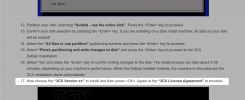
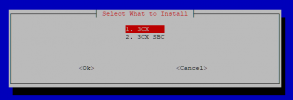
But when you reach this step, do not select 3CX PBX. Select 3CX SBC instead.
1642430982652.png
1642431210428.png
>> Pick option 2 here <<

3. Select <OK> to verify the "3CX Pre-requisites" and accept the "End-user License Agreement" to continue.
4. Enter the "Provisioning URL" for your 3CX, e.g. https://mycompany.3cx.com:5001, and select <OK>.
5. Enter the "Authentication KEY ID" and select <OK>.
6. Select <OK> and proceed to install and restart.
 
Have a question. I installed the cli edition above with 3CS SBC, But don't I need to manually set the internal ip address of the Debian machine to static? If so, I am not a command line person in Linux.

Suggestions?
 
when it comes to the section asking you to set the hostname during install, use the back option. Then choose the "configure network manually" to set your static IP.
 
Ok, I got the Debian OS installed, IP address set to the ip of the original Windows SBC machine. All the phones are online and checking in using SBC.

Same issue with the HT802's. They will come online and be green in the Users tab of 3CX and then after 20 min, will go offline and show up as NEW on the Phones tab.

Am I using a device that is may not as realiable as others. Does anyone have a suggestion for one to use that just works better?

This is extremely frustrating. I have been doing IT support for 35 years, and this is a first.

Sorry to be such a pain.
 
Grandstreams work well for us but when someone wants it to just work, grab a patton. Expensive but rock solid.
 
Yes, the SBC is currently running Debian ISO in Hyper-V

NTP. I had not, but I just did the update. Will monitor the system

Yes, I setup the VM as Gen 1 with Network Adapter.

Host ethernet adapters are Broadcom BCM5709C devices, not NetXtreme.

Any other suggestions? I am open to all.

Thanks for the help.
 
Let's wait and see how the SBC behaves now that NTP is active.
 
OK, I have been fighting this for a week now. No change since moving to Debian.

I added an additional HT802 yesterday. Same results

I did find some network subnet issues on some machines using Wireshark. I went to the site yesterday and fixed those issues hoping it would fix this issue. No such luck.

Wireshark does not seem to tell me anything. If I trap on one of the HT802, after the initial sip connection, Wireshark will show an ARP to the network every 10 min asking for the DNS server. Never indicates the device is not registered.

I can post Wireshark trap for anyone to look at if anyone is willing to.

I checked the time sync with all machines and all are correct.

One thing I have noticed, looking at the statistics of the 3CX SBC device in the console, it will show the device is online and will be ok for awhile then will go offline and back online. This does not seem to impact the HT802, they will stay online, but eventually they will fail. Not all at the same time. One may go off then in 10 min another and maybe an hour later another. But over the course of a couple of hours, they all will go off. A reboot brings each one back online and then we go through it all again.

Any help is greatly appreciated.

Thanks
 
Wireshark does not seem to tell me anything
For Wireshark to be useful, it's important to know how the capture was made. By this, I mean that you would have to mirror the port of a device that is facing problems, and capture specifically that device as close to the source as possible. Can you please tell us how the capture was made?

One thing I have noticed, looking at the statistics of the 3CX SBC device in the console, it will show the device is online and will be ok for awhile then will go offline and back online.
The SBC is very stable, and so is the HT802 (from experience at least). You should not be seeing disconnections, so this might be a sign that you have more than one problems. Both these devices can face issues when there is something wrong with the network, I still suspect that to be the issue based on what we know so far.

Could be anything from network storm / loop, rogue DHCP, bad cable, sketchy internet connection, temporarily overloaded internet connection, misconfigured switch... so not sure I can be of much help from this point onwards but those are the kind of things I would seek to eliminate.
 
Just to give everyone an update. First I want to thanks of of you that pushed me to continue to look at the internal network as a possible cause of the problem.

When I initially setup the first SBC, all was good. No issues. But just by happenstance, someone at another building plugged an ethernet cable into a printer that has been connected to their computer for a couple of years using USB. The printer was a hand-me-down at that time. The printer was statically set for the internet IP address I used on the new SBC. Since the ip I used was not being used at the time I setup the SBC, I did not get any ip address conflicts so I thought a duplicate IP could not be the issue when I was troubleshooting.

Well after leaning more about Wireshark, I was able to determine that was actually the issue and the actual device that was causing the issue. On Saturday morning I shut down the SBC, remoted into the printer interface and changed the IP address. Booted the SBC backup up and things have been happy ever since.

Again, thanks for pushing me.

All is right with the world today.
 
@BCS-Tech Great job, I'm very happy to hear that you were able to track it down in the end, I know these types of issues are not easy!
 
Status
Not open for further replies.

Members Online Now

Forum statistics

Threads
111,831
Messages
589,277
Members
164,660
Latest member
RJenkinsROCK