• We do not provide troubleshooting help for unsupported phones. Please try with a supported phone.
  • V20 Update 10 Alpha 2 Learn more

Solved HT802 falling offline

Status
Not open for further replies.

BCS-Tech

New User
Joined
Jun 4, 2021
Messages
38
Reaction score
3
I have installed a new hosted system this week at a new customers site. The local office has a Windows 2016 server setup for dedicated SBC services, nothing else on the machine and the firewall is disabled on the server.

I have installed 3 Grandstream HT802 for modem and fax services. I have installed the HT802's at other locations but all of those locations have 3CX installed locally on a server and never had any issues. This location is a hosted service at 3CX.

The issue is, the device is operating normally and then for some reason it will drop offline and the system will show it as a NEW device with an ip address of 127.0.0.1. If I reboot the HT802, it will come back online and disappear from the system as a NEW device and show connected with the internal IP address via SBC. Then hours later we go thought this again. Here is an image of what I see.


As a second issue that may be related. If I plug in a new (non provisioned) phone, it will show up the system as a new device, and at the same time, other previously provisioned devices, both phones and HT802's will go offline and show up as a NEW device. I can provision the truly new device and get it online and it works. But I have to reboot the other devices that were previously provisioned to get them to come back online.

Any suggestions?

Thanks
 
Last edited by a moderator:
Hi,

If you see the device appearing in bold as New then think this is a good sign that the HT802 is quite possibly rebooting at some point. When it "soft-reboots" it probably fails to load its configuration and reports as new if I had to guess.

Another manual reboot by you, (power cycling) and the device comes back until next time. Look into the following:

1. Try to upgrade your firmware first and foremost
2. Factory reset, and reprovision it again using our guide after you've upgraded
2. Check or change the PSU - bad power causes reboots and instability in general
3. If you cannot, unplug the analog cables from it and let it run for a while on its own. There's a chance that the devices/phon cables you connected to it are doing something nasty to the unit and it crashes out

https://www.3cx.com/voip-gateways/grandstream-ht-fxs/
 
Power is provided from UPS
3 different HT802's exhibit the same behavior, so don think it is a line issue. And one of the devices was brought online for several hours with no analog lines attached and did the same thing.

I will try the firmware route.
 
  • Like
Reactions: JohnS_3CX
Yes, ensure they have been reset and reprovisioned after the upgrade to avoid any issues with leftover old settings.

Their changelog shows an entry for "Fixed devices freeze randomly and is HTTP/SSH inaccessible with no dial tone in the attached analog phone." which came after your current version.


Note: the latest version does not accept the Web UI password that 3CX assigns. This is planned to be fixed later by Grandstream's next update so don't let it alarm you. You can login with the default "admin" password and then change it yourself if you wish to have more security.
 
When i try to do a firmware upgrade uploading from a local file, I get the following error
HT803 FW Error.JPG
 
Hi @BCS-Tech

Factory reset the unit first to ensure it is stable, then log in when it comes back online.

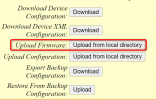
Use this 3rd option here:
1642084864338.png

Oh also make sure you unzip the file you got from Grandstream's site, you have to upload the .bin file contained in the zip.
 
I did a factory reset from the GUI and now I cannot log back in. Neither the default "admin" works or the orginal set by 3CX.

Do I need to do a PIN reset directly on the back of the device?

Sorry for all this, I am not a NUB. I have been doing IT support for over 30 years, but this one is kicking my .....!
 
No worries! Yes, I usually use the pin to reset when testing.

I've noticed on a few occasions that the default password is not accepted immediately after reset, but if you give it a couple of minutes it does finally get accepted (probably the built in web server is still loading in the background - embedded onboard SoC takes a bit of time).
 
I have now reset 2 HT802's and cannot get into either one, Using old password or the admin pw. Any other suggestions? I am at a loss.
 
The default password, assuming that a full reset took place, is admin. I haven't come across another easy access if that doesn't work.

Are these devices, supplied by a company, that might have changed the defaults?
 
  • Like
Reactions: JohnS_3CX
I am about ready to through these in the trash. I cannot do a FW upgrade. Will not take it. When I do a factory reset, the device reboots, gets a new IP address and then goes right back to the same config it was using, so it does not seem to be resetting. I set the ip address to a manual ip. Login using the 3CX admin assigned passwords and get back into the device using the manually assigned ip. Do a factory reset, either pinned or Gui. It will reboot, Get an new DHCP address and then I have to use the old 3CX assigned password. It seems like it is doing an auto provision, but I was under the impression these devices would not auto config. All the instructions I have seen for HT802 says you must save the .xml file create bt 3CX and manually upload the config and then reboot.

Am I wrong? What is the proper procedure for 3CX and HT802?
 
Perhaps try removing them from the network, and use an old router (for the DHCP) not connected to the internet, and a PC, to do the upgrade.
 
Note that (generally speaking) these type of devices may sometimes not be able to accept the very latest firmware if you are a few versions behind (ie. there is a minimum version requirement before you install the next version).

The solution is rather simple: install the in-between versions, and update sequentially until you reach the latest.
This model has a couple of older versions available from Grandstream here:
http://www.grandstream.com/support/firmware/previousfirmware#HandyToneATAs

As for the password, is there any chance they are being provisioned by a remote server or DHCP Option 66 on your network? (would explain settings coming back after reset) The default used is simply admin and that lets me in when I reset mine, although like I said it might take a couple of minutes before the device is fully booted up and accepts the password..
 
I know the DHCP potion is on. Should that option be removed during the upgrade or is it needed at all with the SBC installed.
 
The whole point of having DHCP Option 66 is so that as soon as you reset your devices, they will find 3CX and provision themselves automatically without asking you. That's why after you reset it, it keeps coming back with the same settings.

If you want to reset a device and have it remain reset you will either have to:

a) temporarily disable option 66

b) or - connect it to another network which does not have option 66 (ie. on a small home/office router with a private network and own DHCP)

c) or - Don't do any of the above, login with the existing 3CX supplied password that works, and manually upgrade the firmware in place. Then reset it when you are done upgrading, and it will come back up and reprovision itself due to Option 66 anyway, and that should complete the entire procedure.

Then you just monitor the devices for a while to ensure that the upgrade fixed the issue you were originally facing.
 
OK, Finally got them updated. Here are the steps used for anyone else that might be having a similar issue.

Logged into the HT802 with "admin" and 3cx assigned PW.
Removed the DHCP Option 66 from DHCP server
On the HT802 Basic Setting page. go to the bottom
Reset Type, select "Full Reset"​
After reboot (takes over 5 mins to complete), log back in with admin and admin
Tried to do a manual upgrade from a file on the computer and got the GCI error
To fix this
Put firmware.grandstream.com in the field "Firmware Server Path" on the "Advanced Settings" page​
Change the "Upgrade Via" above to HTTP (Recommended by Grandstream)​
Click Apply​
Click Reboot​
Go get a cup of coffee. Takes 8 to 10 min's to do the upgrade.
Once complete log back in as admin with admin pw.
Turn Option 66 Back on on the DHCP server
Reboot the HT802 one more time. Since Option 66 is enabled, the HT802 should get the config from 3CX and be back online.
It may take an additional 5 min's after the extensions in the config come back online before you can log back into the HT802 using admin and admin
The FW upgrade should now be complete

Now I am back at the starting point and waiting to see if this fixed my initial issue. The devices going offline randomly. Will let you know.

Thanks
 
OK, after 2 days work getting the 3 HT802's upgraded to the latest firmware, the issue is still exist.

Periodically, one of the HT802's will show up as bold NEW. Once this happens, a couple of Yealink phones will also show up as NEW. Reboot all "NEW" devices and all will come back online.

Also, when a truly new device is plugged into the network, some of the existing already provisioned devices will show up as NEW and have to be rebooted to get them back online.

I am at a loss. Hopefully someone will have a suggestion.
 
Sounds like a network issue of some sort to me.
 
  • Like
Reactions: JohnS_3CX
Have you tried leaving DHCP Option 66 off?
 
I removed DHCP 66 early yesterday and still have the same issue.

Going through the logs on the 3cx hosted service I found this error multiple times in the 3CXTunnel.log file.

TCPSocketProcessor: POLLERR for 58<-::ffff:24.181.116.194:50488:30
12:27:17.480...|Error|ConnMgr.cpp(1355): TCPSocketProcessor: Removed after error 58<-::ffff:XXX.XXX.116.194:50488:30
12:27:17.480...| Info|Tunnel.cpp(464): !! Tunnel 'ClientTunnel'(123456): terminating connection with ::ffff:XXX.XXX.116.194:50488
12:27:17.480...| Warn|Tunnel.cpp(477): Terminating connection with SBC 'Main Office' id=VimaYpFGfpcZ, public IP=::ffff:24.181.116.194, local IP=10.141.4.250
12:27:17.480...| Info|Tunnel.cpp(393): Forcing termination of VimaYpFGfpcZ
12:27:17.480...| Info|Tunnel.cpp(464): !! Tunnel 'ClientTunnel'(123456): terminating connection with ::ffff:XXX.XXX.116.194:50488
12:27:17.480...| Warn|Tunnel.cpp(477): Terminating connection with SBC 'Main Office' id=VimaYpFGfpcZ, public IP=::ffff:XXX.XXX.116.194, local IP=10.141.4.250
12:27:17.480...| Warn|Bridge.cpp(464): Currently mapped connection with id=sbc.839fa3ca doesn't match to one being removed, ignore removal
12:27:17.480...| Info|ConnMgr.cpp(1250): TCPSocketProcessor: Removed 58<-::ffff:24.181.116.194:50488:30, total 0

I don't know what time zone is used to mark the log, so I cannot be sure the issue I am having correlates with these times. But this looks suspicious.

??????????
 
Status
Not open for further replies.

Forum statistics

Threads
112,147
Messages
590,959
Members
165,167
Latest member
Finatra.us