Hubspot not showing all calls

Status
Not open for further replies.

ethan105

Silver Partner
Advanced Certified
Joined
Sep 15, 2021
Messages
12
Reaction score
0
Hi there,

We have had the 3CX HubSpot integration running well for a few months and within the last few days not all calls are getting logged in HubSpot.
I have tried rebuilding the app in the developer account, redoing the server side reconfiguration, restarting the 3cx computer and still the same issue.
Anybody have some insight on what might be happening?

Thanks

Ethan
 
Hello Ethan,

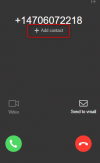
Something that changed in 3CX v18 Update 8 is that contacts are not automatically created anymore when the caller's number can't be matched to a CRM contact. Now you need to manually create the contact from the Web Client / Desktop App. When you receive a call that can't be matched to a contact you will see this:
1693596245618.png

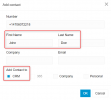
When you click "Add contact", the following dialog is shown, where you can fill the contact details, and check the "CRM" option to create the contact in your CRM:
1693596281908.png

Once you do this, the call will be logged for this contact in your CRM.
 
Hi Ernetso,

Is there any plans to revert it back to the way it was ?

Kind regards

Ethan
 
Hello Ethan,

No, there are no plans to change this back.

You can edit the template to achieve that if you want, but you will lose any update released in the future....
 
  • Like
Reactions: Evolute IT
Hello Ethan,

No, there are no plans to change this back.

You can edit the template to achieve that if you want, but you will lose any update released in the future....
It is the same for Zoho CRM ?

How we can achieve this from mobile 3cx app ?

Thank you !
 
You can edit the template to achieve that if you want, but you will lose any update released in the future....
Is there a link to a resource showing what changes need to be made in order to achieve that?
 
Is there a link to a resource showing what changes need to be made in order to achieve that?
The changes to achieve this would be the following:
1) From the second line of the XML template, change the Name attribute from Name="HubSpot" to Name="HubSpotCustom".

2) Remove the ID from the CreateContactRecord scenario, so it's considered a contact lookup scenario, so this line:
<Scenario Id="CreateContactRecord" Type="REST">

Would need to be changed to:
<Scenario Type="REST">

3) Change the SkipIf attribute from the request, to execute it only when no record has been found, so this:
XML:
<Request SkipIf="[CreateContactEnabled]!=True||[IIf([CreateOnCallDirection]==Inbound,[CallDirection]!=Inbound,False)]==True"
                 Url="https://api.hubapi.com/crm/v3/objects/contacts" RequestContentType="application/json" RequestEncoding="Json"
                 RequestType="Post" ResponseType="Json">

Should be changed to:
XML:
<Request SkipIf="[CreateContactEnabled]!=True||[IIf([FoundRecordCount]&gt;0,True,False)]"
                 Url="https://api.hubapi.com/crm/v3/objects/contacts" RequestContentType="application/json" RequestEncoding="Json"
                 RequestType="Post" ResponseType="Json">

4) Finally the following 2 lines will need to be changed to specify a contact name, now that these parameters don't exist anymore:
XML:
<Value Key="firstname" Passes="2" Type="String">[CreateContactFirstName]</Value>
<Value Key="lastname" Passes="2" Type="String">[CreateContactLastName]</Value>

to:
XML:
<Value Key="firstname" Passes="2" Type="String">New</Value>
<Value Key="lastname" Passes="2" Type="String">3CX Contact</Value>
 
The changes to achieve this would be the following:
Thanks Ernesto!
I made those changes and at first got this error:
System.InvalidCastException: Unable to cast object of type 'System.String' to type 'System.Boolean'.

I then changed to the below and it is now working perfectly for us. I understand that it no longer checks if CreateContactEnabled is True so it will create the contact regardless of the setting if it hasn't found a contact.

XML:
<Scenario Type="REST">
    <Request SkipIf="[IIf([FoundRecordCount]&gt;0,True,False)]" Url="https://api.hubapi.com/crm/v3/objects/contacts" RequestContentType="application/json" RequestEncoding="Json" RequestType="Post" ResponseType="Json">
        <PostValues Key="">
            <Object Key="properties">
                <Value Key="firstname" Passes="0" Type="String">3CX</Value>
                <Value Key="lastname" Passes="0" Type="String">[Number]</Value>
                <Value Key="phone" Passes="0" Type="String">[Number]</Value>
 
How do you change these fields? I'm trying to change it and I can't do it.
where do we change this?
Is there an app for this?
 
How do you change these fields? I'm trying to change it and I can't do it.
where do we change this?
Is there an app for this?
You need to get the XML file from the 3CX Console > Settings > CRM > Show Template. And then edit it using a text editor.
 
I can look at the data and copy it to a notepad for example, but I can't paste it into 3cx with the changed data and when I save the notepad it only gives me the option to save in TXT and I can't upload the TXT to 3cx .
 
I can look at the data and copy it to a notepad for example, but I can't paste it into 3cx with the changed data and when I save the notepad it only gives me the option to save in TXT and I can't upload the TXT to 3cx .
You can use Notepad++ which is much better for XML edition than Notepad. In any case, from Notepad you can save it as XML, you just need to select "All files" instead of "TXT" in the Save dialog. Then you will be able to upload your changes to 3CX.
 
  • Like
Reactions: Evolute IT
I see a lot of people doing this solution but all of us stuck when the system create the contact regardless of the setting if it hasn't found a contact.
Might be a solution for us .
 
Status
Not open for further replies.

Forum statistics

Threads
111,973
Messages
590,076
Members
164,895
Latest member
jasonkkrause