I migrated from 3CX hosting to my own server, now I don't have access to the portal

Status
Not open for further replies.

opennube

Silver Partner
Basic Certified
Joined
Apr 1, 2021
Messages
26
Reaction score
6
Hello,
I migrated an instance from 3CX hosting service. The migrating did not work. After "hanging" on restoring the PBX for hours, I decided to reboot. Now the domain points out to the my new server, but I don't have access to the management console, either by public IP or private. Even worse, I don't have access to my instances on my 3cx.com portal. I've get a 404 forbidden message.

I will appreciate any help here.

Ps.
Migrated from 3CX hosting instances to the latest Debian ISO,
The backup is 8.6 GB
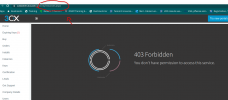
 
I turned off my new 3CX PBX on my server but calls are still being received on the 3CX hosted server. But when I try to access my instance, I get the 403 error. See image.
3cxforbbiden.png
 
did you switch off your 3cx hosted 3cx ?

The fqdn does it points to the old server or new server - you may need to let the fqdn update

can you access the old server via https://wan ipaddress (ignore cerificates errors)
 
Last edited:
did you switch off your 3cx hosted 3cx ?

The fqdn does it points to the old server or new server - you may need to let the fqdn update

can you access the old server via https://wan ipaddress (ignore cerificates errors)
I could not turn off the instance. I wanted to keep the same fqdn. The fqdn points to the new server. But the new server failed to restare the backup.. I tried it twice and it hands and never restore. At this point, I want the fqdn to point to 3CX IP address. I need the system up and running, but I have no control via the panel, nor 3CX replied to my ticket.
Calls reach the PBX hosted by 3CX, but because the fqdn is pointing to a non-woring PBX, desk phones or soft phones cannot reach it.
 
I felt forced to stay with 3CX hosting. I was never able to migrate to the new PBX. I tried it twice, I built 2 different VMs with high specs and still will hang trying to restore the backup. My client is a medical office so I don't have much time for downtime.
 
Do bear in mind that a backup file of 8GBs will take some time so it might be that you just have to wait. At what exact point does it seem to hang, what step?

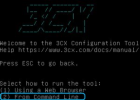
I'd suggest using the CLI installation wizard instead of the web installation wizard:
1647258716538.png

This would require that you upload the backup directly to the server first because the CLI wizard will ask for a local path to the backup file.

Let me know if this helps.
 
More than 7 hrs?
 
So it does hang on the backup upload section? If that's the case, I definitely recommend the CLI wizard. You could connect to the machine and upload the backup file directly to the OS via SFTP and then point then give the 3CX install wizard the bath to the file. Make sure the backup file has been given sufficient file permissions.
 
Status
Not open for further replies.

Forum statistics

Threads
111,974
Messages
590,081
Members
164,899
Latest member
mazet