Import all contacts from CRM as CRM contacts

Status
Not open for further replies.

JanFilipowski

Free User
Advanced Certified
Joined
May 2, 2022
Messages
11
Reaction score
0
Hi 3CX community,
Recently, I've been dealing with this problem: I want to have over a thousand contacts imported from my CRM to the phonebook. I know that the contacts are made only when a call is placed, but then, they aren't shown on the desk phones. I can, of course, import them all manually, but there is a problem: It is going to inevitably double the contacts that already have been imported.

So, the question is: Is it possible to import over a thousand contacts with the CRM properties, which will prevent the CRM integration from doubling the existing contacts, as well as allowing it to create new contacts and update the new ones?

Please note that I am aware that the new contacts won't be shown on my desk phone at first call, however, it still would be nice to have them in my phonebook.

Thank you in advance for your help.

Regards,
Jan Filipowski
 
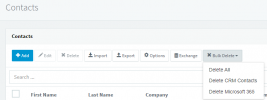
You might chose to delete your CRM Contacts first, before you reimport:

1693893918920.png
 
  • Like
Reactions: Evolute IT
And try to import 500 contacts at a time in a file , i got exeprience about more than thousand contact got PBX stuck with import so to avoid to do this many times due to hanging better to limit import by 500
 
  • Like
Reactions: jed
That is right, however it doesn’t prevent the CRM integration from creating new contacts, which already exist in the phone book. I’d consider it ridiculous if creating such contact wasn’t possible.
 
That is right, however it doesn’t prevent the CRM integration from creating new contacts, which already exist in the phone book. I’d consider it ridiculous if creating such contact wasn’t possible.
You cannot create them manually. There's no way to import the CRM data into a contact. Only the integration can do that.
 
  • Like
Reactions: edossantos
Any reason why you want these contacts in the 3CX phonebook? Adding the contacts to the 3CX phonebook is not mandatory now. You can disable that option from the 3CX Console > Settings > CRM > And clear the option "Add CRM contacts to 3CX company phonebook when a call or message is sent or received". You will still see the contact details from the CRM when you make or receive a call.
 
  • Like
Reactions: Evolute IT
As I said (or maybe I misunderstood the configuration) only contacts in the phone book show on desk phones while an inbound call is made. Furthermore the phone book is updated after the SIP invite message was send to the desk phone, which means that I won’t see who is calling until they reach me a second time.
 
As I said (or maybe I misunderstood the configuration) only contacts in the phone book show on desk phones while an inbound call is made. Furthermore the phone book is updated after the SIP invite message was send to the desk phone, which means that I won’t see who is calling until they reach me a second time.
That was always the case. Nothing new here.

That's why we recommend using the DesktopApp to control the Deskphone. You then get best of both worlds.
 
  • Like
Reactions: jed and edossantos
That's correct, from deskphone you will only see the contacts from the phonebook. Unfortunately there is no way to run a full synchronization of CRM contacts to the 3CX phonebook. So you will need to wait for this to be filled over time.

A better approach is what @ConceptsWeb has described, using the 3CX Desktop App to control the deskphone. You can still use the deskphone, but you will see in your computer the details of the call, and you will be able to easy handle calls from there too.
 
  • Like
Reactions: Evolute IT and jed
Status
Not open for further replies.

Latest Posts

Forum statistics

Threads
111,893
Messages
589,598
Members
164,763
Latest member
Techmansam