Import/export of (company) contacts

LVL

SMB User
Joined
Oct 15, 2026
Messages
10
Reaction score
2
Hello,
I know this question is not new, but I did not find any reply that answers my problem.

I have Free SMB account.
In the forum it is said that you can export the "company phonebook" to get a .csv file via the admin panel.
However, I do not find this option after clicking on "Admin" left below?

The reason I want to export is that I really want to IMport contacts (csv file) but get error because of wrong format which is bizarre as the file is an export from a 3CX PBX, but anyway...
I found a link to a template in the forum but that link is no longer active (error 404).
So, in fact 2 questions:
1. How can I export contacts (NOT users)?
2. Does anybody have a (correct) template to fill a csv file to import contacts?

Thanks for help
Regards,
LVL
 
Hello,
I know this question is not new, but I did not find any reply that answers my problem.

I have Free SMB account.
In the forum it is said that you can export the "company phonebook" to get a .csv file via the admin panel.
However, I do not find this option after clicking on "Admin" left below?

The reason I want to export is that I really want to IMport contacts (csv file) but get error because of wrong format which is bizarre as the file is an export from a 3CX PBX, but anyway...
I found a link to a template in the forum but that link is no longer active (error 404).
So, in fact 2 questions:
1. How can I export contacts (NOT users)?
2. Does anybody have a (correct) template to fill a csv file to import contacts?

Thanks for help
Regards,
LVL
" Phonebook - Company" option is not available in SMB.
In SMB, you would need to add contacts individually and then assign visibility (Department or Personal).
 
Hello,
Thanks for reply.
However, I am confused...
When going to the "contacts" page, I do see a button that is labeled "import contacts" which is what to do in the end!
The only thing is that I need a correct template for the csv file that I can fill in and then import...
Thanks
LVL
 
Hello,
Thanks for reply.
However, I am confused...
When going to the "contacts" page, I do see a button that is labeled "import contacts" which is what to do in the end!
The only thing is that I need a correct template for the csv file that I can fill in and then import...
Thanks
LVL
Can you share a screenshot of where you see "import contacts" exactly, it may help to better understand which system you are logged in to.
 
I see. In this case, you can create a CSV file to import contacts, you need to format a spreadsheet with clear headers (like First Name, Last Name, and Email, etc.) and save it in the .csv format. Then upload it as needed.
 
That I know, but the problem is that this csv file needs to have the different headers and data in a specific order or it is refused!
So my question is: what is the correct and complete order?
Is there a template somewhere (in .xlx or .csv format) that I can use to complete the data and then import?
Thanks,
LVL
 
Thanks,
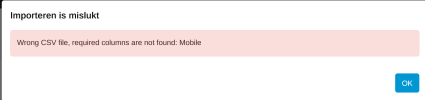
tried it, entered some data, saved in .csv, tried to import and got following error:
1792159988704.png
What's wrong?
 

Forum statistics

Threads
112,269
Messages
591,594
Members
165,374
Latest member
HM_User