Solved Inbound Rule and SIP Trunks "Any DID" Option?

Status
Not open for further replies.

SyncWave

Silver Partner
Joined
Oct 25, 2013
Messages
186
Reaction score
63
Normally I add each DID to the trunk and map each DID in the inbound rules but normally I only have a few I need to do that with. I have a client consolidating a bunch of branch offices that each had local numbers. On other systems I was able to have a default inbound rule for any undefined DID, wildcard, variable, whatever you want to call it but it allowed all DIDs routed to the system to flow in by default. Am I missing something or is that not possible in 3CX?

It behaved like a firewall but the deny all for anything undefined could have an action assigned (IVR not deny/drop call).
 
  • Like
Reactions: VoIPTools
I looked at that section and skipped over the UK note since we'd newer be configuring a PBX for someone in Europe, I read "select from available DIDs. Thanks

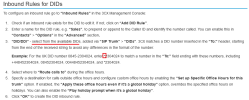
1665423641722.png


I could swear awhile back I setup a trunk with one main number selected and didn't add all the DIDs tagged to it and it didn't work.
 
Actually still doesn't work the way I mentioned. Can't have anything less than 4 characters and in inbound rules I can only select full numbers I've added. Example: lets say +12345679999 in your main number but you also have +12345678888 and many more, for the rule I manually type 1234* and it auto-fills to the 9999 number when you save it.
 
Last edited:
Typically one primary DID will be needed per SIP Trunk and the this DID may apply to other associated/sub DIDs, however this depends on the configuration/compatibility of the SIP Provider. It is recommended to use a supported SIP Trunk/Provider compatible with 3CX Hosted instances. https://www.3cx.com/partners/voip-providers/
Should calls to the associated/sub DIDs not follow the route/rule for the primary DID, then consider either verifying the configuration of the SIP Trunk account with the provider as it may be necessary to list the associated DIDs in the PBX > SIP Trunk > DID configuration for proper routing. In reference to the example provided in the screenshot of the documentation, kindly note that the wildcard character may only be abbreviated as a prefix *9999 for it to properly apply. It will not apply if formatted following any digits +1234*
Should you have any further issues, then please consider submitting a ticket through your Customer portal for closer review of the behavior by a 3CX Engineer
 
I tried *1234 type configuration and it autofills to a DID in inbound rules. Looks like I can do that under the SIP Trunk though, I'll try it out. Thanks
 
Hi @SyncWave,

3CX has a so called catch all functionality. If an inbound call matches the trunk and it does not match an inbound rule it will route the call to the main trunk number destination.
I would recommend adding the DIDs under the trunk but do not create inbound rules for the ones that you do not need. The PBX will route all calls to those DIDs to the main trunk number destination.
 
Status
Not open for further replies.

Forum statistics

Threads
111,974
Messages
590,081
Members
164,899
Latest member
mazet