Inbound rules v20

jake.peters

Silver Partner
Basic Certified
Joined
Mar 10, 2022
Messages
9
Reaction score
1
Hi,

We have a customer that has 4 different company's set up under one tenant as departments, however they only have 8SC so they do not have the ability for multi company. so we have setup DDI number and assigned them to each department, however when someone calls the DDI number on the users side it shows the default departments number not the person that's calling number, any one know what could cause this and the fix
 
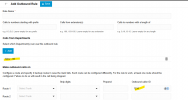
You'll have to make an outbound rule that sets the CLI on a department basis

1756991053170.png
 
Hi, is this only for the oubound, as we have set the outbound up and that works but its only when a customer calls
 
Did you set the outbound number in the extension? Did your provider support clip no screening?
 
Hello jake.peters,

So when a call comes into the PBX, it will go to the correct group/queue/user where you will see the name of the company/provider/department/DID ?

For for example you will see "CompanyA" on the phone and not "Caller 15551231234", correct ?

Where do you see this, on the Iphone Smartphone APP, or deskphone Yealink, of PC Web Client ??

Paulo
 
Correct, they see it on there mobile as we have forward to the mobile on the extension
 
This important information is missing in your post... You will always see the department number and not the caller number in this case. The 3cx is calling you. When your provider is supporting clip no screening maybe you can do something.
 
My Apologises for leaving that information out did not think that could be the cause, so is there anyway we can get it to show the callers number or will it always be the Main number that shows?
 
As i already said... if you provider supports clip no screening you can try to adjust your template to send the caller number instead.
 
Okay, thank you
 

Members Online Now

Forum statistics

Threads
111,835
Messages
589,288
Members
164,665
Latest member
dominik.pepel