Installing 3CX on Linux using 3CX Debian ISO

Status
Not open for further replies.

Bianca Allery

Staff member
Joined
Dec 9, 2015
Messages
74
Reaction score
37
This guide covers all the configuration required to install 3CX using a Debian Linux ISO. It covers system requirement checks, including supported VM platforms, network and firewall requirements and supported hardware.

Read the Guide.
 
  • Like
Reactions: AlecM
  • Like
Reactions: Rick-Arcus-IT
Hello.
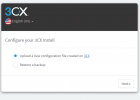
I have installed V20 alpha, but I can only configure the settings from the "configuration file" or "backup file" as shown in the image.

Is it possible to manually configure new settings?

FireShot Capture 022 - 3CX PBX Web Configuration Tool - 133.167.86.62.png
 
  • Like
Reactions: VoIPTools
I discovered the same thing yesterday. I was presented the same two options, and I'm unaware of a workaround like the old "legacy" option.
 
You need to get the config file for a new installation. Just go to your portal and select the key you want to use and click on install. There you will get the config file to install a new pbx. Its nearly the same than before, just a new way to install.
 
  • Like
Reactions: TheodorosG_3CX
That is correct, you get the xml with all the configuration, upload it and proceed.
 
  • Like
Reactions: bitn2
Hello,

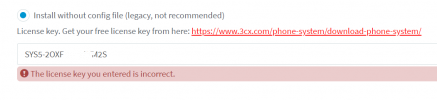
My aim is to install 3CX free version in-house on ESX for that I installed the debian-amd64-netinst-3cx.iso. The Installation went fine however I cannot register my system. After launching the web wizard and chose the option "Install without config file (legacy, not recommended)" and create an account the installation automatically creates a hosted installation on the 3CX cloud. I tried to copy the serial number and past it on my local installation but it did not work. How can I install the free version locally on my server?
 

Attachments

  • Screenshot 2024-02-01 205003.png
    Screenshot 2024-02-01 205003.png
    27.5 KB · Views: 8
Hello,

My aim is to install 3CX free version in-house on ESX for that I installed the debian-amd64-netinst-3cx.iso. The Installation went fine however I cannot register my system. After launching the web wizard and chose the option "Install without config file (legacy, not recommended)" and create an account the installation automatically creates a hosted installation on the 3CX cloud. I tried to copy the serial number and past it on my local installation but it did not work. How can I install the free version locally on my server?
There is no free version for local install anymore.
 
  • Like
Reactions: Evolute IT
Unless you already had a license from a while ago, the current Free offer is the 3CX hosted Free/SMB product.
 
Is there a way to network boot the installation iso for 3CX PBX V20?
The VPS I want to use to install the image offers a way to boot a custom ISO using iPXE - but to do that there needs to be some support from 3CX side - as the install image contains "netinst" I was curious if 3CX has this infrastructure already or is the only way to download the ISO and mount it?
 
@VosSystems
Hi there.
The only way as you say, will be to download the ISO and mount it.
 
Thanks for the heads up - I'll have to setup my own bootserver for it then
 
  • Like
Reactions: OlegR_3CX
@VosSystems
If you wish you could share your solution with the other community members here once you managed to do so, feel free to create a new thread.

Have a nice day
 
I'm approaching the point when I have to replace V18 running on Windows 10 pro with V20 on Linux. Currently I have the backups stored on a USB drive. I'm assuming I can use the ISO file to make a blank USB drive into a bootable USB drive to insall 3CX as it worked for Debian, then just restore the backup.

I'm wondering whether I should get a new HDD or possibly a SSD instead of trying to overwrite Windows?

Also I'm currently running a DNS service (Acrylic DNS) on the same machine. I don't really have another server to do DNS, so I'm wondering if the 3CX V20 box could do it? On an older version it was possible to SSH in and make tweaks like installing cifs and mounting a SMB share so it could backup to it, so in principle I could install or configure DNS but it doesn't seem like a good idea to muck around as root.
 
I'm approaching the point when I have to replace V18 running on Windows 10 pro with V20 on Linux. Currently I have the backups stored on a USB drive. I'm assuming I can use the ISO file to make a blank USB drive into a bootable USB drive to insall 3CX as it worked for Debian, then just restore the backup.

I'm wondering whether I should get a new HDD or possibly a SSD instead of trying to overwrite Windows?

Also I'm currently running a DNS service (Acrylic DNS) on the same machine. I don't really have another server to do DNS, so I'm wondering if the 3CX V20 box could do it? On an older version it was possible to SSH in and make tweaks like installing cifs and mounting a SMB share so it could backup to it, so in principle I could install or configure DNS but it doesn't seem like a good idea to muck around as root.
Tells us more about this environment.

-Do you have any other servers/machines that are always on?
-Do you have the ability to put in a Raspberry Pi or similar?
-Does your router have hairpinning abilities? What model router do you have?
-What devices are connecting to 3CX? IP Phones? Desktop Clients? Mobile clients?

Perhaps we can find a way to help you with the FQDN requirement.
 
Regarding potential servers in practice there are two or three machines that don't get switched off, ever, so I'm giving some thought to putting Acrylic DNS on both of them and using them as primary and secondary DNS. That way if one is down things will still work. I'll probably put stickers on to say they are acting as servers as a reminder.

A Raspberry PI is a possibility.

The router is a BT Smarthub, which in principle ought to be able to perform split DNS but in practice it has been crippled so using the UI it can only accept names without domains. I don't know if there's a CLI hidden anywhere that might allow setting options beyond what the web interface supports?

We have two IP phones. Everything else will work using the public IP address without split DNS but not the two phones.
 
Status
Not open for further replies.

Latest Posts

Forum statistics

Threads
111,952
Messages
589,894
Members
164,845
Latest member
tdzski5