Installing 3CX SBC on Raspberry Pi 5

Status
Not open for further replies.

cb83

Customer
Joined
Jul 12, 2024
Messages
23
Reaction score
0
I am unable to install the SBC on a Pi5

The article "Installing 3CX SBC on Raspberry Pi 5" (last updated 05 July 2024) is not of any help and the steps do not look anything like the screenshots.


Step 6: Install 3CX SBC
Log in to the Raspberry Pi as user “pi” via the CLI or SSH.
Run the 3CX install script:
sudo bash -c "$(wget -qO- http://downloads-global.3cx.com/downloads/sbc/3cxsbc.zip)"
Select ‘OK’ to verify the “3CX Pre-requisites” and accept the “End-user License Agreement” to continue.
Enter the “Provisioning URL” for your 3CX, e.g. https://mycompany.3cx.com:5001, and select ‘OK’.
Enter the “Authentication KEY ID” and select ‘OK’.
Select ‘OK’ and proceed to install and restart.

This does nothing.

Also downloading the file "http://downloads-global.3cx.com/downloads/sbc/3cxsbc.zip" from my Windows machine returns a 26KB file that cannot be opened.

Is there an issue with the repository?

Does anybody have an accurate guide for installing the SBC on a Pi5.

Many thanks.
 
Have you set a static IP address on the Pi5? and have you done sudo reboot and pinged the raspberry pi to make sure there is a network connection?
 
Have you set a static IP address on the Pi5? and have you done sudo reboot and pinged the raspberry pi to make sure there is a network connection?
Yes the network connection is good. Can ping addresses inside and outside of the LAN. Can also ping the Pi from other devices on the LAN.
 
Are you using SSH? i would reccomend using this and then copy and pasting the wget command in and it should all work. i did a raspberry pi 4 and 5 yesterday and both worked fine.
 
Are you using SSH? i would reccomend using this and then copy and pasting the wget command in and it should all work. i did a raspberry pi 4 and 5 yesterday and both worked fine.
Thanks for the replies.

I can't even SSH to it. Connection is refused.

Which image are you using?

"Download the preferred Bookworm Raspberry Pi OS Lite image available in arm64 and armhf"

I am using arm64. Will try armhf but understand this can only address 4GB memory.
 
Please do ifconfig and send a photo. I believe the static ip you have put in is being used elsewhere. Please try another ip address and see if this works
 
Please do ifconfig and send a photo. I believe the static ip you have put in is being used elsewhere. Please try another ip address and see if this works
Enabled the SSH service and was able to copy and paste as you suggested. Thanks.

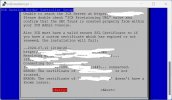
However I get this far and it fails.

Assume I need to do the firewall setup first.

3cx_sbc.jpg
 
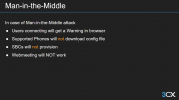
Is your PBX using a trusted certificate?

If your PBX certificate is not trusted, it will NOT provision the SBC.

1720785793917.png
 
Is your PBX using a trusted certificate?

If your PBX certificate is not trusted, it will NOT provision the SBC.

View attachment 42530

There is no certificate.

Where can I find the guide on how to generate one?

I used the [mypbx].3cx.uk FQDN when setting up the PBX

Thanks
 
Can you access your PBX through the web client, without the security warning?
Do you have any kind of HTTPS proxy or SSL DPI?

This could interfere with the SSL connection.
 
I can reach the SBC via SSH now having enabled the service using raspi-config

When accessing the PBX through the web client I get the red banner with a security warning.

I've not done anything with certificates.

Also not made any firewall changes yet.

The PBX is on premise and resides on a dedicated vlan. I am accessing the PBX from inside my LAN at this stage.
 
Focus your troubleshooting on the PBX side. The SBC will be the one to go pull the configuration from the PBX.

Ensure you can access the PBX via its FQDN with the web client. Once that has been done, you should be able to provision the SBC instantly.

Your isue here is with HTTPS access to the PBX.
 
  • Like
Reactions: JohnS_3CX
Focus your troubleshooting on the PBX side. The SBC will be the one to go pull the configuration from the PBX.

Ensure you can access the PBX via its FQDN with the web client. Once that has been done, you should be able to provision the SBC instantly.

Your isue here is with HTTPS access to the PBX.

I think this is the issue, yes.

Am I right in assuming that I need to follow the steps in this article

https://www.3cx.com/docs/manual/firewall-router-configuration/

Because I'm using the xyz.3cx.uk fqdn does that mean that the certificate is handled by 3cx or do I need to load one to the PBX?
 
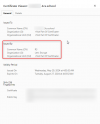
The 3CX server should auto generate a Let's Encrypt cert for all "3cx" hostnames, during installation/initial config.
 
Your certificate should look like this.

1721027385200.png

If you are using a 3cx.uk FQDN and see anything different to the Let's Encrypt certificate it means your firewall is hijacking the SSL connection and inserting its own certificate which is not valid. You should fix your firewall to prevent this from happening.
 
Status
Not open for further replies.

Forum statistics

Threads
111,953
Messages
589,910
Members
164,845
Latest member
tdzski5