Integration CRM API

Status
Not open for further replies.

thiago.lemos@nassautecnol

Silver Partner
Advanced Certified
Joined
Aug 26, 2020
Messages
76
Reaction score
13
I'm integrating a CRM that is not native with 3cx.
When building the template, I did all the field mapping and created a link to query the number, based on [Number] and [APIKey].
But when I test it, it says "Your CRM integration is working fine, but the contact number does not exist. Please check the log for more information or try a different number".
It's as if I couldn't carry out the query based on the number I put to the test.
Any tips?
 

Attachments

  • WhatsApp Image 2023-04-19 at 14.52.49.jpeg
    WhatsApp Image 2023-04-19 at 14.52.49.jpeg
    117.3 KB · Views: 10
One thing to consider is how the phone number was formatted both in the CRM, and by your SIP provider. For example, these phone numbers are not the same: 8016424655 vs 18016424655 vs (801) 642-4655.
 
  • Like
Reactions: Evolute IT
Probably the template is not generating the required outputs to consider the returned value a contact match. Can you show how you're implementing your contact lookup scenario?
 
attached the requested xml.
 

Attachments

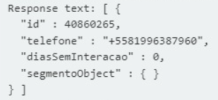
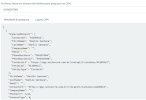
This is what the API is returning:
1682000742805.png

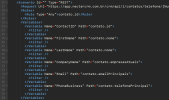
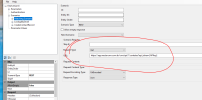
And this is how you're trying to map those values to variables in the template:
1682000777310.png

As you can see, this doesn't match what the server returns. Instead of "contato.id" you should use just "id". Instead of "contato.telefonePrincipal" you should use "telefone". There is no name in the response, so you should do something about that....
 
Hello, thanks to your tip I managed to solve part of the problem.
However, when I receive a call, the customer's name does not appear in 3cx, does this have to do with the profile url? The test area worked to fetch the client and is also creating the client that did not yet exist in the base.
 

Attachments

What app do you use? The contact name will show only on the Webclient/PWA/DesktopApp.
 
I'm using Webapp at the moment.
If it doesn't show, then something is wrong.

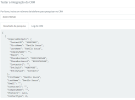
If you use the TEST button in Settings > CRM, and use the same number you use in your real testing, does it grab the name? You would see "Variable FirstName set to (something)".
 
If it doesn't show, then something is wrong.

If you use the TEST button in Settings > CRM, and use the same number you use in your real testing, does it grab the name? You would see "Variable FirstName set to (something)".

In this CRM there is no separation of First Name or Last Name.

Within the test, it is creating the contact within the CRM if it does not exist, if it exists, it just does the search.

1682696633365.png

1682696820833.png
 
  • Like
Reactions: jed and edossantos
Hello, I managed to reach a result according to the CRM documentation, but it is still not working in 3CX, it remains the same.


1683028395448.png


In the second image, with this url I can search in the test and if you don't have it, create it.
1683028828128.png
 
From your screenshot, the contact lookup is working and returning the correct contact. What issue are you having? The contact details will be visible in the Web Client or Desktop App when you receive the call. Don't you see this?
 
From your screenshot, the contact lookup is working and returning the correct contact. What issue are you having? The contact details will be visible in the Web Client or Desktop App when you receive the call. Don't you see this?
Exactly, this is another number of mine that I registered in the base. It should show up, but it doesn't.

1683032100525.png
 
Exactly, this is another number of mine that I registered in the base. It should show up, but it doesn't.

View attachment 35331
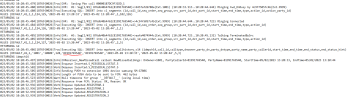
In order to investigate the issue, please enable verbose logs from the 3CX Console > Dashboard > Activity Log > Settings. Then make a test call where you reproduce the issue, and check the 3cxSystemService.log file that you can download from the 3CX Console > Dashboard > Activity Log > Logs button > Instance folder. If there is an issue during contact lookup, you will see it there.
 
  • Like
Reactions: Evolute IT
In order to investigate the issue, please enable verbose logs from the 3CX Console > Dashboard > Activity Log > Settings. Then make a test call where you reproduce the issue, and check the 3cxSystemService.log file that you can download from the 3CX Console > Dashboard > Activity Log > Logs button > Instance folder. If there is an issue during contact lookup, you will see it there.
 

Attachments

Ok, I managed to identify the problem and solve almost everything. Thank you to everyone who has helped me so far.

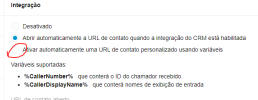
One last question, which variable returns the customer's ID in the link?

1683046308251.png

1683046366267.png
 
Status
Not open for further replies.

Forum statistics

Threads
112,322
Messages
591,887
Members
165,470
Latest member
Robert Lee