Integration to Zoho CRM

Status
Not open for further replies.

Matt Larter

New User
Joined
Oct 27, 2020
Messages
34
Reaction score
5
Hi all,

We have recently opened the API connection between our 3CX management console and our Zoho platform of which I have successfully authorised the token and can see that there are API connection credits being registered as traffic.

What isnt working is the physical logging of activities which I'm guessing is the template configuration. When I test the connection with a valid phone number I get the response:

"Server returned a non successful status code - HTTPStatusCode=BadRequest - Reason= - Content={"code":"INVALID_QUERY","details":{"reason":"the field is not available for search","api_name":"Phone"},"message":"invalid query formed","status":"error"}"

The field in Zoho to which our extensions are registered to users is called "Extension Number" and I believe that the script needs to look for the field "Extension_Number". I tried to alter the script but I still get the same error message as above.

Not being particularly skilled in this, I'm hoping that someone who has had the same issue may be able to guide me.

Thanks.
 
It sounds like you've renamed your Phone field in Zoho to a different name since it can't find it, is it possible for you to change it back? Might be easier than changing the template. reason":"the field is not available for search","api_name":"Phone"}

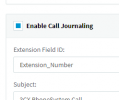
Extension Number can be changed outside the template safely since it's a custom field that you create for Zoho users and not a standard one. For all of these, capitalization matters and use underscores instead of spaces.

1615496140169.png
 
It sounds like you've renamed your Phone field in Zoho to a different name since it can't find it, is it possible for you to change it back? Might be easier than changing the template. reason":"the field is not available for search","api_name":"Phone"}

Extension Number can be changed outside the template safely since it's a custom field that you create for Zoho users and not a standard one. For all of these, capitalization matters and use underscores instead of spaces.

View attachment 21125
Ok so I have removed the "Extension_Number" field and gone back to "Phone", matched it in CRM and re-authorised the API but still getting the same error message.
 
The phone lookup test that you are doing tests against contacts/leads/accounts, not the user extension numbers. So you need to look at the fields on Zoho to make sure that contacts, leads and accounts have a phone field.
 
The phone lookup test that you are doing tests against contacts/leads/accounts, not the user extension numbers. So you need to look at the fields on Zoho to make sure that contacts, leads and accounts have a phone field.
Ok, that may be part of the problem. We have Companies using "Company Phone" and contacts using "Mobile" and "Direct Dial".

Can you test using either of the above fields?
 
The problem here is that the "Phone" field on one of the entities (Contacts, Leads, Accounts) is hidden. In order to understand which entity it is, you need to see the previous log line, which will tell you on which entity 3CX is doing the lookup.

In order to fix this, you need to make this field visible in the Zoho configuration:
https://help.zoho.com/portal/kb/articles/how-to-show-or-hide-fields-in-zoho-crm
 
Ok that makes sense, I've made them non visible to all account types and re added all of the original list.

It now errors on "Fax" but this is in all forms which confuses me more so. As this is a standard field, its not like I can even edit the field.
 
Check the entity causing the issue with the Fax field. Maybe you're checking contacts, and it's on accounts...
 
Check the entity causing the issue with the Fax field. Maybe you're checking contacts, and it's on accounts...
Good point well made, noted and it is now a success "Woo!"...

The next issue is then how to remap the template to look for the user defined fields instead. Is this a case of just editing the template and removing the standing elements and replacing them with the fields we want to map to? I cant alter the CRM as there are 3 other API integrations linked to an MIS, Xero accounts and another Switch workflow. Standing template below...

<Variables>
<Variable Name="Id">data.id<Filter /></Variable>
<Variable Name="FirstName">data.First_Name<Filter /></Variable>
<Variable Name="LastName">data.Last_Name<Filter /></Variable>
<Variable Name="Email">data.Email<Filter /></Variable>
<Variable Name="CompanyPhone">data.Company_Phone<Filter /></Variable>
<Variable Name="Mobile">data.Mobile<Filter /></Variable>
<Variable Name="AccountName">data.Account_Name.name<Filter /></Variable>

Basically we need the following if any template wizards could help?

Contacts: (Removing Phone, Other Phone and Fax)
Company Name
First Name
Last Name
Email
Company Phone
Mobile
Direct Dial

Leads: (Removing Phone and Fax)
Company Name
First Name
Last Name
Email
Company Phone
Mobile

Accounts: (Removing Phone and Fax)
Company Name
First Name
Last Name
Email
Company Phone
Mobile

Any help would be hugely appriciated.
 
You will need to edit the template and upload it as a custom template. To do this:
1) Go to the 3CX Console > Settings > CRM Integration > Show template button. Copy the XML to a new text file. Save this file as ZohoCustom.xml or any name you like, except "Zoho.xml" which is the standard template. Please note that if you use the standard template name, any 3CX update will override your changes.

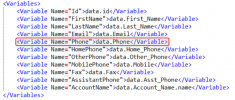
2) Inside the template, you also need to edit the template name, which is in the "Name" attribute on the second line:
1615554360490.png

3) Make your changes, and then upload this file to the 3CX Console > Settings > CRM Integration > Add button.


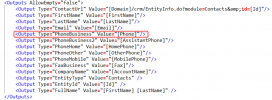
Regarding the changes, you will see that for each entity (contacts, leads, accounts), there is a lookup scenario. In each scenario, you need to edit:
1) The search criteria:
1615554498115.png

2) Variable mapping:
1615554535598.png

3) Output generation:
1615554575586.png


This way you can search using the fields you need, then map those values to variables, and finally generate the outputs using those values.

Please note that if you're using custom fields, you will need to use the Field ID, which is different from what you see in the web page as the field "friendly" name. In order to identify the Field ID, please check this:
https://www.3cx.com/community/threads/zoho-crm-jounaling-issue.76432/#post-347809
 
Hmmm, may be time to find someone who knows what they are doing!
 
  • Like
Reactions: Evolute IT
DM me. I'm used to those. Done a few.
 
  • Like
Reactions: Matt Larter
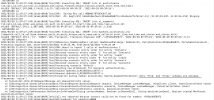
Sorry if I write here but I have not found anything on the form regarding my problem. I did the integration between zoho crm and 3cx pro but I realized that it returns this error which I think is the reason why it does not register any calls. Can anyone help me? I'll post the log side 3cx
 

Attachments

  • 3cx http problem.png
    3cx http problem.png
    465.1 KB · Views: 10
Sorry if I write here but I have not found anything on the form regarding my problem. I did the integration between zoho crm and 3cx pro but I realized that it returns this error which I think is the reason why it does not register any calls. Can anyone help me? I'll post the log side 3cx
Looks like a misconfigured integration. You're not specifying the protocol (https://) in Accounts Server URL or Zoho CRM URL:
https://www.3cx.com/docs/pbx-crm-integration-zoho/
 
Thanks endosantos for the answer, I seem to have set it up correctly. place the screen below. The strange thing is that when I do the test it doesn't give me any errors and after 5 minutes it starts to create problems
 

Attachments

  • Senza nome.png
    Senza nome.png
    33.9 KB · Views: 5
Thanks endosantos for the answer, I seem to have set it up correctly. place the screen below. The strange thing is that when I do the test it doesn't give me any errors and after 5 minutes it starts to create problems
I will need the full 3cxSystemService.log to check what's going on, not just the screenshot you sent. You can send it to me in a private message if you prefer.
 
I sent the log in private. Thank you very much
 
I sent the log in private. Thank you very much
Thanks for sending the logs. I can see that during the authentication scenario, you're getting this error:
2021/03/30 18:51:26.582|16166|0028|Verb|The response is: '{"error":"invalid_code"}'

Then, 3CX can't get the endpoint to which send the REST API calls, and that's why you later get the error about "Only 'http' and 'https' schemes are allowed.".

But the root of the issue is that you're not properly authorizing 3CX to access this web service. This is the procedure you need to follow from the console, after filling the client ID and client secret, you need to press the Authorize button. Check this part of the guide:
https://www.3cx.com/docs/pbx-crm-integration-zoho/#h.683njp8zi1a4

When Zoho prompts to select an account, you need to choose the normal account, and NOT the developer account. If you select the wrong account, you will no be authorizing the access to your data, which is in the normal account. This might be the cause of the issue.
 
Good morning,
the operation was done correctly, in fact if you use the test function of 3cx with an unknown number to zoho it creates the new lead for me.
The problem is that after a few seconds that I have re-authorized the token the error "http ..." reappears. If I try to use the test function with a number known to zoho it does not record any events. below the logs.

2021/04/01 08:46:52.869|16166|0007|Verb|Not processed. Number=3666858872, connection=356, state=Ringing
2021/04/01 08:46:52.869|16166|0007|Verb|Add to processing. Number=3666858872, connection=356, state=Ringing
2021/04/01 08:46:52.869|16166|0007|Info|CRM ProcessActiveConnections(). Attached entries to connection: 1
2021/04/01 08:46:52.869|16166|0007|Verb|CRM: LocalMatches=1. Number=3666858872, connection=356, state=Ringing
2021/04/01 08:46:52.869|16166|0007|Info|CRM: Synchronize(...) called
2021/04/01 08:46:52.870|16166|0012|Verb|Dequeue Inserted.CONNECTION.356
2021/04/01 08:46:52.870|16166|0046|Info|CRM: maxConcurrency=16
2021/04/01 08:46:52.870|16166|0046|Info|CRM: making request to CRM. Number=3666858872
2021/04/01 08:46:52.870|16166|0046|Trac|Obtaining scenario entity order for entity 'Contacts'
2021/04/01 08:46:52.870|16166|0046|Trac|Obtained scenario entity order '1' for entity 'Contacts'
2021/04/01 08:46:52.870|16166|0046|Trac|Obtaining scenario entity order for entity 'Leads'
2021/04/01 08:46:52.870|16166|0046|Trac|Obtained scenario entity order '0' for entity 'Leads'
2021/04/01 08:46:52.870|16166|0046|Trac|Obtaining scenario entity order for entity 'Accounts'
2021/04/01 08:46:52.870|16166|0046|Trac|Obtained scenario entity order '2' for entity 'Accounts'
2021/04/01 08:46:52.871|16166|0046|Verb|Processing scenario 'Default'.
2021/04/01 08:46:52.871|16166|0046|Verb|Creating new HttpClient for Scenario authentication.
2021/04/01 08:46:52.873|16166|0046|Erro|Exception during number processing: System.ArgumentException: Only 'http' and 'https' schemes are allowed. (Parameter 'value')
at System.Net.Http.HttpRequestMessage.set_RequestUri(Uri value)
at CrmIntegration.ScenarioProcessorBase.ProcessRequest(ScenarioRequest request, IValueManager customManager, HttpClient client, CancellationToken token)
at CrmIntegration.ScenarioProcessorBase.ProcessScenario(ProtocolScenario scenario, IValueManager customManager, CancellationToken token)
at CrmIntegration.ScenarioProcessorBase.Execute(ProtocolScenario scenario, CancellationToken token)
at CrmIntegration.CrmProcessor.GetContactInfoFromCrm(String contactNumber, Boolean isInboundCall, String destinationEmail, Boolean createIfNotFound, CancellationToken token)
2021/04/01 08:46:52.873|16166|0046|Verb|Removed from processing. Number=3666858872
2021/04/01 08:46:52.873|16166|0046|Info|CRM: processing of 3666858872 has been finished
2021/04/01 08:46:53.176|16166|0007|Verb|Enqueue Updated.REGISTRAR.103
2021/04/01 08:46:53.176|16166|0007|Verb|Enqueue Updated.REGISTRATION.103
2021/04/01 08:46:53.176|16166|0012|Verb|Dequeue Updated.REGISTRAR.103
2021/04/01 08:46:53.176|16166|0012|Verb|Dequeue Updated.REGISTRATION.103
2021/04/01 08:47:07.669|16166|0007|Verb|Enqueue Updated.CONNECTION.355
2021/04/01 08:47:07.669|16166|0012|Verb|Dequeue Updated.CONNECTION.355
2021/04/01 08:47:07.672|16166|0007|Verb|Enqueue Updated.CONNECTION.356
2021/04/01 08:47:07.672|16166|0012|Verb|Dequeue Updated.CONNECTION.356
2021/04/01 08:47:08.715|16166|0007|Verb|Enqueue Deleted.CONNECTION.356
2021/04/01 08:47:08.715|16166|0007|Verb|Enqueue Deleted.CONNECTION.355
2021/04/01 08:47:08.716|16166|0012|Verb|Dequeue Deleted.CONNECTION.356
2021/04/01 08:47:08.716|16166|0012|Verb|Dequeue Deleted.CONNECTION.355
2021/04/01 08:47:09.246|16166|0018|Trac|CHR: Receiver.OnReadyToRead()
2021/04/01 08:47:09.246|16166|0018|Trac|CHR: _sock.Receive == 4
2021/04/01 08:47:09.247|16166|0018|Trac|CHR: Received 3173 out of 3173 bytes
2021/04/01 08:47:09.247|16166|0018|Trac|CHR: callOnPacketReceived()
2021/04/01 08:47:09.247|16166|0018|Trac|CHR: Received 3173 bytes, start parsing
2021/04/01 08:47:09.247|16166|0018|Verb|CHR: Adding event: 2021-04-01 08:46:50.618|IncomingCall|000001788C2F41F8_113|7b738b0c0587/Participant DN.10/Extension dn-name='Francesco Facipieri' epname='Ext.10'
>7b738b0c0587/Participant DN.10/Extension dn-name='Francesco Facipieri' epname='Ext.10'
disp_name=Francesco Facipieri
number=10
sip.contact=<sip:[email protected]:64794>
sip.from="Francesco Facipieri"<sip:[email protected]3cx.it:5060>;tag=31739879
sip.rl_uri=sip:[email protected]3cx.it:5060;user=phone
sip.src_addr=88.147.110.47:64794
sip.to="3666858872" <sip:[email protected]3cx.it:5060;user=phone>
sip.user_ag=Fanvil X5 1.4.0.2090 0c383e14c5c0
target=3666858872
 
Status
Not open for further replies.