- Joined
- Sep 18, 2024
- Messages
- 67
- Reaction score
- 16
Hi team,
I have a 2 digits small system with 7 extensions (10-16).
I want to make an intercom call between 2 exts, but actually (so ashamed), I don't know how very well how to make it.
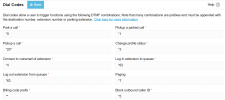
I research a bit and what I found is that I should configure *9 as the intercom number on the dial codes section, but I couldn't find that feature (see attached image).
So I went to the Help section, and found this:
Important: Intercom dial code is disabled by default. If you want your phone to Auto-answer (only applicable for legacy devices) you need to configure a dial code in the “Settings” > ”System” > “Dial Codes” > “Paging”. This dial code must be unique and must not conflict with any of the other dial codes.
So I put *7 as the star code for Paging to enable the intercom calls (I understand that, maybe I'm wrong). In this case, to make an intercom call 2 ways (not Paging one way), should I dial *710 to make a intercom call to extension 10?
I really want to use and prefer *7 instead *9 to avoid any possible issue with the emergency number, but since I don't see the intercom section, I'm a bit confused.
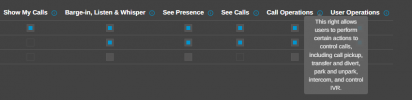
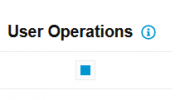
On the other hand, I enabled the User Operations feature for each user so they have the ability to make intercom calls, right?
Thanks for your help and support on this in advance.
Sincerely,
Anthony R.
I have a 2 digits small system with 7 extensions (10-16).
I want to make an intercom call between 2 exts, but actually (so ashamed), I don't know how very well how to make it.
I research a bit and what I found is that I should configure *9 as the intercom number on the dial codes section, but I couldn't find that feature (see attached image).
So I went to the Help section, and found this:
Start an Intercom Call
Prefix the extension you wish to call with *9, followed by the extension. For example, to make an intercom call to extension 100 you should dial: *9100Important: Intercom dial code is disabled by default. If you want your phone to Auto-answer (only applicable for legacy devices) you need to configure a dial code in the “Settings” > ”System” > “Dial Codes” > “Paging”. This dial code must be unique and must not conflict with any of the other dial codes.
So I put *7 as the star code for Paging to enable the intercom calls (I understand that, maybe I'm wrong). In this case, to make an intercom call 2 ways (not Paging one way), should I dial *710 to make a intercom call to extension 10?
I really want to use and prefer *7 instead *9 to avoid any possible issue with the emergency number, but since I don't see the intercom section, I'm a bit confused.
On the other hand, I enabled the User Operations feature for each user so they have the ability to make intercom calls, right?
Thanks for your help and support on this in advance.
Sincerely,
Anthony R.