Interface with Bitrix24

Status
Not open for further replies.

HasanBalcok

Customer
Joined
Mar 5, 2021
Messages
15
Reaction score
0
Hello

I have a question. We have an interface with Bitrix24, normally for each incoming call a new window should open at our end where we can process the lead. Normally, a window should open for each employee who is logged into the queue ( English Ring Groups ) of 3cx. Until a short time ago this also worked. Only here we have the problem that the lead is not shown to everyone ( I can gladly send you a screenshot). Therefore not every employee can see the lead. In addition, I would like to know how we can determine the person responsible for the incoming calls. We ask for your help and thank you in advance for your effort

Hasan
 
Hello Hasan,

Are you using the Web Client or the Chrome Extension on your agent's PCs? Please note that one of them is required to get the popup.

Is the contact being matched to the CRM contact? Do you see them being added as 3CX contacts? Can you make a test lookup from the 3CX Console > Settings > CRM Integration > Test button?
 
Helllo,

Yes we Use the Chrome Extension on our Agent PC and I will make a Test.
I do a Video from my Settings.

I will also do a test today and see if a window opens or not and let you know.

Thank you for the good support and quick response
 
First, remove that video as soon as you can, because you're exposing your web hook URL. Also delete that web hook from Bitrix and create a new one, so you're not hacked...

Said this, you're pressing the "Test" button but not doing the test. You need to enter a phone number and execute a test lookup.
 
Helllo,

Yes we Use the Chrome Extension on our Agent PC and I will make a Test.
I do a Video from my Settings.

I will also do a test today and see if a window opens or not and let you know.

Thank you for the good support and quick response
 
Helllo,

Yes we Use the Chrome Extension on our Agent PC and I will make a Test.
I do a Video from my Settings.

I will also do a test today and see if a window opens or not and let you know.

Thank you for the good support and quick response
 
Hello ,

thanks for the hint. Can you tell me how to delete my message? Thanks
 
Hello ,

thanks for the hint. Can you tell me how to delete my message? Thanks
Not the message. Remove the video that you uploaded. You used a cloud service for that, you should check their support if you don't know how to do it. Or just remove the web hook in Bitrix, and the video will contain invalid credentials.
 
  • Like
Reactions: HasanBalcok
I do it. Thanks
 
Hello Dear Support,

Hello Dear Support,
we do not get any further. A window should open for each incoming call. However, only one window opens with the saved number. New leads are not opened. What can I do ?
 
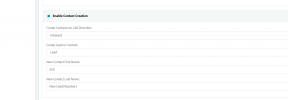
Enable contact creation.
 
Hello Dear Support,

Hello Dear Support,
we do not get any further. A window should open for each incoming call. However, only one window opens with the saved number. New leads are not opened. What can I do ?
Did you test the contact lookup? Is it working and returning valid contact details?
 
Currently, the contacts that we saved in the past are displayed correctly. When they call, a tab also opens on the computer. However, when a new number calls, no tab opens. It rings, but we do not see the contact information. Can you please help us?
 
Currently, the contacts that we saved in the past are displayed correctly. When they call, a tab also opens on the computer. However, when a new number calls, no tab opens. It rings, but we do not see the contact information. Can you please help us?
Did you enable the contact creation in the 3CX Console > Settings > CRM Integration?
 
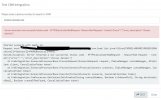
You should enable verbose logs from the 3CX Console > Dashboard > Activity Log > Settings, make a test call, and check the 3cxSystemService.log file. There you will see any error while creating the contact.
 
I do a test and this is the Error WhatsApp Image 2021-03-16 at 14.13.31.jpeg
 
Well, the error is pretty clear: "Access Denied". Are you using the Web Hook URL that you deleted because you exposed in a public video? You should create a new web hook, and configure it in 3CX.
 
  • Like
Reactions: Evolute IT
Thank you for the info. It was helpful. Now a window opens for the leads. I still have two small Problems.

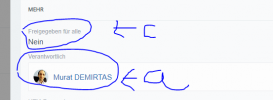
a- When opening a lead, I want to determine who is responsible.
b- Another employee is denied access.
c- the lead should be released for everyone

Are you aware of these errors?

1616767565463.png
 
Status
Not open for further replies.

Latest Posts

Forum statistics

Threads
111,990
Messages
590,161
Members
164,925
Latest member
batarong