IP Blocked..

Status
Not open for further replies.

Baz111191

New Customer
Joined
Feb 4, 2021
Messages
11
Reaction score
1
I have recently started using this service and am happy with how it has turned out so far. However, when looking into some settings I was looking at why there was no display picture showing for the agent within the chatbox. I think I found the setting within the WebClient (option to upload a display picture). I set up a separate extension for the new agent I wanted to use. When signing out of the WebClient from the admin account and logging in to the new extension it had blocked my IP address. This has also meant that i cannot access the admin account. Is there a way to: 1. unblock my IP so I can re-access my account? 2. How can I prevent this from happening again?

P.S. Profile picture displaying as a default no-photo image within the chatbox. I have a display image uploaded in the default agent setting within the WP plugin.

Any help would be greatly appreciated.
 
Log in to your MGMT console from another WAN IP and unblock your IP then add your IP to the whitelist.

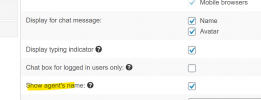
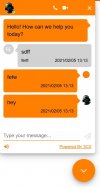
If you have "show agents name" selected and the agent "takes ownership" of the chat, it will use the picture specified for that ext. if that ext has no pic, then it will show no pic.

1612525835055.png
 
Thank you for your response. That worked a treat! These are just some of the finishing touches.

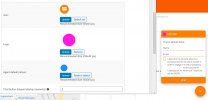
The last niggle would be the logo picture. It has one in the WP Plugin but I cannot seem to see where it appears in the chatbox. How do I get this to show?
 
1.jpg

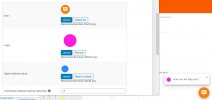
2.jpg

3.jpg
 
Again, thank you for your quick response. I understand where the company logo is supposed to display. However, for me, this shows the display picture I have inserted into the agents extension profile for all fields an not the individual ones uploaded into the plugin. Does this image take priority over the images uploaded into Wordpress?

Does this have something to do with only having one agent set up? This was just a thought as with only 1 profile set up then that is the only agent for the system to use?

I appreciate all the help you have given me kieferschild :)
 
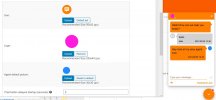
When you have the option selected for "Show Agents Name" and the Agent has "taken" ownership of the chat then all avatars change including the company name. Here is an example of me taking ownership of a chat.

4.jpg
 
Last edited:
  • Like
Reactions: NickD_3CX
Status
Not open for further replies.

Forum statistics

Threads
112,349
Messages
592,026
Members
165,512
Latest member
gmacinit