- Joined
- Jul 19, 2023
- Messages
- 7
- Reaction score
- 0
Hello,
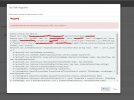
We're trying to make a custom CRM integration .So I have a template and the Test button shows is working but getting this error:
"Server returned a non successful status code - HTTPStatusCode=NotFound - Reason=Not Found - Content={"status":404,"message":"No data were found"}"
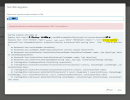
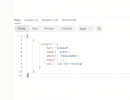
Additionally, the phone number-based contact lookup gives the following result. (Getting proper result while checking in POSTMAN).
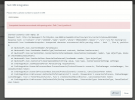
"Unexpected character encountered while parsing value: . Path '', line 0, position 0.
Started scenario with empty id
Request text: http://192.168.xx/xx/api/3cx/contacts?phone=5631XXXXXX
Response text: {"id":"123456","name":"Mr.weeqweq","phone":"5631XXXXXX","email":"[email protected]","account_number":"100000000064879","customer_id":"156497989","loan_no":"","product_type":"Ind","defaulter_type":"TELECOM","url":"http:\/\/192.168.xx.xx\/xx\/admin\/telecom_recoveries\/telecom_recovery\/1374169","type":"telecom"}
Newtonsoft.Json.JsonReaderException: Unexpected character encountered while parsing value: . Path '', line 0, position 0.
at Newtonsoft.Json.JsonTextReader.ParseValue()
at Newtonsoft.Json.JsonReader.ReadForType(JsonContract contract, Boolean hasConverter)
at Newtonsoft.Json.Serialization.JsonSerializerInternalReader.Deserialize(JsonReader reader, Type objectType, Boolean checkAdditionalContent)
at Newtonsoft.Json.JsonSerializer.DeserializeInternal(JsonReader reader, Type objectType)
at Newtonsoft.Json.JsonConvert.DeserializeObject(String value, Type type, JsonSerializerSettings settings)
at Newtonsoft.Json.JsonConvert.DeserializeObject(String value)
at CrmIntegration.JsonResponseParser.Parse(String responseText)
at CrmIntegration.ScenarioProcessorBase.ProcessScenario(ProtocolScenario scenario, IValueManager customManager, CancellationToken token)
at CrmIntegration.ScenarioProcessorBase.Execute(ProtocolScenario scenario, CancellationToken token)
at CrmIntegration.CrmProcessor.GetContactInfoFromCrm(List`1 result, IEnumerable`1 scenariosToProcess, IValueManager customManager, Func`2 filterResultsFunctor, Func`1 createContactRecordFunctor, CancellationToken token)
at CrmIntegration.CrmProcessor.GetContactInfo(String contactNumber, InteractionTypes interactionType, CancellationToken token)."
My template scenario ,
<Scenarios>
<Scenario Id="" Type="REST">
<Request Url="http://192.168.xx.xx/xx/api/3cx/contacts?phone=[Number]" MessagePasses="0" RequestEncoding="UrlEncoded" RequestType="Get" ResponseType="Json" />
<Rules>
<Rule Type="Any">contact.id</Rule>
</Rules>
<Variables>
<Variable Name="ContactID" Path="contact.id">
<Filter />
</Variable>
<Variable Name="FirstName" Path="contact.name">
<Filter />
</Variable>
<Variable Name="CompanyName" Path="contact.name">
<Filter />
</Variable>
<Variable Name="Email" Path="contact.email">
<Filter />
</Variable>
<Variable Name="PhoneBusiness" Path="contact.phone">
<Filter />
</Variable>
<Variable Name="PhoneMobile" Path="contact.phone">
<Filter />
</Variable>
<Variable Name="CustomValue" Path="contact.type">
<Filter />
</Variable>
<Variable Name="ContactUrl" Path="contact.url">
<Filter />
</Variable>
</Variables>
Please help me to fix this issue.
We're trying to make a custom CRM integration .So I have a template and the Test button shows is working but getting this error:
"Server returned a non successful status code - HTTPStatusCode=NotFound - Reason=Not Found - Content={"status":404,"message":"No data were found"}"
Additionally, the phone number-based contact lookup gives the following result. (Getting proper result while checking in POSTMAN).
"Unexpected character encountered while parsing value: . Path '', line 0, position 0.
Started scenario with empty id
Request text: http://192.168.xx/xx/api/3cx/contacts?phone=5631XXXXXX
Response text: {"id":"123456","name":"Mr.weeqweq","phone":"5631XXXXXX","email":"[email protected]","account_number":"100000000064879","customer_id":"156497989","loan_no":"","product_type":"Ind","defaulter_type":"TELECOM","url":"http:\/\/192.168.xx.xx\/xx\/admin\/telecom_recoveries\/telecom_recovery\/1374169","type":"telecom"}
Newtonsoft.Json.JsonReaderException: Unexpected character encountered while parsing value: . Path '', line 0, position 0.
at Newtonsoft.Json.JsonTextReader.ParseValue()
at Newtonsoft.Json.JsonReader.ReadForType(JsonContract contract, Boolean hasConverter)
at Newtonsoft.Json.Serialization.JsonSerializerInternalReader.Deserialize(JsonReader reader, Type objectType, Boolean checkAdditionalContent)
at Newtonsoft.Json.JsonSerializer.DeserializeInternal(JsonReader reader, Type objectType)
at Newtonsoft.Json.JsonConvert.DeserializeObject(String value, Type type, JsonSerializerSettings settings)
at Newtonsoft.Json.JsonConvert.DeserializeObject(String value)
at CrmIntegration.JsonResponseParser.Parse(String responseText)
at CrmIntegration.ScenarioProcessorBase.ProcessScenario(ProtocolScenario scenario, IValueManager customManager, CancellationToken token)
at CrmIntegration.ScenarioProcessorBase.Execute(ProtocolScenario scenario, CancellationToken token)
at CrmIntegration.CrmProcessor.GetContactInfoFromCrm(List`1 result, IEnumerable`1 scenariosToProcess, IValueManager customManager, Func`2 filterResultsFunctor, Func`1 createContactRecordFunctor, CancellationToken token)
at CrmIntegration.CrmProcessor.GetContactInfo(String contactNumber, InteractionTypes interactionType, CancellationToken token)."
My template scenario ,
<Scenarios>
<Scenario Id="" Type="REST">
<Request Url="http://192.168.xx.xx/xx/api/3cx/contacts?phone=[Number]" MessagePasses="0" RequestEncoding="UrlEncoded" RequestType="Get" ResponseType="Json" />
<Rules>
<Rule Type="Any">contact.id</Rule>
</Rules>
<Variables>
<Variable Name="ContactID" Path="contact.id">
<Filter />
</Variable>
<Variable Name="FirstName" Path="contact.name">
<Filter />
</Variable>
<Variable Name="CompanyName" Path="contact.name">
<Filter />
</Variable>
<Variable Name="Email" Path="contact.email">
<Filter />
</Variable>
<Variable Name="PhoneBusiness" Path="contact.phone">
<Filter />
</Variable>
<Variable Name="PhoneMobile" Path="contact.phone">
<Filter />
</Variable>
<Variable Name="CustomValue" Path="contact.type">
<Filter />
</Variable>
<Variable Name="ContactUrl" Path="contact.url">
<Filter />
</Variable>
</Variables>
Please help me to fix this issue.