Issues to auth while connecting our CRM-Solution

Status
Not open for further replies.

d3nis

Customer
Joined
Mar 10, 2021
Messages
11
Reaction score
1
Hey there,
I am trying to connect our CRM as an integration to a 3CX account by using the template generator. As a product manager of this CRM I am doing some kind of research and prototyping.
With static authentication I have already managed to successfully test some calls via the template generator. Unfortunately I can't manage to implement actual authentication.

The actual authentication works as follows:
A request is sent to the endpoint.
Code:
curl --location --request GET 'https://thegatewayhere.com/admin-token-service/stable/public/adminUser/authenticate' \
--header 'token: mySecretToken'
This call contains a token in the header and returns a cognitoToken as result in plaintext.

This cognitoToken should now be used in the header for all subsequent calls. For example, to call a contact:
Code:
curl --location --request GET 'https://api.production.cloudios.flowfact-prod.cloud/entity-service/entities/72e014c3-f4c2-41f8-bea3-aa9e2a1eac4d' \
--header 'cognitoToken: theCognitoTokenHere'

Unfortunately I can't make it use the cognitoToken from the first call for further calls. It seems that the header is not taken into account when requesting a contact. However, you can see in testing that the call to fetch the cognitoToken was successful. What am I doing wrong?

Here is my current template:
XML:
<?xml version="1.0"?>
<Crm xmlns:xsi="http://www.w3.org/2001/XMLSchema-instance" xmlns:xsd="http://www.w3.org/2001/XMLSchema" Country="US" Name="FLOWFACT2" Version="1">
  <Number Prefix="Plus" MaxLength="500" />
  <Connection MaxConcurrentRequests="2" />
  <Authentication Type="Scenario">
    <Value>Auth</Value>
  </Authentication>
  <Scenarios>
    <Scenario Id="Auth" Type="REST">
      <Request SkipIf="" Url="https://thegatewayhere.com/admin-token-service/stable/public/adminUser/authenticate" MessagePasses="0" RequestEncoding="UrlEncoded" RequestType="Get" ResponseType="PlainText">
        <Headers>
          <Value Key="token" Passes="0" Type="String">mySecretToken</Value>
        </Headers>
      </Request>
      <Variables>
        <Variable Name="cognitoToken">
          <Filter />
        </Variable>
      </Variables>
      <Outputs AllowEmpty="false">
        <Output Type="HeaderName" Passes="0" Value="cognitoToken" />
        <Output Type="HeaderValue" Passes="0" Value="[cognitoToken]" />
      </Outputs>
    </Scenario>
    <Scenario Id="" Type="REST">
      <Request Url="https://thegatewayhere.com/entity-service/entities/72e014c3-f4c2-41f8-bea3-aa9e2a1eac4d" MessagePasses="0" RequestEncoding="UrlEncoded" RequestType="Get" ResponseType="Json">
      </Request>
      <Rules>
        <Rule Type="Any">id</Rule>
      </Rules>
      <Variables>
        <Variable Name="ContactID" Path="id">
          <Filter />
        </Variable>
        <Variable Name="FirstName" Path="firstName.values">
          <Filter />
        </Variable>
        <Variable Name="LastName" Path="lastName.values">
          <Filter />
        </Variable>
        <Variable Name="CompanyName" Path="company.values">
          <Filter />
        </Variable>
        <Variable Name="PhoneBusiness" Path="phones.values.number">
          <Filter />
        </Variable>
      </Variables>
      <Outputs AllowEmpty="false">
        <Output Type="ContactID" Passes="0" Value="[ContactID]" />
        <Output Type="FirstName" Passes="0" Value="[FirstName]" />
        <Output Type="LastName" Passes="0" Value="[LastName]" />
        <Output Type="CompanyName" Passes="0" Value="[CompanyName]" />
        <Output Type="PhoneBusiness" Passes="0" Value="[PhoneBusiness]" />
        <Output Type="ContactUrl" Passes="0" Value="https://apps.flowfact.com/entities/entity-overview/entityId/[ContactID]/schemaId/contacts/layoutId/contacts" />
      </Outputs>
    </Scenario>
  </Scenarios>
</Crm>

Would be great if you can support me. If it works we can have a general template for our crm solution provided to all (potential) customers.
 
Is that token expiring? If so, try using the OAuth2 auth, and edit the Response Scenario to your needs.
 
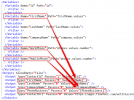
I see 2 problems in your template, in the "Auth" scenario where you get the cognitoToken:
1) You're not defining Rules. If you don't do this, 3CX can't identify a record from the response, and then there will be no match.

2) You're defining the variable as follows:
XML:
<Variable Name="cognitoToken">
  <Filter />
</Variable>

But you must define the Path, otherwise the variable will remain empty...


The problem here is that your response is plain text, and now that I see this, even if the tool provides the PlainText option for the scenario, in that case all the response is set to the root node, and this can't be read using a path, because the path would be empty in this case, and you can't specify an empty path. Then, you can't use PlainText. You will need to return JSON or XML, and then you will be able to add rules and variable path, to tell 3CX exactly from where the value should be taken.
 
  • Like
Reactions: Evolute IT
Hey edossantos,
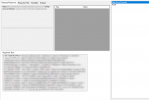
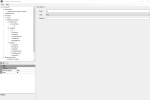
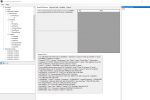
I guess you're right. I'll try to implement some kind of proxy, which transforms the plaintext into a json. Then it might work. Meanwhile I just mocked the Auth by adding a static header with the right credentials into the contact lookup call. It works and I get my result as json:
1616431738311.png

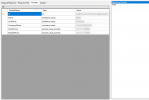
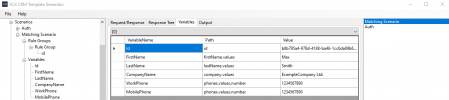
Also the Variables are filled.
1616431770758.png

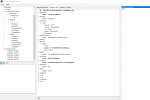
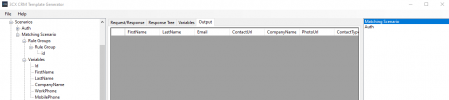
But the Output is empty.
1616431806176.png

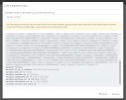
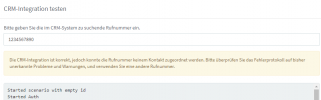
And by testing in 3cx it just tells me the following message:
1616431924121.png

What am I doing wrong? The contact has been found but is still not displayed, when I do a test call.
Could you help me in here?

Thanks and regards...Denis
 
You need to ensure that:
  • You're returning the FirstName, LastName, or CompanyName outputs
  • You're returning the number being searched in a phone output.
  • You're returning a unique URL in the ContactUrl output.
If you don't do that, the returned record is ignored.
 
  • Like
Reactions: Evolute IT
Hello edossantos,
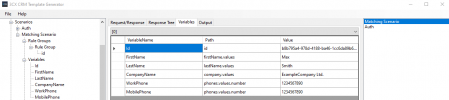
how do I return that? The "Variables" are filled and have a value (see screenshot), but it is not returned in the "Output". I don't know why. It seems to make no difference, if I set a placeholder or a static value in the output.
1616450859459.png
 
Maybe you're not properly identifying the records from the response in the Rule Groups. I would need to see the full logs to understand what's wrong here...
 
Right now I am just looking for the id. Is that wrong?
1616684700724.png

Here the result set, which seems to work, but the output is still empty:
1616684780786.png
1616684844968.png
1616684855235.png

1616684869642.png


This is the json from the response:
JSON:
{
    "id": "b8b795a4-978d-4188-ba46-1cc6da89b6ec",
    "lastName": {
        "values": [
            "Smith"
        ]
    },
    "identifier": {
        "values": [
            "97326982"
        ]
    },
    "addresses": {
        "values": [
            {
                "zipcode": "10117",
                "country": "Deutschland",
                "city": "Berlin",
                "street": "Pariser Platz 1",
                "geolocation": {
                    "longitude": 13.3776285,
                    "latitude": 52.5161577
                }
            }
        ]
    },
    "salutationletter": {
        "values": [
            "Sehr geehrte/r Frau/Herr Smith,"
        ]
    },
    "latitude": {
        "values": [
            52.5161577
        ]
    },
    "phones": {
        "values": [
            {
                "note": "",
                "number": "1234567890",
                "type": "office"
            }
        ]
    },
    "emails": {
        "values": [
            "[email protected]"
        ]
    },
    "firstName": {
        "values": [
            "Max"
        ]
    },
    "company": {
        "values": [
            "ExampleCompany Ltd."
        ]
    },
    "salutation": {
        "values": [
            "Mr."
        ]
    },
    "status": {
        "values": [
            "active"
        ]
    },
    "longitude": {
        "values": [
            13.3776285
        ]
    },
    "_acps": [
        {
            "groupId": "8f78d1a2-5a61-41db-8ae6-5a1f70d6551b",
            "accessLevel": 7
        }
    ],
    "_acls": [
        {
            "id": "8f78d1a2-5a61-41db-8ae6-5a1f70d6551b",
            "uri": "groups/groups/8f78d1a2-5a61-41db-8ae6-5a1f70d6551b",
            "read": true,
            "search": true,
            "write": true,
            "delete": true,
            "type": "groups"
        }
    ],
    "_metadata": {
        "id": "b8b795a4-978d-4188-ba46-1cc6da89b6ec",
        "schema": "contacts",
        "timestamp": "1616684469416",
        "createdTimestamp": "1616684424802",
        "lastModifier": "efdbccb9-d928-4c26-a630-fe1bce5678a1",
        "documentType": "9040c578-830e-48b3-9e3c-4d2ab0149b46"
    },
    "_refs": [
        {
            "id": "efdbccb9-d928-4c26-a630-fe1bce5678a1",
            "uri": "users/users/efdbccb9-d928-4c26-a630-fe1bce5678a1",
            "type": "user",
            "relation": "creator"
        },
        {
            "id": "0bc268a4-f34d-4b0e-8c3f-2b64b4106fab",
            "uri": "companies/companies/0bc268a4-f34d-4b0e-8c3f-2b64b4106fab",
            "type": "company",
            "relation": "creator"
        }
    ]
}

I tried to giva as many information as possible to solve my issue...sorry for inserting so much pictures and code :)
 

Attachments

  • 1616684862797.png
    1616684862797.png
    33.1 KB · Views: 4
Last edited:
I see that the CRM is returning the phone number 1234567890. Is that the number you're searching for? Please note that the response must include the number being searched.
 
Yes, I just entered the number in the contact, because it is used in the sample test call if I am right.
1616711335175.png
 
Can you upload this template to the 3CX Console > Settings > CRM Integration, and then make a test lookup using the Test button there? The behaviour will be the same, the lookup will not work, but I would like to see the logs generated from there. That will give me an idea of what's wrong.
 
Hey, sure I can do. Everything what helps :)
The result looks like this:
Code:
Started scenario with empty id
Started Auth
Request text: https://api.<enviroment>.cloud/admin-token-service/stable/public/adminUser/authenticate
Response text: eyJraWQiO...token goes on...
Response finished
Finished Auth
Request text: https://api.<enviroment>.cloud/entity-service/entities/b8b795a4-978d-4188-ba46-1cc6da89b6ec
Response text: {"id":"b8b795a4-978d-4188-ba46-1cc6da89b6ec","lastName":{"values":["Smith"]},"identifier":{"values":["97326982"]},"addresses":{"values":[{"zipcode":"10117","country":"Deutschland","city":"Berlin","street":"Pariser Platz 1","geolocation":{"longitude":13.3776285,"latitude":52.5161577}}]},"salutationletter":{"values":["Sehr geehrte/r Frau/Herr Smith,"]},"latitude":{"values":[52.5161577]},"isBlocked":{"values":[true]},"phones":{"values":[{"note":"","number":"1234567890","type":"office"}]},"emails":{"values":["[email protected]"]},"firstName":{"values":["Max"]},"company":{"values":["ExampleCompany Ltd."]},"salutation":{"values":["Mr."]},"status":{"values":["active"]},"longitude":{"values":[13.3776285]},"_acps":[{"groupId":"8f78d1a2-5a61-41db-8ae6-5a1f70d6551b","accessLevel":7}],"_acls":[{"id":"8f78d1a2-5a61-41db-8ae6-5a1f70d6551b","uri":"groups/groups/8f78d1a2-5a61-41db-8ae6-5a1f70d6551b","read":true,"search":true,"write":true,"delete":true,"type":"groups"}],"_metadata":{"id":"b8b795a4-978d-4188-ba46-1cc6da89b6ec","schema":"contacts","timestamp":"1616685800850","createdTimestamp":"1616684424802","lastModifier":"efdbccb9-d928-4c26-a630-fe1bce5678a1","documentType":"9040c578-830e-48b3-9e3c-4d2ab0149b46"},"_refs":[{"id":"efdbccb9-d928-4c26-a630-fe1bce5678a1","uri":"users/users/efdbccb9-d928-4c26-a630-fe1bce5678a1","type":"user","relation":"creator"},{"id":"0bc268a4-f34d-4b0e-8c3f-2b64b4106fab","uri":"companies/companies/0bc268a4-f34d-4b0e-8c3f-2b64b4106fab","type":"company","relation":"creator"}]}
Response finished
Variable Id set to b8b795a4-978d-4188-ba46-1cc6da89b6ec
Variable FirstName set to Max
Variable LastName set to Smith
Variable CompanyName set to ExampleCompany Ltd.
Variable WorkPhone set to 1234567890
Variable MobilePhone set to 1234567890
Finished scenario with empty id

And on top there is the following advice:
Translated german hint to english:
CRM integration is correct, but the phone number could not be matched to a contact. Please check the error log for previously undetected problems and warnings, and use a different phone number.

1617090636188.png
 
Can you attach here the XML template you're using. I can see that it's not the same that you posted in the original post, because there are new variable mappings in this log. I need this to understand.
 
Sure, please find attached.
Because of the authentication issue i mentioned before, i just put the authentication manually in the header of the Matching Scenario. This token will expire after a while. You can get a new token by using the API-Call from the Auth Scenario, which is the following:

Code:
curl --location --request GET 'https://api.production.cloudios.flowfact-prod.cloud/admin-token-service/stable/public/adminUser/authenticate' \
--header 'token: 910f0577-186c-4761-9019-ba1ae29c5a7d'

It's just a test system...so feel free to try out.
 

Attachments

First, please note that the authentication scenario will not work. The authentication server returns the token in plain text, and there is no way you can get it into a variable for further processing. Your server must return JSON or XML to be able to properly work with this. Otherwise you will be able to test this hardcoding a token, but when you need to go to production you will not be able to do it. So just keep this in mind...

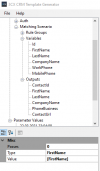
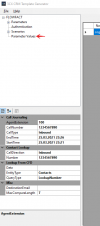
Said this, now let's focus on the contact lookup scenario. You're mapping the values from the JSON response to variables, but then when you map these variables to outputs, the variable names are wrong. Check this screenshot with the details:
1617202196628.png


1) You define a variable FirstName but then you use [Name] for the output. The variable [Name] is empty of course.

2) You defina a variable WorkPhone and another variable MobilePhone, but when you generate the PhoneBusiness output, you try to read the value from variable [PhoneBusiness] which doesn't exist. You need to use [WorkPhone] or [MobilePhone] there.

If the output doesn't include the phone number being searched, the record is discarded, which is what's happening here.
 
  • Like
Reactions: jed and Evolute IT
I am not sure if it is the same saying in english, but in germany you would say "sometimes you cannot see the forest for the trees," Thank you so much edossantos. Now I made it! It works fine! And we can start testing.
By the way: if the QA give its GO, is it somehow possible to get into your list of templates for CRM integrations?
In addition: is the 3CX GDPR-compliant in european standards?

And again, thanks for the great support!
 
  • Like
Reactions: edossantos
I am not sure if it is the same saying in english, but in germany you would say "sometimes you cannot see the forest for the trees," Thank you so much edossantos. Now I made it! It works fine! And we can start testing.
Glad to know you have it working!

By the way: if the QA give its GO, is it somehow possible to get into your list of templates for CRM integrations?
Well, this is something we would need to evaluate. Supporting a CRM involves a lot of work apart from the initial development and testing, like re-test everything with every release of 3CX, create automation tests to automatically test it every night, giving support to users having issues with it, just to name a few. If the CRM is widely used, we can consider adding it to the list. Please send me a PM with all the details you have about it, and we'll check it internally with the team.

In addition: is the 3CX GDPR-compliant in european standards?
Yes, of course. You can check our privacy policy here:
https://www.3cx.com/company/privacy/
 
Status
Not open for further replies.

Latest Posts

Forum statistics

Threads
112,323
Messages
591,896
Members
165,474
Latest member
costionofrei