Solved Issues with SMTP latest version

Status
Not open for further replies.

Mr F

Forum User
Joined
Sep 27, 2023
Messages
27
Reaction score
6
I upgraded from V20 8 to the latest version

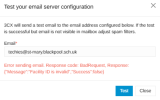
Noticed voicemails were not being sent as attachments using the 3cx smtp server, giving an error of

Error sending email. Response code: BadRequest, Response: {"Message":"Facility ID is invalid","Success":false}

I restored back to V20 version 8 and SMTP has started working again, I believe the update I upgraded to was version 8 secondupd (possibly the update after this)
 

Attachments
  • 1781683721062.png
    1781683721062.png
    23 KB · Views: 10
Last edited:
What happens if you do a license refresh?
 
@Mr F do you have more than 1 public ip addresses in your network going out to the Internet ?
If so, lets say on the PBX you have Publc ip 1.2.3.4 but you have 2 WAN IPs " 1.2.3.4 and also 5.6.7.8 ".
Is your oubound traffic go out from public ip 1.2.3.4 or its going out from 5.6.7.8 ?
 
Last edited:
@Mr F do you have more than 1 public ip addresses in your network going out to the Internet ?
If so, lets say on the PBX you have Publc ip 1.2.3.4 but you have 2 WAN IPs " 1.2.3.4 and also 5.6.7.8 ".
Is your oubound traffic go out from public ip 1.2.3.4 or its going out from 5.6.7.8 ?
I only have one public IP address on interface 1 and a secondary interface configured for my SIP WAN the correct public IP matches what's shown in the dashboard, although i do have a static route in my /etc/network/interfaces to push all voice traffic to my SIP provider
 
Last edited:
I was forced to restore back to V20 update 8 because we are a school and it affected absence emails from being sent and transcribed , we are now back in a working state but it does worry me as at some point i need to upgrade the version.
 
@Mr F put your FQDN at the link below and see on what IP your FQDN resolves to :
https://dns.google/

Then ensure 100% that the outbound traffic goes out from the IPv4.
Now, the same applies with IPv6 ( if you have ) so ensure this please as well.
Specifically if you have more than 1 IPv6 in 1 or more NIC / NICs as this is something that we have seen.
You can put the PBX in Verbose and also see the System Service log in order to see
which IPv6 ( if you have more than 1 ) sees.
 
@Mr F put your FQDN at the link below and see on what IP your FQDN resolves to :
https://dns.google/

Then ensure 100% that the outbound traffic goes out from the IPv4.
Now, the same applies with IPv6 ( if you have ) so ensure this please as well.
Specifically if you have more than 1 IPv6 in 1 or more NIC / NICs as this is something that we have seen.
You can put the PBX in Verbose and also see the System Service log in order to see
which IPv6 ( if you have more than 1 ) sees.
@NikosT_3CX Thanks for helping, I already checked this and our FQDN resolves to the correct public IP address shown in the dashboard, i will try and see what the ipv6 is shown in the service log and see if there is a mismatch there
 
  • Like
Reactions: NikosT_3CX
I updated to Version 20.0 Update 9 (Second Update) and SMTP is working as usual now.
 
  • Like
Reactions: NikosT_3CX
ahh that was my next suggestion ;)
 
Status
Not open for further replies.