Issues with Windows SBC

Status
Not open for further replies.

mahonyt

Customer
Basic Certified
Joined
Sep 5, 2014
Messages
8
Reaction score
0
Hello There,

I am looking for a little bit of guidance pinpointing what is causing our issue.

We have 3CX on AWS Debian which works fine. I wanted to deploy SBC in our office so that we can easily provision our phones. I have SNOM D765 with 10.1.54.16 firmware and Yelling t27p with 45.83.0.130.

SBC is installed on Windows 10 with firewall disabled for testing purposes to eliminate the potential issues. The SBC link between 3CX and SBC looks established. Right after SBC install, I was asked to update the SBC to latest version 16.2.24. I restarted SBC service as part of troubleshooting since then. Statistics says there are 0 agents agents behind SBC. The two desk phones and SBC are on the same network.

Is there anything that strikes you that I need to do in order to make this work? I have used SBC with 3CX before without issues but this time round for some reason just don't want to play.
 
Have the phones worked thru the sbc before ? or is this a new setup ?
 
Last edited:
Hi,

You haven't told us what the actual problem is though :)

For example

- Phones don't appear in bold when resetting them?
- Phones will appear but not provision?
- Phones will appear and provision, but not register?

The 27P for example I expect will not immediately provision due to limitations:
https://www.3cx.com/sip-phones/yealink-t20p-t22p-t26p-t28p/

The D765 should work correctly once factory reset.
 
Thank you for your replies.

This is a new setup for both 3CX and SBC. Phones were re-set to default settings.

Phones do not appear in 3CX whatsoever.
 
Ok so this narrows it down, the next place to look is networking.

This is how the SBC detects phones: a freshly reset phone, will send multicast message across the network to announce that it is present. The SBC sees that message, and relays it to your PBX (hence the phone appears in bold in your Phones section).

If the network is setup in a way that this message does not reach your SBC machine, or the SBC machine is not listening for the IP range 224.0.1.75 via your active NIC then the phones will not appear.
So make sure the SBC machine is on the same subnet as your phones (to make things easier) and check to see if it is joined in the multicast group: https://www.3cx.com/docs/plug-and-play-ip-phone/
 
Ok, thanks John,

So ... SBC and IP phones are on the same network/subnet. Can ping the phones from SBC and browse to them. No VLANs on the network.

I ran Netsh interface ipv4 show join on SBC and it does listen on 224.0.1.75.

I freshly re-set the SNOM. I also set the HTTP password in order to eliminate the error which shouldn't have any impact on provisioning anyway.

This made no difference to behaviour and phones still do not appear in 3CX console.
 
you should then run wireshark on your Windows machine where the SBC is installed, and start a capture.

use the filter ip.addr==224.0.1.75 and go ahead and factory reset the Snom.

Once it finishes and reaches the language selection screen, you should see a subscribe packet being sent to that destination from your snom

Note 1:
Make sure though that there is only one single NIC on the PC, you want to be sure that the SBC will bind only to one interface, so go ahead and disable absolutely all your network adapters except the one ethernet card you will be using

Note 2:
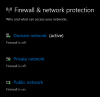
The windows firewall may not be entirely disabled, you have to make sure that it is disabled for the currently active network as seen in Windows Security > Firewall
1606915222674.png
 
John,

I ran Wireshark and received the requests once restarted Snom. Can you let me know what am I looking for in this data? Is there any particular piece I can upload here for review/advise?

Thanks
Tom
 
you will see something like this:

Source: your Snom IP
Destination: 224.0.1.75
Info: SUBSCRIBE sip{your_snom_MAC_address}@224.0.1.75
1606919889736.png
 
See attached.
 
Last edited by a moderator:
What about my Note 1 and Note 2 from post #7?
 
There is only 1 NIC on the PC and Windows Firewall is fully disabled. No other anti-virus on the SBC PC.
 
run Netsh interface ipv4 show join again and send us a screenshot
 
Ok all looks great so far, now lets see if the SBC can see the SUBSCRIBEs

1. In your management console, edit the SBC and go to settings.

2 .Set Logging to Verbose and press OK

3. Tick the SBC and press Push Config

4. As soon as the SBC comes back online go ahead and reset your phone

5. Once the phone sends the SUBSCRIBE (which you can see live in wireshark) you can go and check the SBC logs found at %programdata%\3CXSBC\Logs\3cxsbc.log

scroll down the list and look for a recent timestamp is followed by the word subscribe, and you should be able to find something that looks like this containing the unique MAC of the device


Code:
SUBSCRIBE sip:MAC%xxxxxxxxxxxxxx@localhost SIP/2.0
Via: SIP/2.0/UDP 10.31.0.79:48822;rport=48822
Contact: <sip:10.31.0.79:48822>
To: <sip:MAC%xxxxxxxxxxxxxx@localhost>
From: <sip:MAC%xxxxxxxxxxxxxx@localhost>;tag=474090885
Call-ID: [email protected]
CSeq: 1 SUBSCRIBE
Expires: 0
Accept: application/url
User-Agent: snomD765/10.1.54.16
Event: ua-profile;profile-type="device";vendor="snom";model="snomD765";version="10.1.54.16"
Content-Length: 0
 
I've done that and below is export of the log:

SUBSCRIBE sip:MAC%3a000413900A83@localhost SIP/2.0
Via: SIP/2.0/UDP 192.168.39.25:49236;rport=49236
Contact: <sip:192.168.39.25:49236>
To: <sip:MAC%3a000413900A83@localhost>
From: <sip:MAC%3a000413900A83@localhost>;tag=1871946324
Call-ID: [email protected]
CSeq: 1 SUBSCRIBE
Expires: 0
Accept: application/url
User-Agent: snomD765/10.1.54.16
Event: ua-profile;profile-type="device";vendor="snom";model="snomD765";version="10.1.54.16"
Content-Length: 0

Now, guess what has just happened ... both phones appeared in 3CX console.
It doesn't make much sense as no further settings modification was made but it looks like the Verbose Logging livened up the communication between SBC and 3CX?
 
I don't think that would make any difference other than the SBC got restarted when you send the Push Config.

Try provisioning all your phones now and let me know how you get on
 
Status
Not open for further replies.

Latest Posts

Forum statistics

Threads
111,990
Messages
590,161
Members
164,926
Latest member
tohoken1